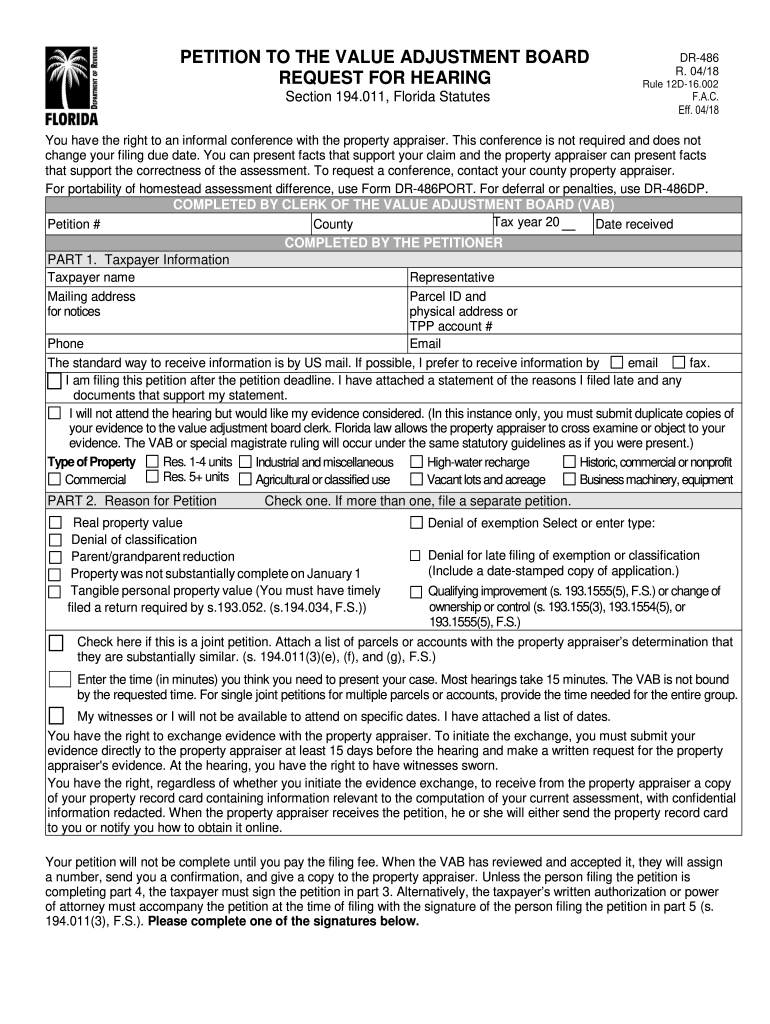
E property appraiser. This conference is not required and does not change your filing due date. You can present facts that support your claim and the property appraiser can present facts that support the correctness of the assessment. To request a conference, contact your county property appraiser. For portability of homestead assessment difference, use Form DR-486PORT. For deferral or penalties, use DR-486DP. COMPLETED BY CLERK OF THE VALUE ADJUSTMENT BOARD (VAB) Tax year 20 Petition # County D.
Loading

Open form follow the instructions

Easily sign the form with your finger

Send filled & signed form or save
How to fill out the FL DR-486 online
The FL DR-486 form is essential for filing a petition to the Value Adjustment Board regarding property assessment disputes in Florida. This guide provides comprehensive instructions on how to complete the form online, ensuring that all users, regardless of their legal background, can navigate the process confidently.
Follow the steps to complete the FL DR-486 online form effectively.
- Press the ‘Get Form’ button to access the FL DR-486 form in your editing interface.
- Begin by filling out Part 1 with taxpayer information, including the taxpayer's name, representative (if any), mailing address, Parcel ID, physical address, phone number, and email. Indicate your preferred method of receiving notifications between US mail or email.
- In this section, you can also state if you are filing the petition past the deadline and attach a statement justifying the late filing, along with supporting documents.
- Select the type of property by checking the appropriate box, which may include residential, commercial, agricultural, or others.
- In Part 2, clearly indicate the reason for your petition by checking the relevant option such as denial of exemption, real property value, or other specified reasons. If necessary, submit separate petitions for multiple reasons.
- If this is a joint petition, mark the checkbox and attach the required list of similar parcels or accounts.
- Provide an estimate of the time you will need to present your case, noting that the VAB may not be bound by your request.
- If you will not attend the hearing, inform the board by checking the respective box and ensure to submit two copies of your evidence.
- In Part 3, sign and date the petition to certify that you are the property owner, or provide written authorization for a representative if necessary.
- Complete Part 4 if you are filing on behalf of the taxpayer as an employee or licensed professional, ensuring you indicate your licensing information.
- If you are an unlicensed representative, fill out Part 5 with the necessary checks and provide authorization details. Ensure you note any attachments, such as a power of attorney.
- Once all parts are complete, review your form for accuracy, and then save your changes. Consider downloading, printing, or sharing the completed form as needed.
Complete your FL DR-486 form online today to effectively voice your property assessment concerns.
Experience a faster way to fill out and sign forms on the web. Access the most extensive library of templates available.
Related content
For deferral or penalties, use the. Petition to the Value Adjustment Board – Tax...
You have the right to appeal the decision by filing a request for hearing (Form DR-486)...
CHAPTER 1 .................. MAINTENANCE. CHAPTER 2 .................. MACHINE OUTLINE...
Get answers to your most pressing questions about US Legal Forms API.
How do I challenge my property taxes in Florida?
To challenge your property taxes in Florida, gather your evidence, review your property appraisal, and complete the FL DR-486 form to initiate the appeal process. It’s important to be methodical and prepared when presenting your case. Resources such as uslegalforms can provide helpful templates and guidance to streamline your challenge.
Do I need to file Florida DR 405?
Filing Florida DR 405 is necessary if you're applying for certain exemptions such as the Homestead Exemption. This form is distinct from FL DR-486, which is used for appeals. Understanding which forms to file is crucial in ensuring you qualify for potential savings on your property taxes.
What is the best evidence to protest property taxes?
The best evidence to protest property taxes includes recent comparable sales of similar properties, photographs, and detailed descriptions of your property’s condition. Additionally, using the FL DR-486 form can help organize this information in a professional manner. Strong, factual evidence can significantly enhance your appeal’s effectiveness.
How to appeal property taxes in Florida?
To appeal property taxes in Florida, you need to file a petition with your county's Value Adjustment Board within a specific timeframe. The FL DR-486 form is essential for this process, offering a structured approach to presenting your case. Make sure to collect and present relevant evidence to strengthen your argument during the appeal.
How can I reduce my property taxes in Florida?
You can reduce your property taxes in Florida by applying for exemptions, correcting any assessment errors, and utilizing resources like FL DR-486 for guidance on the appeals process. Regularly reviewing your property’s assessed value and comparing it to similar properties can provide additional leverage for a successful appeal. Taking these steps can lead to a more manageable tax burden.
How to get an appraiser license in Florida?
To obtain an appraiser license in Florida, you need to complete specific education requirements and training. After completing the coursework, pass the necessary exams to demonstrate your knowledge. Finally, submit your application, including the FL DR-486 form when applicable, to the Florida Real Estate Appraisal Board. This ensures you follow all necessary steps for compliance.
Is it a good idea to appeal property taxes?
Appealing property taxes can be a wise decision if you believe your property is overvalued. By using the FL DR-486 form, you can formally contest the assessed value with your local property appraiser. This process may reduce your tax burden if successful. Understanding your property’s market value helps you make an informed choice about whether to proceed.
Use professional pre-built templates to fill in and sign documents online faster. Get access to thousands of forms.
If you believe that this page should be taken down, please follow our DMCA take down process here.
This form is available in several versions. Select the version you need from the drop-down list below.