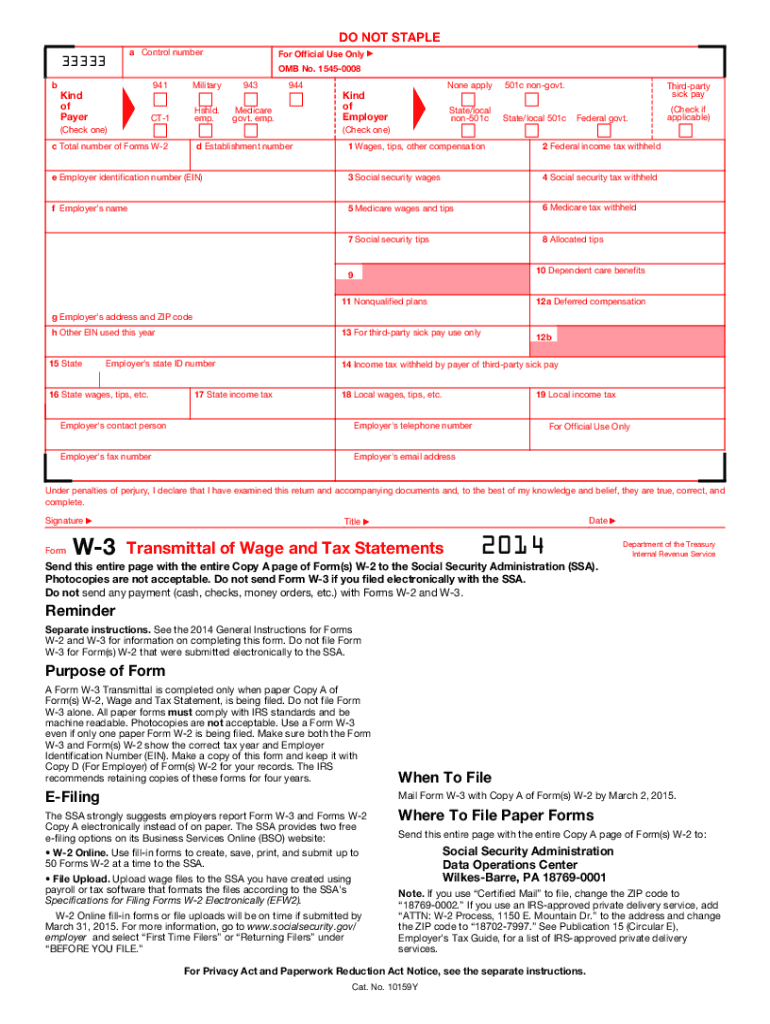
Electronically to the SSA. Purpose of Form A Form W-3 Transmittal is completed only when paper Copy A of Form(s) W-2, Wage and Tax Statement, is being filed. Do not file Form W-3 alone. All paper forms must comply with IRS standards and be machine readable. Photocopies are not acceptable. Use a Form W-3 even if only one paper Form W-2 is being filed. Make sure both the Form W-3 and Form(s) W-2 show the correct tax year and Employer Identification Number (EIN). Make a copy of this form and keep.
Loading

Open form follow the instructions

Easily sign the form with your finger

Send filled & signed form or save
How to fill out the IRS W-3 online
Filling out the IRS W-3 form online is an essential step for employers to report wages and tax information accurately. This guide provides clear, step-by-step instructions to help you complete the form correctly, ensuring compliance with IRS regulations.
Follow the steps to fill out the IRS W-3 form online.
- Click ‘Get Form’ button to obtain the form and open it in the editor.
- Enter the control number and check the appropriate box indicating the kind of employer you are by selecting one of the options provided, such as '941', '943', or 'Federal government'.
- In section a, fill out your establishment number if applicable. If none apply, check 'None apply'.
- For section b, enter your employer identification number (EIN), ensuring it is accurate for proper identification.
- Complete section c by stating the total number of Forms W-2 that you are submitting.
- Fill in sections 1-19 as necessary, providing relevant wage and tax information such as total wages, federal income tax withheld, social security wages, and corresponding tax amounts.
- Include employer’s name and address in section f and g, respectively, ensuring all information is clearly stated.
- After filling out all required fields, review the form for accuracy, ensuring compliance with IRS specifications.
- Save your changes and consider downloading or printing the form for your records. Ensure that you have both the W-3 and W-2 forms ready if filing on paper.
- Finalize your submission according to the method of filing you have chosen, whether electronically or via mail.
Start completing your IRS W-3 form online today to ensure timely and accurate reporting!
Experience a faster way to fill out and sign forms on the web. Access the most extensive library of templates available.
Related content
Jun 24, 2025 — Information about Form W-3, Transmittal of Wage and Tax Statements (Info...
Jan 26, 2024 — Do not use these forms to report wages subject to U.S. income tax...
May 2, 2017 — Be sure that the payer's name and EIN on Forms W-2 and. W-3 are the same...
Get answers to your most pressing questions about US Legal Forms API.
How to fill out a third party authorization form?
To fill out a third-party authorization form, you need to provide your personal information, the tax year(s) in question, and the details of the individual or organization authorized to represent you. Ensure that all information is accurate to avoid any issues. Companies like USLegalForms offer templates that make completing these forms straightforward and compliant.
What is k in box 14?
In Box 14 of the IRS W-3 form, 'k' refers to the amount of uncollected Social Security or RRTA tax. This field is used to report additional taxes that may have been withheld from employees but were not yet collected. Understanding what to include in this box is essential for maintaining accurate records. Consult with resources like USLegalForms for clarification and assistance.
How to complete W-3?
To complete the IRS W-3 form, you need to fill in your business information, total employee wage amounts, and tax withheld from all W-2 forms. Carefully input these details, as accuracy is crucial for IRS compliance. Afterward, ensure all sections are filled and cross-check the information for any errors. Using platforms like USLegalForms can simplify this process significantly.
What is the easiest way to fill out a tax return?
The easiest way to fill out a tax return is by using tax software or professional tax services that guide you step by step. These tools often include features that automatically calculate taxes owed and help ensure all forms are correctly filled out, including the IRS W-3 and W-2 forms. You can find services like USLegalForms that provide templates and support for a smooth filing experience.
What is the W-3 format?
The W-3 form is a transmittal form used to summarize information from multiple W-2 forms. It is structured to include fields for total employee wages, taxes withheld, and other crucial data. Understanding the format is essential for accurate reporting to the IRS. Utilizing tools from USLegalForms can help streamline the completion of this form.
How to fill W3?
Filling out the IRS W-3 involves entering the combined data from all W-2 forms you've issued. Ensure that you input the correct social security numbers and employer information. Double-check your calculations to avoid errors. For clarity, uslegalforms offers straightforward instructions and resources to simplify this process.
What if I don't understand my Box 14?
If you find Box 14 on your W-2 confusing, seek clarity from your employer first, as this box can include various types of income or deductions. Typically, employers use it to provide information such as state disability insurance, union dues, or other deductions. If there are still questions, consulting the IRS guidelines or using a platform like USLegalForms can assist you in interpreting the data correctly.
What is the difference between W-2 and W3?
The key difference between W-2 and W-3 lies in their purpose: the W-2 reports individual employee earnings and taxes withheld, while the W-3 serves as a summary of all W-2 forms submitted by an employer. The IRS W-3 is critical for ensuring accurate reporting of total wages and taxes to the IRS. Both forms must be filed correctly to maintain compliance and avoid potential penalties.
What is the W3 format?
The IRS W-3 format is structured as a summary form that accompanies W-2 forms when you file them with the IRS. It includes specific sections such as total number of forms submitted, total wages, and tax withheld. Adhering to this format is essential for proper documentation and to avoid any issues with your filing.
How to complete W3?
To complete the IRS W-3, you need to gather your W-2 forms and ensure all information matches. Fill out the form by entering the total number of W-2s you are submitting, the total wages, and the total federal income tax withheld. Finally, make sure to review your entries for accuracy before submitting the form to the IRS.
Use professional pre-built templates to fill in and sign documents online faster. Get access to thousands of forms.
If you believe that this page should be taken down, please follow our DMCA take down process here.
This form is available in several versions. Select the version you need from the drop-down list below.