Loading
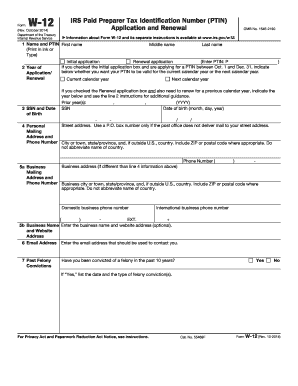
Get Irs W-12 2014
This website is not affiliated with IRS
How it works
-

Open form follow the instructions
-

Easily sign the form with your finger
-

Send filled & signed form or save
How to fill out the IRS W-12 online
Completing the IRS W-12 form online is a straightforward process that allows individuals to apply for or renew their Paid Preparer Tax Identification Number (PTIN). This guide provides step-by-step instructions to help users navigate each section of the form effectively.
Follow the steps to complete the IRS W-12 form online.
- Click ‘Get Form’ button to obtain the form and open it in the editor.
- Enter your name in the fields provided, including first, middle, and last name. Ensure you print clearly or type the information accurately.
- Indicate whether this is your initial application or a renewal application by checking the appropriate box. If applicable for an initial application, select whether you want your PTIN to be valid for the current or next calendar year.
- Provide your social security number (SSN) and date of birth in the format specified.
- Fill in your personal mailing address in detail, including city, state, and ZIP code. If relevant, include your phone number.
- If you have a different business address, provide that information in section 5, along with your business phone number.
- Enter your business name and website address if applicable in section 5b.
- Provide an email address that the IRS can use to contact you.
- Respond to the question about past felony convictions. If applicable, provide details regarding the felony, including date and type.
- Indicate your current status regarding federal tax compliance. If you have never filed a U.S. income tax return, check the appropriate box.
- List your professional credentials by checking all that apply and entering associated state abbreviations and numbers.
- Complete section 10 regarding whether you prepare Form 1040 series tax returns for compensation.
- If applicable, fill out the business identification section under line 11, including your business name and identification numbers.
- Provide the address used on your last U.S. tax return filed. If you have never filed, mark the designated box.
- Select your filing status from the options provided based on your last U.S. tax return.
- Include the application or renewal fee in the specified amount and follow instructions for payment. Ensure that the payment is not attached to the form.
- Sign and date the form to certify that all information is accurate and complete.
- Save your changes, download, print, or share the completed form as needed.
Complete your IRS W-12 form online today for a seamless experience.
Get form
Experience a faster way to fill out and sign forms on the web. Access the most extensive library of templates available.
The W-9 form is used by individuals to provide their taxpayer identification information to businesses or entities that will report payments made to them. By filling out the W-9, you can ensure that correct income information is reported to the IRS. This form is crucial for freelancers and contractors, and it complements the IRS W-12 for those involved in tax preparation.
Get This Form Now!
Use professional pre-built templates to fill in and sign documents online faster. Get access to thousands of forms.