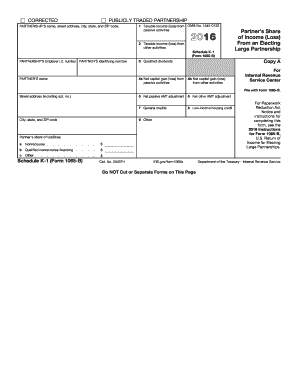
Dends PARTNER S name 4a Net capital gain (loss) from passive activities 4b Net capital gain (loss) from other activities Street address (including apt. no.) 5 Net passive AMT adjustment 6 Net other AMT adjustment 7 General credits 8 Low-income housing credit 9 Other City, state, and ZIP code Partner s share of liabilities: a Nonrecourse . . . . . b Qualified nonrecourse financing . . . . $ c Other . . . . $ . . . . . . . . . . . Schedule K-1 (Form 1065-B).
Open form follow the instructions
Easily sign the form with your finger
Send filled & signed form or save
How to fill out the IRS Schedule K-1 (1065-B) online
Filing your taxes can seem overwhelming, especially when dealing with complex forms like the IRS Schedule K-1 (1065-B). This guide will assist you in completing the form accurately and efficiently, ensuring you have a clear understanding of each section's requirements.
Follow the steps to fill out the IRS Schedule K-1 (1065-B) online
- Click ‘Get Form’ button to obtain the form and open it in the online editor.
- Enter the name, street address, city, state, and ZIP code of the partnership at the top of the form. This information is essential for identifying the entity involved.
- Fill in the partnership's Employer Identification Number (EIN) and the partner's identifying number. These are important for tax reporting.
- Record the partnership's taxable income (loss) from passive activities in the first section of the form.
- Indicate the taxable income (loss) from other activities in the second section. This will encompass earnings or losses from non-passive activities.
- Input the qualified dividends amount, if applicable, in the designated section.
- Next, report the net capital gain (loss) from both passive and other activities in their respective sections. This information will impact your overall tax liability.
- Detail any net passive AMT adjustment and net other AMT adjustment in their allocated fields.
- Include information about general credits and any low-income housing credit in the specified sections.
- Complete the partner's share of liabilities, detailing nonrecourse, qualified nonrecourse financing, and any other liability amounts.
- Review all inputs for accuracy. Once verified, you may save your changes, download the form, print it, or share it as needed.
Start filling out your IRS Schedule K-1 (1065-B) online today!
Experience a faster way to fill out and sign forms on the web. Access the most extensive library of templates available.
Related content
Jan 21, 2025 — Enter the property distributed subject to recognition of precontribution...
Schedule K-1 (Form 1065) 2016. Page 2. This list identifies the codes used on ... B Gross...
b Did any individual or estate own, directly or indirectly, an interest of 50% or more in...
Get answers to your most pressing questions about US Legal Forms API.
Where do I report K-1 Form 1065 income on my 1040?
To report K-1 Form 1065 income on your IRS Form 1040, you will include it on Schedule E, which details supplemental income and loss. Specifically, you will report the amount from the K-1 in Part II of Schedule E, ensuring it matches the information provided on the K-1. If you need help, consider using platforms like U.S. Legal Forms to assist you with this process.
What is the purpose of Schedule K-1 Form 1065?
The purpose of Schedule K-1 Form 1065 is to report a partner's share of income, deductions, and credits from a partnership. It provides vital information needed for accurate tax reporting to the IRS. By carefully reviewing the K-1, partners can ensure they meet their tax obligations and properly declare their earnings.
How is K-1 partnership income taxed?
1 partnership income, as reported on IRS Schedule 1 (1065B), is generally taxed as ordinary income. This means that each partner pays taxes on their share of the profits, even if the income is not distributed. It's crucial to report this income accurately on your personal tax returns to avoid penalties.
Where do I enter Schedule K-1 Form 1065 in TurboTax?
In TurboTax, you will find a specific section for entering information from Schedule K-1 Form 1065. Typically, you can locate this by searching for 'K-1' within the software. Make sure to carefully follow the prompts provided in TurboTax to ensure the information from your IRS Schedule K-1 (1065-B) is entered correctly.
What do I do with a Schedule K-1 Form 1065?
When you receive Schedule K-1 Form 1065, you should transfer the information to your Form 1040 during tax preparation. This includes reporting any income, losses, and deductions listed on the K-1. You can simplify this process by using tax software or services, such as U.S. Legal Forms, which can guide you through each step.
Why would an LLC file a 1065?
An LLC may choose to file IRS Schedule K-1 (1065-B) if it is treated as a partnership for tax purposes. This allows for income to be passed through to the members, avoiding double taxation at the corporate level. Filing the 1065 also provides essential tax information that members need for their individual tax returns.
What do I do with a Schedule K-1?
After you receive your IRS Schedule K-1 (1065-B), you will need to report the income, deductions, and credits noted on the form on your personal tax return. This means including the information from the K-1 on the right sections of your IRS Form 1040. Additionally, keep the K-1 for your records, as you may need it for future reference or audits.
Who generates the K1 tax form?
The partnership itself generates the K-1 tax form for each partner. After filing the IRS form 1065, the partnership prepares and distributes the IRS Schedule K-1 (1065-B) to provide partners with the necessary information for their tax returns. If you are part of a partnership and have not received your K-1, it’s important to reach out to the partnership for this crucial document.
How does a K1 affect my personal taxes?
1 affects your personal taxes by reporting your share of income, which is taxed directly on your individual return. As a partner, the earnings or losses reported on the IRS Schedule K1 (1065B) will impact your tax liability, potentially increasing or decreasing it. Therefore, it’s essential to include this information accurately to avoid issues with your tax filings.
What is an IRS schedule K-1 form 1065?
The IRS Schedule K-1 form 1065 is a tax document issued by partnerships to report income, deductions, and other tax information for each partner. The information on the K-1 helps partners accurately report their share of partnership income on their individual tax returns. It is crucial for partners to understand this document, as it affects their overall tax liabilities significantly.
Use professional pre-built templates to fill in and sign documents online faster. Get access to thousands of forms.
If you believe that this page should be taken down, please follow our DMCA take down process here.
This form is available in several versions. Select the version you need from the drop-down list below.