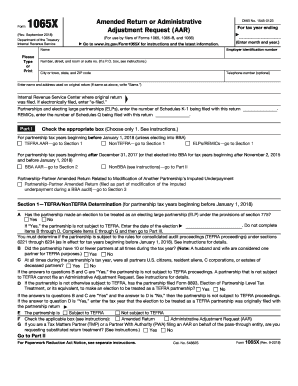
Form1065X(Rev. September 2018) Department of the Treasury Internal Revenue ServiceAmended Return or Administrative Adjustment Request (AAR)(For use by filers of Forms 1065, 1065B, and 1066) (Enter.
Open form follow the instructions
Easily sign the form with your finger
Send filled & signed form or save
How to fill out the IRS 1065-X online
Completing the IRS 1065-X form is crucial for making amendments to previously filed partnership returns. This guide provides clear, step-by-step instructions to help you navigate the process with confidence, ensuring that you can file your amended return or administrative adjustment request accurately.
Follow the steps to successfully complete the IRS 1065-X online.
- Press the 'Get Form' button to acquire the IRS 1065-X form and open it in a suitable editor.
- Enter the employer identification number and the name of the partnership in the designated fields. Make sure to provide accurate information, as this will be the basis for your amendment.
- Indicate the tax year for which you are filing the amended return. This date is critical in processing your request correctly.
- Fill in the address details of the partnership, including street address, city, state, and ZIP code. If the address is the same as on the original return, write 'Same' in the appropriate field.
- Specify the Internal Revenue Service Center where the original return was filed. If it was filed electronically, note that by writing 'e-filed.'
- Complete the section regarding the number of Schedules K-1 being filed with this return, if applicable. This helps clarify the adjustments being made.
- Select the appropriate box based on the type of amendment being requested, whether it falls under TEFRA or BBA guidelines, and proceed accordingly to fill out Section 1 or Section 2.
- If relevant, answer questions regarding the partnership's partner structure, such as the number of partners or their citizenship status, as this will determine the partnership's tax treatment.
- For any adjustments being claimed, complete the corresponding sections in Part II, detailing income, deductions, and other relevant figures. Provide the original reported amounts, net changes, and corrected amounts.
- If filing as an ELP or REMIC, ensure that you complete the sections designated for those entities and follow specific instructions related to tax payments and other adjustments.
- Finally, review all provided information for accuracy, then save any changes made to your form, and prepare to download, print, or share the form as needed.
Start filing your IRS 1065-X online to ensure your amendments are processed promptly.
Experience a faster way to fill out and sign forms on the web. Access the most extensive library of templates available.
Related content
Information about Form 1065-X, Amended Return or Administrative Adjustment Request (AAR)...
Feb 21, 2012 - No portion of Plan X is an employee stock ownership plan. ...... “U.S...
Feb 1, 2018 — See the Instructions for Forms 1065, 1065-B, or 1066 for ... information...
Get answers to your most pressing questions about US Legal Forms API.
How many years can you amend a corporate tax return?
C Corporations They can amend their return by filing Form 1120X. In general, the corporation can file an amended return within three years of the date the original return was due, or within two years of the date it paid the tax due on that return, whichever was later.
Can you amend a tax return from 2 years ago?
Generally, you must file Form 1040X within three years from the date you filed your original tax return or within two years of the date you paid the tax, whichever is later. Right now, you can amend your tax returns for 2014, 2015 and 2016.
Can a tax return be amended?
If you want to make changes after the original tax return has been filed, you must file an amended tax return using a special form called the 1040X, entering the corrected information and explaining why you are changing what was reported on your original return. You don't have to redo your entire return, either.
Can you e file an amended 1120?
Amended Form 1120-H returns cannot be filed electronically using ProSeries software. To mark an electronically filed return as "Amended Return Mode" you must have the accepted acknowledgment for the originally filed return.
How do I file an amended 1120?
To amend a tax return for a corporation, file form 1120x. To amend taxes for an S corporation, create a copy of the original return (on Form 1120S), and check Box H-4 (Amended Return) on the copy. Then use the copy to make the changes to the return, and re-file.
What is substituted return treatment?
A substituted return is an amended return in which the TMP of the TEFRA partnership requests that the treatment of an item shown on the AAR be substituted for the treatment of the item on the pass-through entity's return.
Can amended returns be Efiled?
The Form 1040X, Amended U.S. Individual Income Tax Return isn't accepted electronically; only an original tax return may be electronically filed. You must file Form 1040X on paper and mail it to the IRS.
How do I amend a partnership return?
Scroll down the page to the Electronic Filing of Amended Return section. Check the "Check this box to file amended return electronically" checkbox under the Electronic Filing of Amended Return section. Go to Form 1065 p1-2 and check (5) Amended Return on line G to indicate that this will be an amended return.
How do I amend a 1065?
To Amend Form 1065 (not using Form 1065X) (Click to View Details): Go to Screen 70, Amended Return or Administrative Adjustment Request. Note: If you are amending the return due to a missing election, check the box, Filing pursuant to section 301.9100-2. Hold down Ctrl+E in, Explanation of changes (Ctrl+E).
How do I amend my 2018 tax return?
Step 1: Collect your documents. Gather your original return and all new documents. ... Step 2: Get the right forms together. ... Step 3: Fill out a 1040X. ... Step 4: Submit your amended return.
Use professional pre-built templates to fill in and sign documents online faster. Get access to thousands of forms.
If you believe that this page should be taken down, please follow our DMCA take down process here.