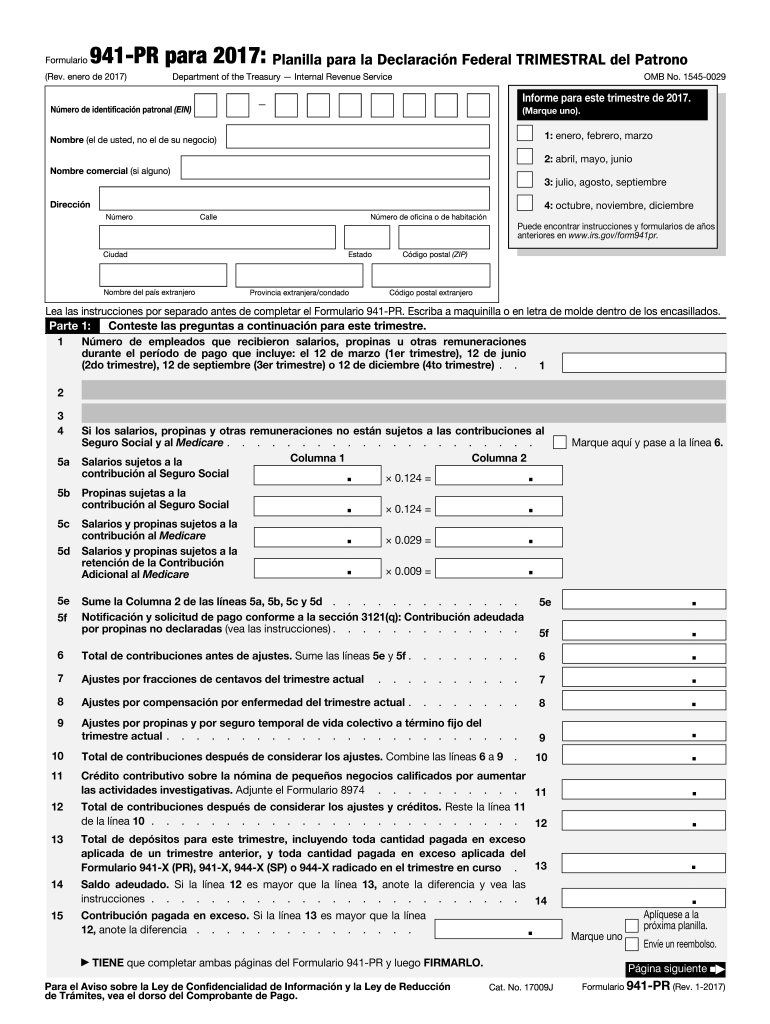
Ra este trimestre de 2017. N mero de identificaci n patronal (EIN) (Marque uno). 1: enero, febrero, marzo Nombre (el de usted, no el de su negocio) 2: abril, mayo, junio Nombre comercial (si alguno) 3: julio, agosto, septiembre Direcci n 4: octubre, noviembre, diciembre N mero Ciudad Nombre del pa s extranjero Calle N mero de oficina o de habitaci n Puede encontrar instrucciones y formularios de a os anteriores en www.irs.gov/form941pr. C digo postal (ZIP) Estado Pr.
Loading

Open form follow the instructions

Easily sign the form with your finger

Send filled & signed form or save
How to fill out the IRS 941-PR online
The IRS 941-PR form is essential for employers in Puerto Rico to report their quarterly federal payroll taxes. This guide provides clear, step-by-step instructions for completing the form online, ensuring you can navigate the process easily and accurately.
Follow the steps to successfully complete the IRS 941-PR form online.
- Click ‘Get Form’ button to obtain the form and open it in the editor.
- Fill out your employer identification number (EIN) at the top of the form. Ensure that you select the correct quarter for your reporting period.
- Provide your name and business name, if applicable. Include your complete address including city, state, and ZIP code.
- In Part 1, answer the related questions about your employment status and the number of employees for the reporting period.
- Complete the calculations for wages and taxes in the respective fields. Make sure to follow the instructions for calculating amounts for social security, Medicare, and any adjustments.
- In Part 2, report your deposit schedule and any adjustments. Indicate if you were a monthly or semi-weekly schedule depositor and complete the necessary sections based on your status.
- Part 3 requires information about your business operations, including whether you have ceased operations or are operating seasonally. Answer appropriately.
- Complete Part 4 by authorizing a third-party designee if applicable, providing their name and contact information.
- Sign the form in Part 5, confirming the information is accurate and complete. Ensure all areas are completed as required.
- Once you have filled out the form, you can save your changes, download, print, or share the completed IRS 941-PR form.
Complete your IRS 941-PR form online today to ensure compliance with federal payroll tax requirements.
Experience a faster way to fill out and sign forms on the web. Access the most extensive library of templates available.
Related content
Nov 12, 2024 — Employers in Puerto Rico use this form to: Report income taxes, social...
“Employment Tax, Total” includes paper and electronic Forms 940, 940-EZ,. 940-PR, 941...
MeF will accept Forms 940, 940-PR, 941, 941-PR, 941-SS, 943, 943-PR, 944, and 945. The...
Get answers to your most pressing questions about US Legal Forms API.
How are taxed Social Security earnings calculated for self-employed?
For self-employed individuals, taxed Social Security earnings are generally calculated using net earnings from self-employment, as reported on Schedule C of your tax return. The current tax rate for self-employed individuals is 12.4%, covering both the employer and employee portions of the tax. Accurate calculations are essential for filing your IRS 941-PR correctly, so it's advisable to consult resources such as uslegalforms for guidance in streamlining the reporting process.
What is the difference between 941 and 941 PR?
The primary difference between IRS Forms 941 and 941-PR is the filing requirement based on location and the nature of your business. The 941 form is for employers in the continental United States, while the 941-PR is specifically designed for employers in Puerto Rico. Each form has unique instructions and regulations that must be followed carefully. Understanding these differences is crucial for correct form completion and ensuring compliance.
How to calculate taxable Social Security wages 941?
To calculate taxable Social Security wages for the IRS 941-PR, start with your employee's total gross wages, ensuring to exclude any non-taxable amounts. Deduct contributions to retirement plans or health savings accounts if applicable. After calculating the total taxable amount, ensure it aligns with the IRS wage limits to maintain compliance in your filings. Using tools from uslegalforms can help you accurately track and report these figures.
How is Social Security payroll tax calculated?
Social Security payroll tax is calculated based on the employee's gross wages, which are subject to the established tax rate. The current rate is 6.2% for employees and 6.2% for employers, applied to wages up to a specific annual limit. For more clarity on how these calculations affect your IRS 941-PR submissions, consider using detailed guides available on platforms like uslegalforms. These resources can simplify your understanding and reporting process.
Where to file 941 PR?
You can file the IRS 941-PR form through the IRS electronic filing system or by mailing a paper form. If you choose to e-file, ensure you have access to the necessary software that supports IRS form submissions. If you decide to mail it, send it to the designated address based on your location. Make sure to check the IRS website for the most current mailing addresses.
What is the difference between 941 and 941 R?
The main difference between IRS Form 941 and Form 941 R lies in their purposes. Form 941 is used for reporting quarterly payroll taxes, while Form 941 R is specifically for adjusting previously filed Forms 941. If you need to amend your filings or make corrections, knowing which form to use is vital. U.S. Legal Forms can assist with any corrections you may need to make.
How do I know if I am a monthly or quarterly depositor?
To determine if you are a monthly or quarterly depositor, you can review your estimated tax liability from the previous year. Typically, if your liability exceeds a certain amount, you will be required to deposit monthly, while smaller amounts may allow for quarterly deposits. It's beneficial to check IRS guidelines or consult with U.S. Legal Forms for your specific circumstances.
Where to send 941 PR?
You should send your IRS 941-PR form to the designated address listed on the form instructions. This typically depends on the specific location of your business and whether you are submitting with payment. Always verify the current mailing address on the IRS website or your form instructions. If you need assistance with filing, U.S. Legal Forms offers easy-to-follow solutions.
What is IRS Schedule R used for?
IRS Schedule R is designed for employers to calculate retirement plan contributions and credits for eligible employees. This schedule is part of the IRS 941-PR form that allows you to claim various tax credits. Accurate completion of Schedule R can reduce your tax liability considerably. For further clarification on tax benefits, U.S. Legal Forms can provide the resources you need.
What is the Schedule R Form 941 used for?
The Schedule R Form 941 serves to calculate the credit for qualified health insurance costs under the Affordable Care Act. Employers can utilize this form to claim a tax credit for these costs, which can result in significant savings. If you’re filing the IRS 941-PR, understanding Schedule R can help maximize your benefits. Consider using U.S. Legal Forms to guide you through the process.
Use professional pre-built templates to fill in and sign documents online faster. Get access to thousands of forms.
If you believe that this page should be taken down, please follow our DMCA take down process here.
This form is available in several versions. Select the version you need from the drop-down list below.