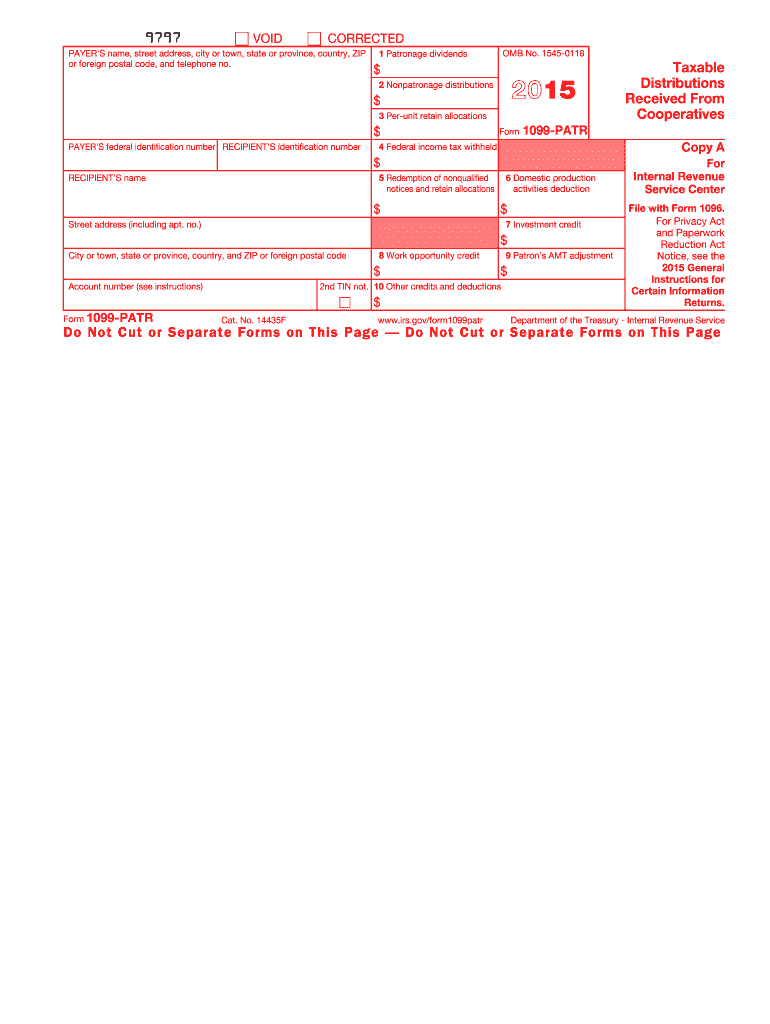
Tions you received from a cooperative may be includible in your income. Generally, if you are an individual, report any amounts shown in boxes 1, 2, 3, and 5 as income, unless nontaxable, on Schedule F (Form 1040), Schedule C (Form 1040), or Form 4835. See the Instructions for Schedule F (Form 1040) and Pub. 225 for more information. Recipient's identification number. For your protection, this form may show only the last four digits of your social security number (SSN), individual taxpayer ident.

Open form follow the instructions

Easily sign the form with your finger

Send filled & signed form or save
How to fill out the IRS 1099-PATR online
The IRS 1099-PATR is a crucial form used to report taxable distributions received from cooperatives. This guide will provide you with a step-by-step walkthrough on how to effectively complete this form online, ensuring you have all the necessary information at your fingertips.
Follow the steps to fill out the form accurately.
- Click ‘Get Form’ button to acquire the IRS 1099-PATR form and open it in your editor.
- Begin by entering the payer's name, address, and contact number in the designated fields to properly identify the issuing cooperative.
- Fill in the payer’s federal identification number and the recipient’s identification number where prompted. This is essential for processing the form correctly.
- Next, complete Box 1 with the amount of patronage dividends that are paid out in the reporting year. Be sure to reflect cash, property, or qualified written notices of allocation.
- In Box 2, record any nonpatronage distributions received. This includes similar payment types as in Box 1 but specifically for nonpatronage.
- Input any per-unit retain allocations into Box 3, including corresponding cash or property amounts that you received.
- Indicate any federal income tax withheld, if applicable, in Box 4. This is important for tax reporting purposes.
- Complete Box 5 with any amounts received from the redemption of nonqualified notices and retain allocations.
- If applicable, fill in Box 6 with the domestic production activities deduction, ensuring it is documented accurately as per the cooperative’s instructions.
- Record any unused investment credits passed through to you in Box 7, referring to Form 3468 for the necessary calculations.
- Record unused work opportunity credits in Box 8, with further calculations as directed by Form 5884.
- Input any alternative minimum tax adjustment in Box 9 and ensure this is reported correctly on Form 6251.
- Complete Box 10 with any remaining unused credits or deductions, referencing the appropriate credit form instructions for reporting.
- Once all fields are filled out accurately, save changes and ensure you download or print the final form for your records. Share it with the necessary parties as required.
Complete your IRS 1099-PATR form online now to ensure all distributions are accurately reported.
Experience a faster way to fill out and sign forms on the web. Access the most extensive library of templates available.
Related content
Feb 19, 2025 — Cooperatives file Form 1099-PATR for each person: To whom the they paid...
Aug 11, 2011 — What's New. Statements to Recipients. If you are required to file Form...
Mar 1, 2017 — Form 1099-MISC, Miscellaneous Income;. Form 1099-OID, Original Issue...
Get answers to your most pressing questions about US Legal Forms API.
Who receives a 1099 statement?
A 1099 statement is typically sent to anyone who has received various types of income from a non-employee source. This could include independent contractors, freelancers, and individuals who have received dividends or other qualifying payments. It is essential to issue these forms to maintain compliance with IRS regulations.
How do I record a 1099-PATR?
To record an IRS 1099-PATR, first enter the distribution amount in your bookkeeping system as income. Make sure to categorize this income correctly, as it relates to cooperative earnings. This will ensure accurate financial tracking and reporting for tax purposes.
How do I report 1099-PATR on Schedule F?
To report the IRS 1099-PATR on Schedule F, start by including the amount shown on the form as income from your cooperative. You will list this income on line 1 of Schedule F as part of your gross income. Make sure to accurately report any related expenses that can offset this income for tax purposes.
Who gets a 1099-PATR?
The IRS 1099-PATR is issued to individuals or entities that received patronage distributions from cooperatives. If you've been involved with a cooperative and received payments from them during the tax year, you will likely receive this form. Keeping track of these payments ensures proper reporting to the IRS.
How do I treat a 1099-PATR?
When you receive an IRS 1099-PATR, treat it as income from your cooperative. This income often qualifies for special tax treatment, so be sure to review the details for any deductions you may apply. It is important to report this income accurately on your tax return to avoid potential issues with the IRS.
Who receives a 1099 Miscellaneous?
The IRS 1099 Miscellaneous form is typically issued to individuals or entities that receive $600 or more in payments for services performed in the course of your business. This includes independent contractors, freelancers, and specific rental or royalty payments. It’s crucial to know these details to maintain compliance when reporting income.
Where is 1099-PATR on TurboTax?
In TurboTax, you can find the IRS 1099-PATR form in the income section under the 'Other Common Income' category. Simply navigate to the area where you enter income and select '1099-MISC or 1099-PATR' as your source. If you have received a distribution from a cooperative, TurboTax will guide you through entering the necessary details for the IRS 1099-PATR.
What is Form 1099-PATR for?
Form IRS 1099-PATR is used to report income received from cooperatives. It reflects the patronage dividends that you may have received from these organizations. Understanding this form is crucial for ensuring that your income is accurately represented on your tax return. For more information about how to handle your 1099-PATR, consider using resources from platforms like USLegalForms to guide you through the process.
How to report sale of farmland on tax return?
When you sell farmland, you need to report the sale on your tax return and potentially on IRS Form 4797. The sale proceeds, along with your adjusted basis in the property, will help determine any gain or loss. If you received IRS 1099-PATR during the year, report that income separately to reflect all aspects of your agricultural income. Consult a tax professional if needed to ensure accuracy.
Where do I report 1099-PATR on Schedule F?
You report IRS 1099-PATR on Schedule F in the section designated for cooperative distributions. This line helps you account for income that is distributed to you by cooperatives. Accurate reporting avoids problems on your tax return and ensures compliance with IRS requirements. Using software like USLegalForms can help clarify where to enter this information correctly.
Use professional pre-built templates to fill in and sign documents online faster. Get access to thousands of forms.
If you believe that this page should be taken down, please follow our DMCA take down process here.
This form is available in several versions. Select the version you need from the drop-down list below.