Loading
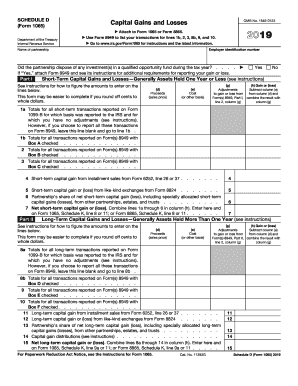
Get Irs 1065 - Schedule D 2019
This website is not affiliated with IRS
How it works
-

Open form follow the instructions
-

Easily sign the form with your finger
-

Send filled & signed form or save
How to fill out the IRS 1065 - Schedule D online
This guide provides a comprehensive overview of how to complete the IRS 1065 - Schedule D form online. It is designed to assist users at all experience levels to navigate each section with clarity and confidence.
Follow the steps to effectively complete the form for reporting capital gains and losses.
- Press the ‘Get Form’ button to access the IRS 1065 - Schedule D form and open it in your preferred digital editor.
- Enter the employer identification number at the top of the form. This is essential for identifying your partnership.
- Fill in the name of the partnership in the designated field to ensure proper documentation.
- Indicate whether the partnership disposed of any investment(s) in a qualified opportunity fund during the tax year by selecting ‘Yes’ or ‘No’.
- In Part I, report short-term capital gains and losses for assets held one year or less, starting with line 1a. Enter totals for transactions reported on Form 1099-B.
- For line 1b through line 6, enter totals for all transactions as detailed in the instructions, including any adjustments from Form 8949.
- Transition to Part II for long-term capital gains and losses, which involve assets held for more than one year. Report similar totals starting from line 8a.
- Continue detailing transactions for lines 8b through 15, ensuring you accurately report any capital gain distributions and partnership shares.
- Once all fields are completed, review the form for accuracy, and ensure that amounts entered correspond to your records.
- After confirming all information is correct, you can save your changes, download the form, print it for your records, or share it as necessary.
Begin your filing process and fill out the IRS 1065 - Schedule D online today.
Get form
Experience a faster way to fill out and sign forms on the web. Access the most extensive library of templates available.
Related links form
The Schedule D tool is an essential part of your tax filing process that helps in reporting capital gains and losses. This tool assists partnerships in calculating their tax obligations based on their trading activities throughout the year. Mastering this tool will ensure you handle IRS 1065 - Schedule D compliance effectively.
Get This Form Now!
Use professional pre-built templates to fill in and sign documents online faster. Get access to thousands of forms.