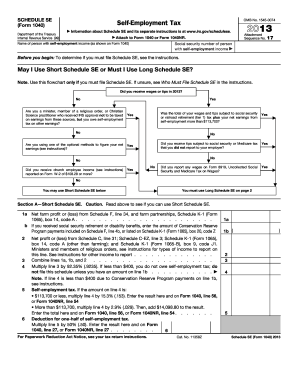
Line 56, or Form 1040NR, line 54 . . . . . . . Deduction for one-half of self-employment tax. Multiply line 5 by 50% (.50). Enter the result here and on Form 1040, line 27, or Form 1040NR, line 27 . . . . . . . . 6 For Paperwork Reduction Act Notice, see your tax return instructions. Cat. No. 11358Z 1a 1b ( ) 2 3 4 5 Schedule SE (Form 1040) 2013 Page 2 Schedule SE (Form 1040) 2013 Attachment Sequence No. 17 Name of person with self-employment income (as shown on Form 1040) Social se.
Open form follow the instructions
Easily sign the form with your finger
Send filled & signed form or save
How to fill out the IRS 1040 - Schedule SE online
Filling out the IRS 1040 - Schedule SE is essential for individuals with self-employment income to report their self-employment taxes. This guide offers straightforward steps to help users navigate the form effectively.
Follow the steps to fill out the IRS 1040 - Schedule SE online.
- Press the ‘Get Form’ button to access the IRS 1040 - Schedule SE form and open it in your preferred online editor.
- Identify the person with self-employment income and enter their name and Social Security number in the specified fields at the top of the form.
- Determine if you should use the Short Schedule SE by reviewing the flowchart provided in the instructions. Answer the questions based on your income sources.
- If eligible for the Short Schedule SE, proceed to fill out Section A by entering net profit or loss figures from your Schedule F (if applicable) and Schedule C (if applicable).
- Calculate your self-employment tax based on the amount on line 4 of Section A. Apply the correct percentage as per IRS guidelines.
- If you are using the Long Schedule SE, complete Section B by providing similar income details and calculations as instructed.
- Once all sections are filled out accurately, review the entire form for completeness and correctness.
- Finally, save your changes, download the completed form, print it, or share it if necessary, ensuring that you retain a copy for your records.
Take the time to complete your IRS 1040 - Schedule SE online today to ensure compliance with tax regulations.
Experience a faster way to fill out and sign forms on the web. Access the most extensive library of templates available.
Related content
Results 1 - 74 of 74 - Inst 1040 (Schedule SE), Instructions for Schedule SE (Form 1040)...
Updated: January 8, 2013 ... Expenses of a hobby can only be deducted on Schedule A (Form...
Get answers to your most pressing questions about US Legal Forms API.
Where does Schedule SE go on 1040?
Schedule SE should be attached to your IRS 1040 when you file your tax return. This schedule provides essential calculations regarding your self-employment tax, and it is crucial for accurately determining your overall tax liability. Using platforms like US Legal Forms can simplify gathering and submitting these documents.
Where does self-employment income go on Form 1040?
Self-employment income is recorded on your IRS 1040 - Schedule SE. After calculating your net earnings on Schedule SE, you will incorporate that information into your main Form 1040. This ensures that your self-employment income is reported accurately, reflecting your total earnings for the tax year.
Where is Schedule SE on 1040?
You will find Schedule SE attached to your IRS 1040 form, typically as an additional schedule. It is important to keep it with your main return so you can easily access the self-employment tax calculations. If you are unsure where to find it, online services like US Legal Forms can guide you in locating and completing the necessary forms.
How do I calculate my SE tax?
To calculate your self-employment tax, you must first complete the IRS 1040 - Schedule SE. You'll start by determining your net earnings from self-employment and then apply the appropriate tax rate to that amount. This calculation ensures you meet your tax obligations while correctly reporting your income.
Where to report self-employment income on 1040?
You report self-employment income on your IRS 1040 - Schedule SE, which is specifically designed for self-employed individuals. This schedule allows you to calculate net earnings from self-employment, which you then transfer to your Form 1040. Keeping this information organized can simplify your tax reporting process.
How do you enter exempt notary income?
To enter exempt notary income on your IRS 1040 - Schedule SE, list it under self-employment income. Exempt notary income should be declared carefully, as it can affect your overall income tax obligations. You may want to consult with a tax professional or use reputable services like US Legal Forms to ensure accurate reporting.
Where does Schedule E income go on 1040?
Schedule E income is reported on your IRS 1040 - Schedule SE. You will start by summarizing your total income on Schedule E, then transfer that figure to your Form 1040. This will help ensure that all your income sources are accounted for when calculating your total tax liability.
What is exempt from notary income?
Exempt from notary income are certain types of earnings or fees that do not fall under the self-employment tax regulations. Examples include fees for some government-related notarial acts and certain reimbursements. Understanding these exemptions is crucial for accurate reporting on your IRS 1040 - Schedule SE, to ensure you are not unnecessarily taxed.
How do you show exempt income?
To show exempt income on your tax forms, you typically need to document it clearly on your IRS 1040 - Schedule SE. This means not including it in your net earnings calculations. It's important to maintain accurate records, ensuring all exempt income is properly identified, so you are in compliance with tax requirements.
How to calculate schedule SE?
To calculate your Schedule SE, gather all income details from your self-employment activities. Use the IRS 1040 - Schedule SE form to enter your net earnings, apply the self-employment tax rate, and complete the calculations per the instructions provided. For simplified steps and examples, USLegalForms can offer great insights to assist you.
Use professional pre-built templates to fill in and sign documents online faster. Get access to thousands of forms.
If you believe that this page should be taken down, please follow our DMCA take down process here.
This form is available in several versions. Select the version you need from the drop-down list below.