In County Fulton County (outside the following) Gloversville (city) Johnstown (city) Genesee County Greene County Hamilton County Herkimer County Jefferson County Lewis County Livingston County Madison County (outside the following) Oneida (city) Monroe County Montgomery County Nassau County Niagara County Oneida County (outside the following) Rome (city) Utica (city) Onondaga County Ontario County Orange County Orleans County Oswego County (outside the f.

Open form follow the instructions

Easily sign the form with your finger

Send filled & signed form or save
How to fill out the NY DTF ST-100 online
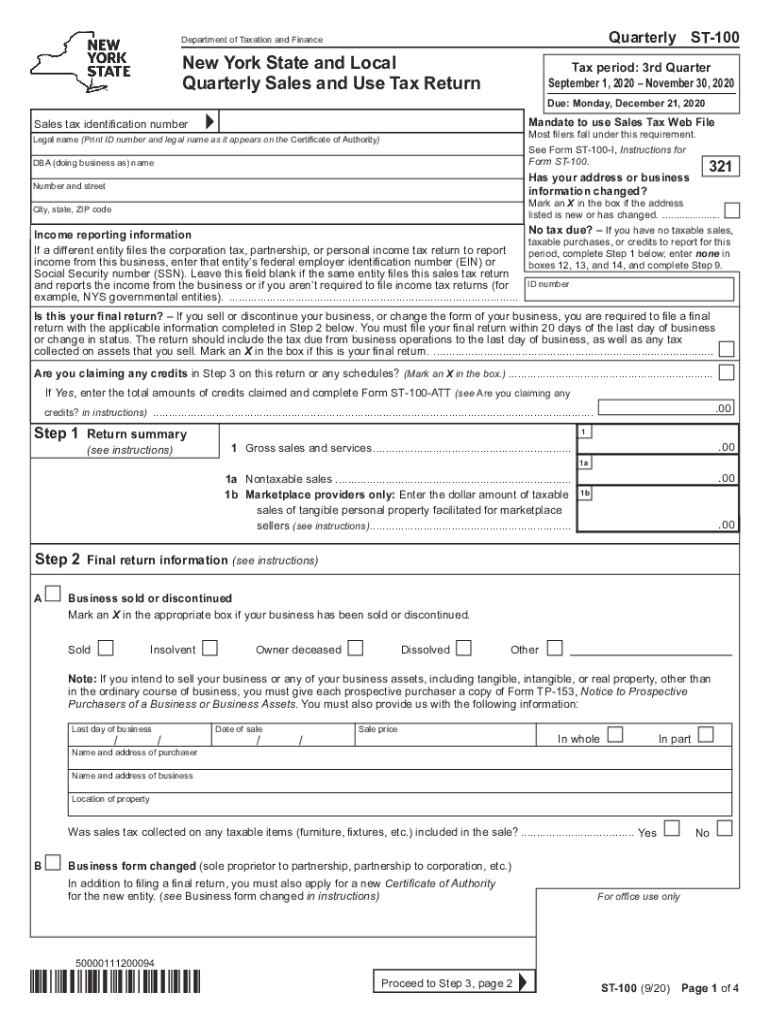
This guide provides comprehensive instructions for filling out the NY DTF ST-100, the New York State Quarterly Sales and Use Tax Return. This user-friendly resource will help you accurately complete and submit the form online.
Follow the steps to fill out the NY DTF ST-100 easily.
- Click the ‘Get Form’ button to obtain the form and open it in the editor.
- Enter your sales tax identification number in the appropriate field at the top of the form. Make sure this matches your Certificate of Authority.
- Provide your legal name and 'doing business as' (DBA) name. Ensure the information matches what is on your Certificate of Authority.
- Check if your address or business information has changed. If it has, mark an 'X' in the box provided.
- Fill in your business income reporting information. If another entity files income tax for this business, enter that entity's federal employer identification number (EIN) or social security number (SSN).
- If you have no taxable sales, purchases, or credits to report, indicate this by entering 'none' in the designated boxes (12, 13, and 14) and proceed to the final step.
- If this is your final return, mark 'X' in the appropriate box and provide details such as the last business day and the reason for ending operations.
- Complete the return summary in Step 1, including gross sales, nontaxable sales, and any marketplace sales figures, where applicable.
- In Step 2, provide details if your business has been sold or discontinued, and fill out the necessary information regarding the sale.
- Proceed to Step 3 to calculate your sales and use taxes based on the provided taxable sales and applicable tax rates for different jurisdictions.
- Complete Steps 4 and 5 to calculate any special taxes and other credits or advance payments you may be eligible for.
- In Step 6, calculate the total taxes due by adding sales and use taxes and any special taxes, then subtract any tax credits or advance payments.
- Sign and date the return at the end. Review your entries for accuracy before final submission.
- Save your changes, download the completed form, or print it for your records.
Complete your NY DTF ST-100 online now for a smooth filing experience.
Experience a faster way to fill out and sign forms on the web. Access the most extensive library of templates available.
Related content
Nov 19, 2025 — Quarterly filer forms (Form ST-100 series). 3rd quarter: September 1...
6 hours ago — The New York State Department of Taxation and Finance (DTF) outlines...
A value of 100 will give 100 percent torque with 100 percent load or 60 percent torque...
Get answers to your most pressing questions about US Legal Forms API.
How to fill out probate forms in NY?
Completing probate forms in NY starts with gathering necessary information, such as the deceased's assets and debts. After identifying the correct forms, provide detailed descriptions and values of the assets. Make sure to follow the specific requirements for each form, as errors can delay the process. Using resources like uslegalforms can simplify filling out these forms and integrating necessary details like the NY DTF ST-100.
How to fill out NY IT 2104 form?
Filling out the NY IT 2104 form is straightforward. Begin by entering your personal information, including your name, address, and Social Security number. Then, specify your filing status and the number of allowances you wish to claim. This completed form helps determine your withholding tax, and using the NY DTF ST-100 can streamline the process.
Where to mail NYS sales tax payment?
You can mail your NYS sales tax payment to the address specified on your NY DTF ST-100 form. This address may vary depending on whether you are paying by check or through another method. It's crucial to ensure that your payment reaches the New York State Department of Taxation and Finance on time to avoid penalties. Using UsLegalForms can help you find the correct mailing address and ensure your payment process is efficient.
What is a ST-100?
The ST-100 is the New York State sales tax return form that businesses use to report their sales tax liability. Completing the NY DTF ST-100 accurately is crucial for timely filing and avoids potential fines. This form details the total taxable sales, exemptions, and the total sales tax due. Using platforms like UsLegalForms can streamline the process of preparing and submitting the ST-100.
What is NYS DTF sales tax?
NYS DTF sales tax is the sales tax imposed by New York State, collected on goods and services sold within the state. This tax is collected by retailers and remitted to the New York State Department of Taxation and Finance. The NY DTF ST-100 form is used to report the sales tax collected, ensuring businesses comply with state tax regulations. It's important for businesses to accurately calculate and report this tax to avoid penalties.
What is NYC DTF?
NYC DTF refers to the New York City Department of Taxation and Finance. This department manages tax collection and enforcement for the city, ensuring compliance with New York's tax laws. They handle various tax forms, including the NY DTF ST-100, which is essential for businesses reporting sales tax. Understanding NYC DTF is vital for any business operating in New York.
What does a certificate of Amendment mean?
A certificate of amendment is an official document that modifies an existing business formation document, such as articles of incorporation or organization. It allows a business to update its name, address, or any other important details. This certificate ensures that your business remains compliant with state laws and regulations. To understand how to manage amendments efficiently, exploring the use of the NY DTF ST-100 can provide valuable insights.
How to file a certificate of amendment in NY?
Filing a certificate of amendment in New York involves submitting form 424 to the appropriate state office. Ensure that you include all necessary information about your business and the amendments being made. After filling out the form, submit it along with any required fees. If you seek clarity or assistance, refer to resources associated with the NY DTF ST-100 for step-by-step guidance.
How to fill out form 424 certificate of Amendment?
To fill out form 424, the Certificate of Amendment, start by entering your business name and the original filing date. Then, clearly state the amendments you wish to make, including any changes to your business structure or details. Follow the form instructions closely and be mindful of the required signatures. Utilizing guidance on the NY DTF ST-100 can help clarify the process of completing this form correctly.
How to file for NYC residency?
Filing for NYC residency requires gathering necessary documentation to prove your residency status. You will need to complete the residency application and provide documents like lease agreements or utility bills. Ensure that you check the official guidelines to avoid any setbacks. Using services associated with the NY DTF ST-100 can simplify the forms and requirements for your application.
Use professional pre-built templates to fill in and sign documents online faster. Get access to thousands of forms.
If you believe that this page should be taken down, please follow our DMCA take down process here.
This form is available in several versions. Select the version you need from the drop-down list below.