Loading
Get Ct Drs Reg-1 2011
How it works
-

Open form follow the instructions
-

Easily sign the form with your finger
-

Send filled & signed form or save
How to fill out the CT DRS REG-1 online
Filling out the CT DRS REG-1 form online can seem daunting, but with clear guidance, you can navigate the process efficiently. This form is essential for registering a business in Connecticut and requires accurate information to ensure compliance.
Follow the steps to successfully complete the CT DRS REG-1 form online.
- Press the ‘Get Form’ button to access the CT DRS REG-1 form in your chosen format.
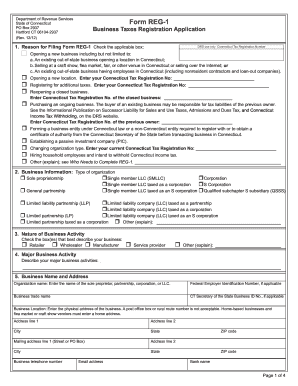
- Start by indicating your reason for filing by checking the appropriate box. You can choose options such as opening a new business, reopening a closed business, or purchasing an ongoing business, among others. Be sure to provide the necessary Connecticut Tax Registration Number if required.
- Next, select the type of organization by checking the relevant box, indicating whether you are a sole proprietorship, partnership, corporation, or another type of entity.
- Provide a detailed description of your business activities by checking the boxes that best apply and filling in any additional explanations required in the 'Nature of Business Activity' section.
- Fill in your business name and address, ensuring that you provide the correct physical address where your business operates, as post office boxes are not acceptable.
- List all owners, partners, corporate officers, or LLC members along with their titles, addresses, and other required information. Attach a separate sheet if necessary.
- Address the income tax withholding questions appropriately, indicating if you intend to pay wages to employees or withhold taxes from nonresident individuals or households.
- Answer the questions related to sales and use taxes, confirming if you will sell goods, rent equipment, or provide taxable services in Connecticut.
- Complete further sections regarding room occupancy tax, business entity tax, and any other applicable taxes as guided in the form, ensuring accuracy in your responses.
- Finally, enter the registration fee amount, ensuring to include any fees required for sales and use taxes. Make checks payable to the Commissioner of Revenue Services, and note that your application will not be processed without payment.
- Conclude by signing the declaration, confirming that all provided information is truthful and complete. Date your signature.
- After completing the form, you can save your changes, download, print, or share the completed document as needed.
Start completing your CT DRS REG-1 form online today to ensure your business is registered and compliant.
Get form
Experience a faster way to fill out and sign forms on the web. Access the most extensive library of templates available.
Related links form
A CT tax ID number is a unique identifier assigned by the Connecticut Department of Revenue Services. It functions as an essential tool for managing taxes and conducting business legally in the state. Proper understanding of your CT DRS REG-1 and related forms will support your compliance efforts.
Get This Form Now!
Use professional pre-built templates to fill in and sign documents online faster. Get access to thousands of forms.