Loading

Open form follow the instructions

Easily sign the form with your finger

Send filled & signed form or save
How to fill out the CO DoR 104PN online
The CO DoR 104PN form is essential for part-year residents and nonresidents of Colorado to accurately calculate their tax obligations. This guide provides clear and detailed steps to help users efficiently complete the form online.
Follow the steps to successfully fill out the CO DoR 104PN online.
- Click ‘Get Form’ button to access the CO DoR 104PN document in the online editor.
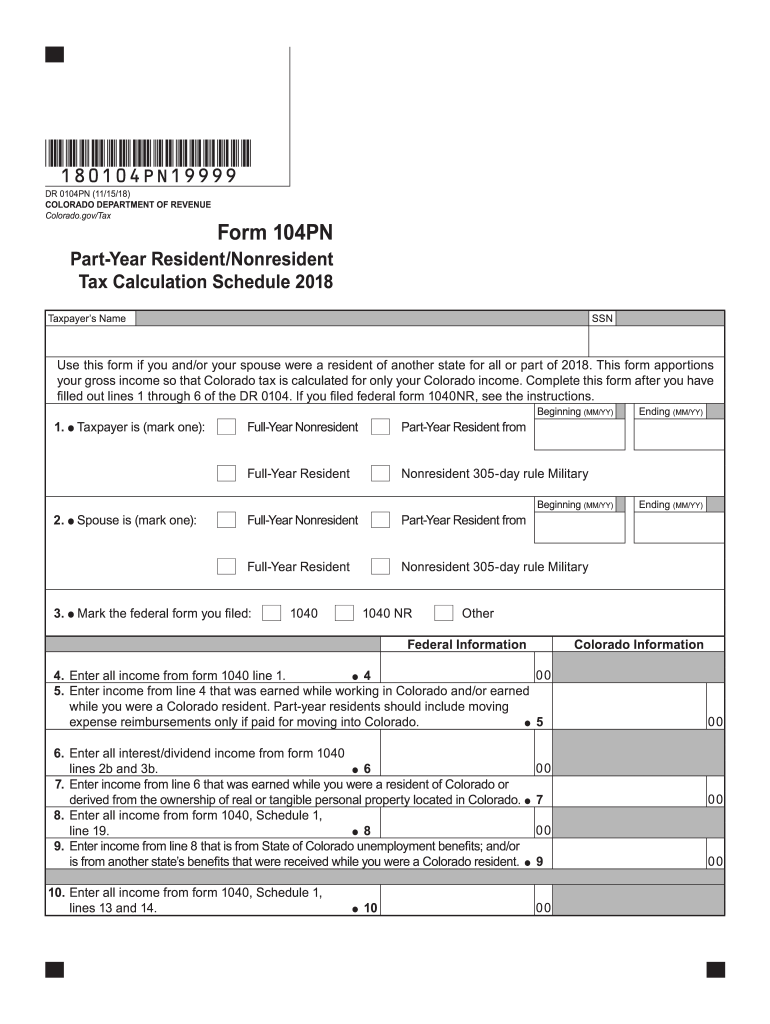
- Begin by entering the taxpayer's name and Social Security Number (SSN) at the top of the form. Ensure that this information is accurate, as it is essential for proper identification.
- In the section describing the taxpayer’s residency status, mark the appropriate box indicating whether the taxpayer is a full-year resident, part-year resident, or full-year nonresident. Be sure to complete this for both the taxpayer and their spouse if applicable.
- Next, indicate which federal tax form you filed by selecting the correct option from the listed choices: 1040 or 1040NR.
- Proceed to enter all income earned from form 1040 line 1 in the designated field. This should include all sources of income received during the tax year.
- In the next field, specify the portion of income entered previously that was earned while working in Colorado or during the period as a Colorado resident.
- Continue filling out the income details as required for lines 6 through 19, ensuring to separate income earned specifically while a Colorado resident from all other income sources.
- Once all income lines have been completed, calculate your total income based on the instructions provided. This total is crucial for determining the adjusted gross income.
- Complete the sections regarding adjustments to income, detailing any subtractions or additions as instructed in the form. This ensures an accurate representation of the taxpayer's fiscal situation.
- After filling out the entire form, you can save your progress, download a copy for your records, print the form for submission, or share it as needed.
Start filling out the CO DoR 104PN online today to ensure accurate and timely tax filing.
Experience a faster way to fill out and sign forms on the web. Access the most extensive library of templates available.
Related content
Part-year residents and nonresidents must complete a Part-Year Resident/ Nonresident Tax...
by W Struyve · 2005 · Cited by 20 — Bhabha equations are derived from fairly basic...
Get answers to your most pressing questions about US Legal Forms API.
How to fill out Employee Withholding Certificate form?
Filling out the Employee Withholding Certificate form, also known as Form W-4, involves providing personal information such as your name, address, filing status, and allowances. Ensure you complete all sections accurately, as this will determine how much tax is withheld from your paychecks. For Colorado residents, this can directly impact your state tax calculations on the CO DoR 104PN. Utilizing a trusted platform like uslegalforms can simplify this process and provide clarity.
How do you calculate taxable income formula?
To calculate your taxable income, start with your gross income and then subtract all eligible deductions, such as retirement contributions and some business expenses. This formula allows you to arrive at the income amount you will report on your tax forms, including the CO DoR 104PN. Understanding this calculation can help you optimize your tax situation and reduce your liabilities.
How is the income tax calculated in Colorado?
Income tax in Colorado is calculated using a flat rate applied to your taxable income, regardless of the amount you earn. This straightforward method allows for easier tax planning and predictability in your financial obligations. When filling out the CO DoR 104PN, use the current flat rate set by the state to accurately determine your tax liability. Staying informed about changes in this rate can be beneficial.
Can I file Colorado state taxes without filing federal taxes?
In most cases, you can file your Colorado state taxes without filing federal taxes; however, it might complicate the process. While Colorado allows state-only filings, you may miss out on certain credits or deductions linked to federal filings. Always ensure that you accurately complete the CO DoR 104PN, as it reflects your state-specific requirements. Consulting with a tax professional can provide additional guidance.
What is taxable Colorado sourced income?
Taxable Colorado sourced income refers to revenue that is generated from work or business conducted within Colorado. This includes wages, salaries, and profits from business activities in the state. It's essential to report these earnings accurately, particularly when filling out the CO DoR 104PN. By understanding what constitutes taxable income, you can ensure compliance with state tax laws.
Who must file a Colorado nonresident return?
Anyone who earns income from Colorado sources but is not a resident must file a Colorado nonresident return. This includes people who may have temporary jobs, rental properties, or other sources of revenue in the state. Understanding your filing requirements is crucial, and the CO DoR 104PN can help clarify your obligations.
Can Colorado form 104X be filed electronically?
Currently, Colorado form 104X is not supported for electronic filing. Instead, you may need to submit it by mail. However, if you are looking for clarity in your filing process, the CO DoR 104PN provides detailed guidance on how to handle your tax obligations effectively.
Can amended returns be filed electronically?
Yes, you can file amended returns electronically in Colorado. This includes using the CO DoR 104PN for accurate reporting. Filing electronically helps to expedite the processing of your amendments, so be sure to follow the correct electronic submission guidelines.
What qualifies for Colorado pension and annuity exclusion?
To qualify for the Colorado pension and annuity exclusion, the income must come from pensions, annuities, and certain retirement plans. The CO DoR 104PN allows you to report these values effectively. Make sure you meet the eligibility criteria to benefit from the exclusion on your state taxes.
What is Colorado tax form 104PN?
The Colorado tax form 104PN is used to report income from pensions and annuities for state tax purposes. This form is crucial for individuals who wish to claim exclusion on their Colorado tax returns. Ensure that you understand how the CO DoR 104PN applies to your specific situation to maximize your benefits.
Use professional pre-built templates to fill in and sign documents online faster. Get access to thousands of forms.
If you believe that this page should be taken down, please follow our DMCA take down process here.
This form is available in several versions. Select the version you need from the drop-down list below.