Loading
Form preview
  • US Legal Forms
  • Other Templates
  • Legal Forms
  • Virgin Islands Legal Forms
  • Vi License & Certificate Of Marriage 1989

Get Vi License & Certificate Of Marriage 1989-2026

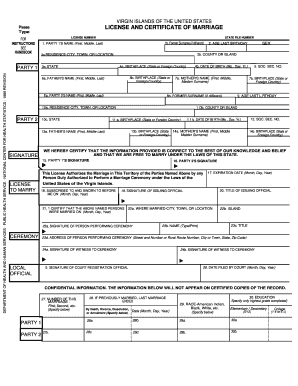
Try) 3c.STATE 6b. BIRTHPLACE (State or Foreign Country) 6a, FATHER'S NAME (First, Middle, Last) Ea. PARTY 2'S NAME (First, Middle, Last) 10c. STATE 4b. DATE OF BIRTH (Mo., Day, Yr.) 7a. MOTHER'S NAME (First. Middle, Maiden Surname) 8b. FORMER SURNAME (if different) 10a. RESIDENCE-CITY, TOWN, OR LOCATION PARTY 2 5. SOC. SEC. NO. 7b. BIRTHPLACE (State or Foreign Country) 9. AGE LAST L,RTHDAY 1 Ob. COUNTY OR ISLAND 11 a. BIRTHPLACE (State or Foreign Country) 13b. BIRTHPLACE (State or.

How it works

  1. Open form

    Open form follow the instructions

  2. Easily sign form

    Easily sign the form with your finger

  3. Share form

    Send filled & signed form or save

How to fill out the VI License & Certificate Of Marriage online

This guide provides a comprehensive overview of how to complete the VI License & Certificate Of Marriage form online. Whether you are getting married for the first time or need to update information, this guide will help you navigate the form step by step.

Follow the steps to accurately complete your marriage license online.

  1. Click ‘Get Form’ button to obtain the form and open it in the editor.
  2. Begin by entering Party 1's name in the designated fields, including the first, middle, and last names. Ensure that the spelling is correct.
  3. Input the former surname of Party 1, if different, in the provided field.
  4. Fill in the birthplace of Party 1, specifying the state or foreign country.
  5. State Party 1's date of birth by selecting or entering the month, day, and year.
  6. Provide the social security number of Party 1 in the respective field.
  7. Enter the residence city, town, or location of Party 1 in the allocated section.
  8. Next, fill out Party 2's information, following a similar approach to Party 1, including the name, former surname, birthplace, and date of birth.
  9. Complete Party 2's social security number and their residence details.
  10. Make sure to enter the names of both parties’ parents as well as their birthplaces.
  11. Proceed to review all entries for accuracy and completeness.
  12. Both parties must sign the document, certifying that the information provided is correct to the best of their knowledge.
  13. Lastly, save your changes, download the completed form, or print it for your records.

Begin completing your marriage license online today and ensure that all information is submitted accurately.

Get form

Experience a faster way to fill out and sign forms on the web. Access the most extensive library of templates available.
Get form

Related content

§ 20-16. Issuance of marriage licenses and ...
The clerk shall provide the parties with two copies of the marriage certificate to be...
Learn more
12 Va. Admin. Code § 5-550-130 - Marriage return...
The record of marriage to be used shall be the Marriage Return and Certificate...
Learn more
Recognition (USA)
This article gives information on recognition of nonbinary gender identities in law...
Learn more

Related links form

Maryland Form Wh Ar NX-800(K). Service Manual Prayer Before Confession RESIDENT INFORMATION FORM EMERGENCY CONTACT FORM

Questions & Answers

Get answers to your most pressing questions about US Legal Forms API.

Contact support

To verify if you are married, you can check your marriage certificate or contact the civil registry office where the marriage occurred. This office should have a record of your marriage if it was legally registered. If you are unsure or need assistance, US Legal Forms can guide you in obtaining your VI License & Certificate Of Marriage to confirm your marital status.

A marriage can be valid if it meets the legal requirements set by the local authorities, including obtaining a marriage license and completing the marriage ceremony. Both parties must also have the legal capacity to marry, meaning they are of appropriate age and not closely related. To ensure you meet all necessary conditions, look into resources available through US Legal Forms, especially regarding the VI License & Certificate Of Marriage.

While both the marriage license and marriage certificate are important, they serve different purposes. A marriage license is the official authorization allowing the couple to marry, whereas a marriage certificate is proof that the marriage has taken place. For those needing both documents, US Legal Forms offers resources to help acquire the VI License & Certificate Of Marriage quickly and efficiently.

Validating a marriage in Brazil often involves ensuring that both partners have complied with local marriage laws and that the marriage was officially registered. You can verify this by checking the records at the civil registry office where the marriage took place or by requesting a marriage certificate. For easy access to necessary forms and documents, consider using US Legal Forms to help you with the VI License & Certificate Of Marriage validation.

The certificate of proof of marriage is an official document that verifies a couple’s marital status. This certificate serves as legal evidence of a marriage and may be required for various administrative purposes, such as applying for a visa or insurance. You can obtain the VI License & Certificate Of Marriage through US Legal Forms, making sure you have the proper documentation for your needs.

To check if someone is married in Brazil, you can request information directly from the civil registry office where the marriage would have been recorded. In many cases, these offices maintain official records, and you may need to provide identification to access this information. Utilizing services like US Legal Forms can streamline the process of obtaining a VI License & Certificate Of Marriage that confirms marital status.

Proving a marriage is genuine typically involves providing documents such as a marriage license or a certificate of marriage. Additionally, supporting evidence can include joint financial records, photo albums, and affidavits from friends or family. For those needing more help, US Legal Forms offers templates and resources for the VI License & Certificate Of Marriage to establish authenticity.

To find marriage records in Brazil, you can start by visiting the local civil registry office where the marriage took place. Many Brazilian municipalities have online databases that allow you to search for marriage records. If you need further assistance, consider using resources like US Legal Forms, which provides guidance on obtaining a VI License & Certificate Of Marriage.

Do I need a REAL ID to enter the United States Virgin Islands? On May 3, 2023, U.S. travelers must be REAL ID-compliant to board domestic flights and access certain federal facilities. If you are a resident of the U.S. Virgin Islands, you may obtain a REAL ID from the Bureau of Motor Vehicles.

With its status as a US Territory, visitors with a valid US driver's license can easily and legally drive in the US Virgin Islands.

Get This Form Now!

Use professional pre-built templates to fill in and sign documents online faster. Get access to thousands of forms.
Get form
If you believe that this page should be taken down, please follow our DMCA take down processhere.
Get VI License & Certificate Of Marriage
Get form
  • Adoption
  • Bankruptcy
  • Contractors
  • Divorce
  • Home Sales
  • Employment
  • Identity Theft
  • Incorporation
  • Landlord Tenant
  • Living Trust
  • Name Change
  • Personal Planning
  • Small Business
  • Wills & Estates
  • Packages A-Z
  • Affidavits
  • Bankruptcy
  • Bill of Sale
  • Corporate - LLC
  • Divorce
  • Employment
  • Identity Theft
  • Internet Technology
  • Landlord Tenant
  • Living Wills
  • Name Change
  • Power of Attorney
  • Real Estate
  • Small Estates
  • Wills
  • All Forms
  • Forms A-Z
  • Other Templates
  • Legal Hub
  • About Us
  • Help Portal
  • Legal Resources
  • Blog
  • Affiliates
  • Contact Us
  • Delete My Account
  • Site Map
  • Industries
  • Forms in Spanish
  • Localized Forms
  • State-specific Forms
  • Forms Kit
  • Real Estate Handbook
  • All Guides
  • Notarize
  • Incorporation services
  • For Consumers
  • For Small Business
  • For Attorneys
  • USLegal
  • FormsPass
  • pdfFiller
  • signNow
  • altaFlow
  • DocHub
  • Instapage
Form Packages
  • Adoption
  • Bankruptcy
  • Contractors
  • Divorce
  • Home Sales
  • Employment
  • Identity Theft
  • Incorporation
  • Landlord Tenant
  • Living Trust
  • Name Change
  • Personal Planning
  • Small Business
  • Wills & Estates
  • Packages A-Z
Form Categories
  • Affidavits
  • Bankruptcy
  • Bill of Sale
  • Corporate - LLC
  • Divorce
  • Employment
  • Identity Theft
  • Internet Technology
  • Landlord Tenant
  • Living Wills
  • Name Change
  • Power of Attorney
  • Real Estate
  • Small Estates
  • Wills
  • All Forms
  • Forms A-Z
  • Other Templates
Customer Service
  • Legal Hub
  • About Us
  • Help Portal
  • Legal Resources
  • Blog
  • Affiliates
  • Contact Us
  • Delete My Account
  • Site Map
  • Industries
  • Forms in Spanish
  • Localized Forms
  • State-specific Forms
  • Forms Kit
Legal Guides
  • Real Estate Handbook
  • All Guides
Prepared for you
  • Notarize
  • Incorporation services
Our Customers
  • For Consumers
  • For Small Business
  • For Attorneys
Our Sites
  • USLegal
  • FormsPass
  • pdfFiller
  • signNow
  • altaFlow
  • DocHub
  • Instapage
Social Media
Call us now toll free:
+1 833 426 79 33
As seen in:
© Copyright 1999-2026 airSlate Legal Forms, Inc. 17 Station Street, Suite 303, Brookline, MA 02445
  • Your Privacy Choices
  • Terms of Service
  • Privacy Notice
  • Content Takedown Policy
  • Bug Bounty Program