Get Ca Jv-300 2010-2026
How it works
-

Open form follow the instructions
-

Easily sign the form with your finger
-

Send filled & signed form or save
How to fill out the CA JV-300 online
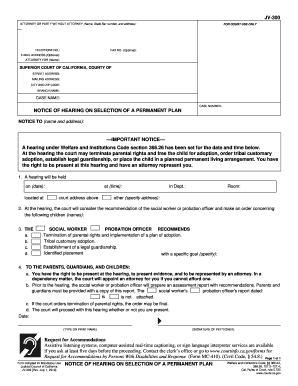
The CA JV-300 form is essential for notifying parties about the selection of a permanent plan for a child in dependency proceedings. This guide will provide clear instructions to assist users in completing the form accurately and efficiently online.
Follow the steps to complete the CA JV-300 form online
- Click the ‘Get Form’ button to obtain the form and open it in the editor.
- Begin by entering the name, state bar number, and address of the attorney or party without an attorney in the designated fields at the top of the form. Provide a valid telephone number, and optionally include a fax number and email address.
- For court use, fill in the street address, mailing address, city, zip code, and branch name of the Superior Court of California relevant to your case.
- In the case name and case number sections, provide the required details that identify the legal proceedings associated with this form.
- Fill out the 'Notice to' section with the name and address of the individuals who will receive this notice regarding the hearing.
- Specify the date and time of the scheduled hearing under the relevant sections. Be sure to include the exact court address and departmental room assignment if applicable.
- List the names of the children for whom the court will make decisions during the hearing.
- Indicate the recommendations of the social worker or probation officer, choosing from options such as termination of parental rights, tribal customary adoption, establishment of legal guardianship, or specified placement goals.
- In the section directed to parents, guardians, and children, confirm the rights pertaining to representation and evidence presentation during the hearing.
- Finally, sign the form by typing or printing your name, and provide your signature in the designated area indicating the date once completed.
- After filling out the form, remember to save any changes made, and utilize the options to download, print, or share the form as necessary.
Complete your CA JV-300 form online today to ensure your legal notifications are processed effectively.
Filing a DBA (Doing Business As) in California requires you to complete a fictitious business name statement. You need to file this statement with the county clerk's office where your business is located. For a seamless experience, consider using resources like the US Legal Forms platform, which provides helpful templates and guidance for the CA JV-300 process, ensuring compliance with local regulations.