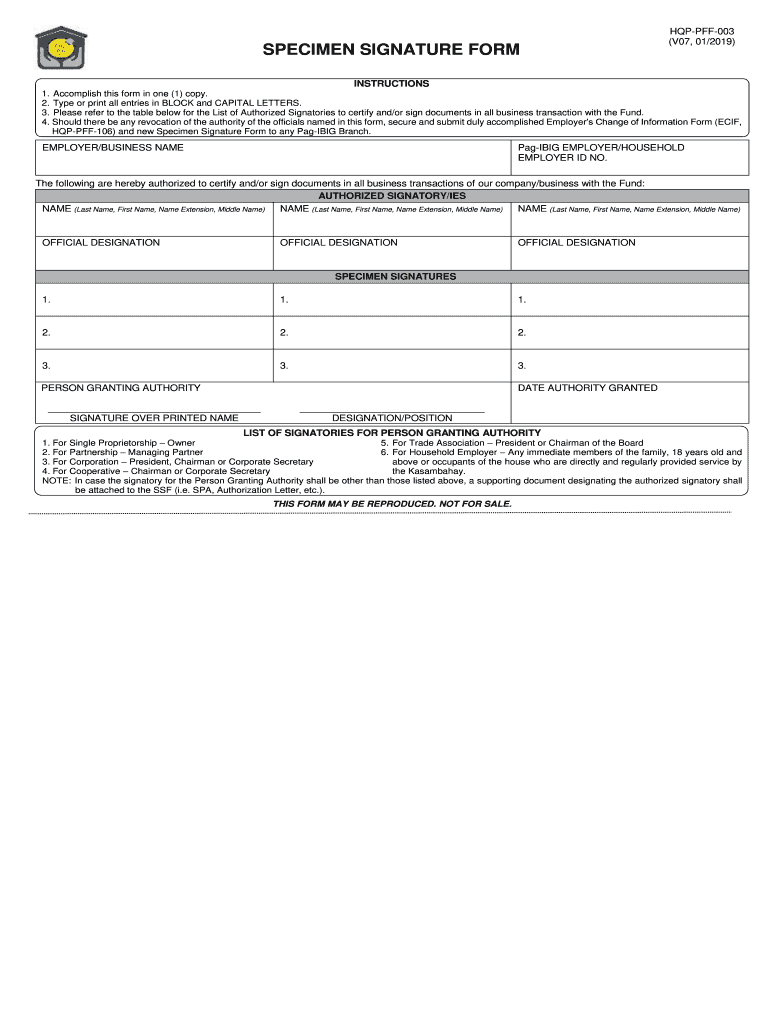
SPECIMEN SIGNATURE FORM HQP-PFF-003 V07 01/2019 INSTRUCTIONS 1. Accomplish this form in one 1 copy. Should there be any revocation of the authority of the officials named in this form secure and submit duly accomplished Employer s Change of Information Form ECIF HQP-PFF-106 and new Specimen Signature Form to any Pag-IBIG Branch. 2. Type or print all entries in BLOCK and CAPITAL LETTERS* 3. Please refer to the table below for the List of Authorized Signatories to certify and/or sign documents in all business transaction with the Fund* 4. EMPLOYER/BUSINESS NAME Pag-IBIG EMPLOYER/HOUSEHOLD EMPLOYER ID NO. The following are hereby authorized to certify and/or sign documents in all business transactions of our company/business with the Fund AUTHORIZED SIGNATORY/IES NAME Last Name First Name Name Extension Middle Name OFFICIAL DESIGNATION PERSON GRANTING AUTHORITY DATE AUTHORITY GRANTED SIGNATURE OVER PRINTED NAME DESIGNATION/POSITION LIST OF SIGNATORIES FOR PERSON GRANTING AUTHORITY 1. For ....

Open form follow the instructions

Easily sign the form with your finger

Send filled & signed form or save
How to fill out the PH Pag-IBIG HQP-PFF-003 online
The PH Pag-IBIG HQP-PFF-003 is a vital document for individuals authorizing signatories to engage in business transactions with the Fund. This guide will provide you with clear, step-by-step instructions to ensure successful completion of this form online.
Follow the steps to fill out the PH Pag-IBIG HQP-PFF-003 effortlessly.
- Click ‘Get Form’ button to obtain the form and access it in your preferred editing tool.
- Fill in the employer or business name in the designated field. Ensure you use BLOCK and CAPITAL LETTERS.
- Enter your Pag-IBIG employer or household employer ID number accurately.
- List the authorized signatories by inputting their full names as follows: Last Name, First Name, Name Extension (if applicable), and Middle Name. Make sure each entry is complete.
- Fill in the official designations for each authorized signatory next to their names, ensuring that the information reflects their roles correctly.
- Provide the specimen signatures for each authorized signatory, ensuring that these are clear and legible.
- Indicate the person granting authority by entering their name and designation or position in the respective fields.
- Include the date when the authority was granted, ensuring the correct format is used.
- After completing all sections, review the form carefully for accuracy and completeness. Make any necessary edits.
- Once satisfied with the information provided, you can save your changes, download the completed form, or print it for your records.
Complete your PH Pag-IBIG HQP-PFF-003 form online today for streamlined processing.
Experience a faster way to fill out and sign forms on the web. Access the most extensive library of templates available.
Related content
HQP-PFF-039 FOR Pag-IBIG Fund USE ONLY MEMBER'S DATA Pag-IBIG MID NUMBER ... (PSOC). 3...
Get answers to your most pressing questions about US Legal Forms API.
How to fill up Pag-IBIG MP2 form online?
Filling up the Pag-IBIG MP2 form online is a simple process. Access the Pag-Ibig website, navigate to the MP2 savings program section, and complete the online application. Using the PH Pag-IBIG HQP-PFF-003 form will help you efficiently manage your contributions and ensure accurate tracking.
How to fill up specimen signature form Pag-Ibig?
To fill out the Pag-Ibig specimen signature form, simply provide your name and write your signature as you would on official documents. Make sure to double-check your details before submission. The PH Pag-IBIG HQP-PFF-003 can be utilized to ensure that you are meeting all necessary requirements.
How to update Pag-Ibig information?
Updating your Pag-Ibig information requires you to fill out the appropriate forms, which can often be done online. Visit the Pag-Ibig website for guidance and ensure you have supporting documents ready. Incorporating the PH Pag-IBIG HQP-PFF-003 will ensure your updates are processed efficiently.
How can I fill a Pag-IBIG form online?
Filling a Pag-Ibig form online involves accessing the Pag-Ibig official portal. From there, find the specific form you need and input your information accordingly. Utilizing tools like the PH Pag-IBIG HQP-PFF-003 will help streamline your submission process.
How to fill up a MDF form?
To fill up the Membership Data Form (MDF), you need to provide your personal details, employment information, and contribution history. The form can typically be obtained from the Pag-Ibig website or local office. Completing the PH Pag-IBIG HQP-PFF-003 form aids in maintaining accuracy across your records.
How to fill up PAG-IBIG membership form online?
Filling up the Pag-Ibig membership form online is easy. Just visit the Pag-Ibig website and locate the online form section, then follow the prompts to enter your information. Make sure to have relevant documents handy to ensure the PH Pag-IBIG HQP-PFF-003 form is filled out correctly.
How can I apply for Pag-IBIG for the first time?
Applying for Pag-Ibig for the first time is straightforward. You simply need to fill out the membership form, which can be downloaded from the Pag-Ibig website. Using the PH Pag-IBIG HQP-PFF-003 form will make the process smoother, as it includes all the required information for your application.
How can I claim Pag-Ibig provident fund?
To claim your Pag-Ibig provident fund, you need to prepare the necessary documents, including your identification and proofs of contribution. Visit your nearest Pag-Ibig branch or check their official website for guidelines. Additionally, forms like PH Pag-IBIG HQP-PFF-003 can assist you in ensuring that all your information is accurate and updated.
How can I get proof of Pag-Ibig membership?
To obtain proof of your Pag-Ibig membership, you can request a certificate online or visit a local Pag-Ibig branch. This document serves as official confirmation of your membership and is essential for availing of various benefits. Make sure to have your membership ID and relevant identification on hand, and take advantage of resources like the PH Pag-IBIG HQP-PFF-003 guide for a smoother process.
What is the meaning of SSF in Pag-Ibig?
SSF stands for Social Security Fund in the context of Pag-Ibig. It is crucial for members as it helps provide benefits and assistance when needed. Understanding the SSF can enhance your experience with the Pag-Ibig system and ensure you receive the full advantages associated with your membership. For detailed information, consider exploring the PH Pag-IBIG HQP-PFF-003 documentation.
Use professional pre-built templates to fill in and sign documents online faster. Get access to thousands of forms.
If you believe that this page should be taken down, please follow our DMCA take down process here.