Loading
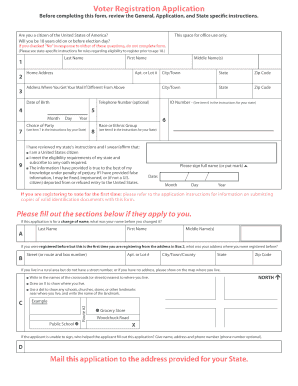
Get State Instructions - The Us Election Assistance Commission - Eac
How it works
-

Open form follow the instructions
-

Easily sign the form with your finger
-

Send filled & signed form or save
How to fill out the State Instructions - The US Election Assistance Commission - Eac online
This guide provides step-by-step instructions for filling out the State Instructions from the US Election Assistance Commission (EAC) online. Whether you are registering to vote for the first time or updating your information, these instructions will help ensure your application is completed accurately.
Follow the steps to successfully complete your application.
- Press the ‘Get Form’ button to access the application form, opening it in your preferred online editor.
- Begin with the top section of the form, answering questions regarding your citizenship and age. If you answer 'No' to either, end the process as you may not use this form.
- In Box 1, fill in your full name in the specified order: Last, First, Middle. Avoid using nicknames or initials. If this is a name change, indicate your previous name in Box A.
- Input your home address in Box 2. Ensure it is your legal address and not a P.O. Box. Use Box 3 for your mailing address if different.
- Provide your date of birth in Box 4 using the format Month, Day, Year.
- Box 5 asks for your telephone number; providing it is optional but beneficial for communication regarding your registration.
- In Box 6, enter your identification number as required by your state. If you do not have one, indicate 'NONE.'
- For Box 7, fill in your political party choice, if applicable. If you choose not to register with a party, leave it blank or indicate 'no party.'
- Box 8 may request your race or ethnic group. Complete it according to the options provided or leave it blank if it's not required by your state.
- Review the instructions in Box 9 carefully. Sign and date the form accurately, ensuring all provided information is truthful.
- Once everything is filled out, save your changes. You can download, print, or share the completed form as per your needs.
Complete your voter registration documents online today to ensure your participation in upcoming elections.
If no candidate receives a majority of electoral votes, the Presidential election leaves the Electoral College process and moves to Congress. The House of Representatives elects the President from the three (3) Presidential candidates who received the most electoral votes.
Industry-leading security and compliance
US Legal Forms protects your data by complying with industry-specific security standards.
-
In businnes since 199725+ years providing professional legal documents.
-
Accredited businessGuarantees that a business meets BBB accreditation standards in the US and Canada.
-
Secured by BraintreeValidated Level 1 PCI DSS compliant payment gateway that accepts most major credit and debit card brands from across the globe.