We use cookies to improve security, personalize the user experience, enhance our marketing activities (including cooperating with our marketing partners) and for other business use.
Click "here" to read our Cookie Policy. By clicking "Accept" you agree to the use of cookies. Read less
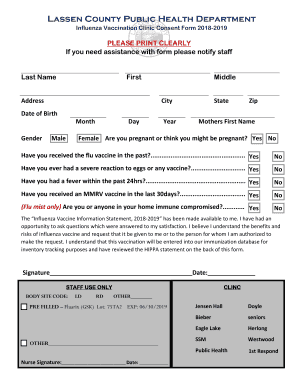
CA Lassen County Public Health Influenza Vaccination Clinic Consent Form 2018
Get CA Lassen County Public Health Influenza Vaccination Clinic Consent Form 2018
Ddle City State Zip Date of Birth Month Gender Male Day Year Mothers First Name Female Are you pregnant or think you might be pregnant? Yes No Have you received the flu vaccine in the past?.................................................... Yes No Have you ever had a severe reaction to eggs or any vaccine?.............................. Yes No Have you had a fever within the past 24hrs?....................................................... Yes No Have you received an MMRV vaccine.
How It Works
Open form follow the instructions
Easily sign the form with your finger
Send filled & signed form or save
JENSEN rating
★★★★★
★★★★
★★★
★★
★
4.8Satisfied
60 votes
How to fill out and sign 75ta2
online?
Get your online template and fill it in using progressive
features. Enjoy smart fillable fields and interactivity. Follow the simple instructions
below:
Getting a authorized specialist, creating a scheduled visit and going to the business office for a private conference makes completing a CA Lassen County Public Health Influenza Vaccination Clinic Consent Form from beginning to end exhausting. US Legal Forms helps you to quickly create legally valid documents based on pre-constructed online blanks.
Prepare your docs in minutes using our simple step-by-step guide:
Get the CA Lassen County Public Health Influenza Vaccination Clinic Consent Form you require.
Open it up with online editor and start altering.
Fill in the empty fields; concerned parties names, addresses and phone numbers etc.
Customize the blanks with smart fillable areas.
Put the particular date and place your electronic signature.
Click on Done following twice-examining all the data.
Save the ready-made document to your system or print it out as a hard copy.
Swiftly produce a CA Lassen County Public Health Influenza Vaccination Clinic Consent Form without needing to involve professionals. We already have over 3 million users benefiting from our rich library of legal documents. Join us right now and gain access to the #1 catalogue of web samples. Give it a try yourself!
Get form
Experience a faster way to fill out and sign forms on the web.
Access the most extensive library of templates available.
1st FAQ
The mailing address is: Harris County Clerk, P.O. Box 1525, Houston, TX 77251-1525.
Place an order now for your birth certificate, immediate family members' birth certificates or death records, and other vital records. Please contact us at 888-596-7307 for any questions regarding getting a new birth certificate.
The claimant must file this completed affidavit in the County Clerk's record in the county of the decedent's residence. The claimant must then upload a file stamped copy of the completed affidavit to ClaimItTexas.org.
Ordering Records In-Person To get an official certified copy of a vital record in person, you must: Be a person qualified to get a certified copy of the record . Visit a local office or the Vital Statistics central office during business hours.
The Heirship Affidavit need only be signed Page 2 and sworn by the disinterested parties. All signatures must be in the presence of a Notary Public. Clerk of the county of decedent's residence, along with an Order for the Judge to sign approving it as conforming with the requirements of TPC §137.
You can get vital records in the county, city, or district where the event occurred. Some offices also provide birth records from anywhere in the state.
What is the quickest way to order my birth certificate? The quickest way is to order online at Texas.gov. How do I purchase a long form birth certificate for my passport? Long-form or full-size birth certificates may be requested online, by mail or in-person.
Vital Records (birth and death certificates) are not public records. The requests for these documents can be made by immediate family members (self, parents, grandparents, legal spouse, sibling or children - all with valid identification). For additional help contact the Vital Statistics desk at 713-274-8690.
They can be reached at (713) 274-0212.
To request a birth certificate, you must be the person named on the certificate, his/her legal representative, or immediate family member. Immediate family members include the person's child, parent/guardian, brother/sister, grandparent, or spouse.
CLINC Related content
Medi-Cal-Provider-Manual.pdf
This Provider Manual shall serve as a supplement as referenced thereto and incorporated...
2021 CA Lassen County Public Health Influenza Vaccination Clinic Consent Form
2020 CA Lassen County Public Health Influenza Vaccination Clinic Consent Form
2018 CA Lassen County Public Health Influenza Vaccination Clinic Consent Form
2017 CA Lassen County Public Health Influenza Vaccination Clinic Consent Form
BEST Legal Forms Company
TOP TEN REVIEWS WINNER - 9 YEARS STRAIGHT!
USLegal has been awarded the TopTenREVIEWS Gold Award 9 years in a row as the most comprehensive and helpful online legal forms services on the market today. TopTenReviews wrote "there is such an extensive range of documents covering so many topics that it is unlikely you would need to look anywhere else".
USLegal received the following as compared to 9 other form sites. Forms 10/10, Features Set 10/10, Ease of Use 10/10, Customer Service 10/10.