Loading
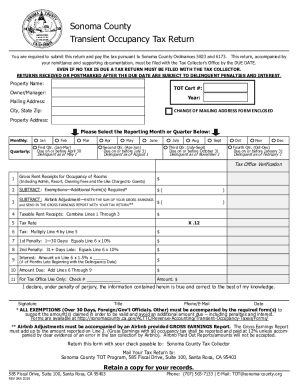
Get Ca Transient Occupancy Tax Return - Sonoma County 2019
How it works
-

Open form follow the instructions
-

Easily sign the form with your finger
-

Send filled & signed form or save
How to fill out the CA Transient Occupancy Tax Return - Sonoma County online
The CA Transient Occupancy Tax Return for Sonoma County is an essential document for property owners and managers who rent out accommodations. This guide offers a clear, step-by-step approach to completing the form online, ensuring you meet tax obligations accurately and efficiently.
Follow the steps to complete your tax return online.
- Press the ‘Get Form’ button to access and download the CA Transient Occupancy Tax Return form.
- Begin by entering the property name in the designated field. This should be the name under which your property is listed or managed.
- Next, input your Transient Occupancy Tax Certification Number (TOT Cert #). This number is typically issued by the county and is necessary for tax identification.
- Provide the owner or manager’s name in the specified section.
- Specify the year for which you are filing the tax return.
- Complete the mailing address section, including street address, city, state, and zip code.
- Select whether you will report on a monthly or quarterly basis by checking the appropriate option.
- Input your gross rent receipts for occupancy of rooms, including any administration, resort, or cleaning fees charged to guests.
- Subtract any applicable exemptions from your gross receipts in the exemptions field. Ensure you have the necessary form(s) to support these exemptions.
- Calculate your Airbnb adjustment, if applicable, and enter the total of your gross earnings in the designated field. Include the required Gross Earnings Report with your submission.
- Combine all relevant amounts to determine your taxable rent receipts.
- Identify the tax rate that applies to your rental income.
- Multiply your taxable rent receipts by the tax rate to determine the total tax due.
- If applicable, calculate the penalties for late submission: the first penalty for 1-30 days late and the second for 31 days or more.
- Calculate interest on the tax due by applying the appropriate rate and number of months late.
- Add all amounts due — tax, penalties, and interest — to arrive at the total amount you owe.
- Complete the declaration section by signing, providing your title, phone number, email, and the date.
- Save your completed form, and choose to download, print, or share your submission as needed.
Submit your CA Transient Occupancy Tax Return online to ensure compliance and avoid penalties.
Get form
Experience a faster way to fill out and sign forms on the web. Access the most extensive library of templates available.
What is Transient Occupancy Tax in Sonoma County? Transient Occupancy Tax is currently levied at a rate of 12% in Sonoma County and is authorized under State Revenue and Taxation Code Section 7280. Transient Occupancy Tax is a tax imposed on guests staying at an establishment for 30 days or less.
Get This Form Now!
Use professional pre-built templates to fill in and sign documents online faster. Get access to thousands of forms.