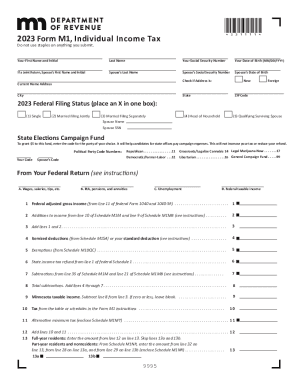
Get 2023 Form M1, Individual Income Tax Return
How it works
-

Open form follow the instructions
-

Easily sign the form with your finger
-

Send filled & signed form or save
How to fill out the 2023 Form M1, Individual Income Tax Return online
Completing your 2023 Form M1, Individual Income Tax Return online can be a straightforward process if you follow the right steps. This guide provides clear, step-by-step instructions to help you navigate each section of the form effectively.
Follow the steps to complete your tax return seamlessly.
- Press the ‘Get Form’ button to obtain the form and open it in your chosen editor.
- Begin by entering your personal information: Input your first name, last name, Social Security number, and date of birth. If filing jointly, include your partner's information as well.
- Indicate your current home address, including city, state, and ZIP code. Make sure to check if the address is new or foreign.
- Select your federal filing status by placing an X in the appropriate box, choosing from single, married filing jointly, married filing separately, head of household, or qualifying surviving spouse.
- Fill in the section for the State Elections Campaign Fund if you wish to contribute. Enter the political party code numbers for both yourself and your spouse if applicable.
- Proceed to report your income. Refer to your federal return and enter total wages, salaries, and tips, including pensions and unemployment income as required.
- Calculate your federal adjusted gross income and input any additions or subtractions as directed from relevant schedules.
- Deduct itemized deductions or the standard deduction as applicable, then report exemptions.
- Once all income and deductions are tallied, calculate your Minnesota taxable income.
- Determine your tax using the provided tables in the Form M1 instructions, including any alternative minimum tax if applicable.
- Report any other taxes or credits that apply, and fill out your total payments including withholding and estimated tax payments.
- Finally, if you have a refund, provide your banking information for direct deposit or indicate the amount owed. Complete your signature and your partner’s if filing jointly.
- Review all entries for accuracy and completeness. Save your changes, then download or print the form as necessary.
Get started on completing your Form M1 online today.
In Form 1065, U.S. Return of Partnership Income, Schedule M-1 is used to reconcile the income that the partnership is reporting on the tax return with the income in its accounting records. Not all partnerships are required to complete Schedule M-1. Form 1065 - Schedule M-1 - Reconciliation of Income (Loss) per ... taxslayerpro.com https://support.taxslayerpro.com › en-us › articles › 3600... taxslayerpro.com https://support.taxslayerpro.com › en-us › articles › 3600...