Loading
Form preview
  • US Legal Forms
  • Other Templates
  • More Forms
  • More Multi-State Forms
  • Ca Archer Travel Corporate Offices Credit Card Authorization Form 2018

Get Ca Archer Travel Corporate Offices Credit Card Authorization Form 2018-2026

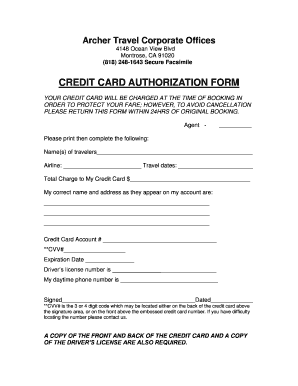
DER TO PROTECT YOUR FARE; HOWEVER, TO AVOID CANCELLATION PLEASE RETURN THIS FORM WITHIN 24HRS OF ORIGINAL BOOKING. Agent - Please print then complete the following: Name(s) of travelers Airline: Travel dates: Total Charge to My Credit Card $ My correct name and address as they appear on my account are:.

How it works

  1. Open form

    Open form follow the instructions

  2. Easily sign form

    Easily sign the form with your finger

  3. Share form

    Send filled & signed form or save

How to fill out the CA Archer Travel Corporate Offices Credit Card Authorization Form online

Filling out the CA Archer Travel Corporate Offices Credit Card Authorization Form online is a straightforward process that ensures your booking is secured. This guide provides clear instructions for each section of the form to help you complete it accurately and efficiently.

Follow the steps to fill out the form accurately and securely.

  1. Click ‘Get Form’ button to obtain the form and open it in the editor.
  2. Begin by entering the name(s) of the travelers in the designated field at the top of the form. Ensure that the names match the identification for traveling.
  3. Next, specify the airline you will be traveling with by filling in the appropriate area.
  4. Indicate your travel dates by entering the start date and return date in the provided section.
  5. Enter the total charge to your credit card in the designated field. This is the amount that will be charged upon booking.
  6. Fill out your correct name and address as they appear on your credit card account in the relevant fields. Provide complete information for accurate processing.
  7. Input your credit card account number in the specified field.
  8. Next, provide the CVV number, which is a three or four-digit code located on your credit card.
  9. Complete the expiration date of your credit card by writing the month and year.
  10. Provide your driver’s license number in the appropriate section.
  11. Fill in your daytime phone number for contact purposes.
  12. Finally, sign and date the form at the bottom. Ensure that your signature matches the one on your credit card.
  13. After completing the form, remember to include a copy of the front and back of your credit card and a copy of your driver’s license, as these are required.
  14. Once all fields are filled, you may save changes, download, print, or share the completed form based on your needs.

Complete your CA Archer Travel Corporate Offices Credit Card Authorization Form online today!

Get form

Experience a faster way to fill out and sign forms on the web. Access the most extensive library of templates available.
Get form

Related content

September 16, 2021
Sep 16, 2021 — (“Archer”) pursuant to the Amended and Restated Business Combination...
Learn more
Untitled
... Corporate contributions programs, Commercial dui attorney brooksville, Bitter melon in...
Learn more
2016 Instruction 1040
Dec 15, 2016 — See What's New in these instructions. THIS BOOKLET DOES NOT CONTAIN...
Learn more

Related links form

MS DoR 89-140 2014 MS DoR 89-140 2012 MS DoR 89-140 2006 MS DoR 89-142 2010

Questions & Answers

Get answers to your most pressing questions about US Legal Forms API.

Contact support

Someone may take the information on the credit card authorization form for malicious purposes like identity theft. Not to mention signing the form for multiple transactions can damage the customer experience. Below will give you some tips on how to avoid these types of situations.

The merchant sends a request to their acquirer, also called a credit card processor — PayPal, for example. The acquirer then submits a request to the credit card issuer. The issuer reviews the customer's account and decides if enough funds exist to cover the cost of the sale.

Typically it contains: The cardholder's credit card information: Card type, Name on card, Card number, Expiration date. The merchant's business information. Cardholder's billing address. Language authorizing the merchant to charge the customer's card on file. Name and signature of the cardholder. Date.

The card authorization process is where any red flags related to potential fraud most often get raised. If the issuer finds that a card has been marked as stolen, lost, or frozen, they will reject the transaction and likely trigger a deeper look into the account to see if there's been other suspicious activity.

Why is it a bad idea to accept credit card information over email? PCI DSS requirement 4.2 states that credit card information must not be captured, transmitted, or stored via email.

Credit card authorization forms are a document/agreement that formally allows a merchant to charge your credit card at a later date, either for single-use or recurring transactions. The amount to be charged can be a predetermined fixed fee or variable based on the services used.

So even using someone else's card with permission is a violation of that card's terms. In that case, the cardholder is liable for any charges you make.

This document is called a credit card authorization form. Although not legally required, credit card authorization forms may be a best practice for merchants in certain situations. It is also advised that you inform your client and provide them with how fees will be handled in future transactions.

Get This Form Now!

Use professional pre-built templates to fill in and sign documents online faster. Get access to thousands of forms.
Get form
If you believe that this page should be taken down, please follow our DMCA take down processhere.
Get CA Archer Travel Corporate Offices Credit Card Authorization Form
Get form

Form categories

Real Estate
  • Home Sale
  • Deeds
  • Leases
  • Landlord Tenant
  • First Refusal Agreement
  • Lis Pendens
  • View all Real Estate
Business & Commercial
  • Small Business
  • Contracts
  • Construction
  • Employment
  • Limited Liability Company
  • Partnerships
  • View all Business & Commercial
Estate Planning
  • Personal Planning
  • Last Will and Testament
  • Living Trust
  • Power of Attorney
  • Living Will (Healthcare Directive)
  • Probate
  • Trusts
  • Small Estate
  • View all Estate Planning

Other Legal Areas

  • Civil Actions
  • Civil Procedure
  • Animals
  • Affidavits
  • Bill of Sale
  • Oil Gas and Minerals
  • Name Change
  • Other
Family Law
  • Divorce
  • Annulment
  • Adoption
  • Marriage
  • Child Justice
  • View all Family Law
  • Forms Catalog
  • Other Templates

Company

  • About Us
  • Pricing
  • Legal Hub
  • Affiliate Program

Knowledge Base

  • Help Portal
  • Legal Resources
  • Blog
  • Industries
  • Legal Guides
  • Sitemap

Services

  • Notarize
  • Form Selector

Support

  • Contact Us
  • Delete My Account

Products

  • USLegal
  • FormsPass
  • pdfFiller
  • signNow
  • altaFlow
  • DocHub
  • Instapage
Social Media
Call us now toll free:
+1 833 426 79 33
As seen in:
© 2026 US Legal Forms. All rights reserved.
  • Your Privacy Choices
  • Terms of Service
  • Privacy Notice
  • Content Takedown Policy
  • Bug Bounty Program