Loading
Get Rg Bank Uniform Residential Loan Application 2021-2026
How it works
-

Open form follow the instructions
-

Easily sign the form with your finger
-

Send filled & signed form or save
How to fill out the RG Bank Uniform Residential Loan Application online
Filling out the RG Bank Uniform Residential Loan Application online is a crucial step in the home financing process. This guide provides clear, step-by-step instructions to ensure that you complete the application accurately and efficiently.
Follow the steps to effectively fill out the RG Bank Uniform Residential Loan Application.
- Press the ‘Get Form’ button to access the application form and open it in your chosen online editor.
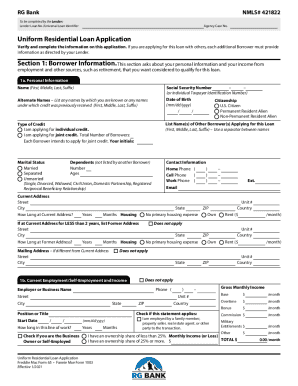
- Complete Section 1: Borrower Information. Fill in your personal details including full name, Social Security Number or ITIN, alternate names, date of birth, marital status, and contact information. Be sure to provide accurate information regarding your income and employment status.
- In Section 2: Financial Information — Assets and Liabilities, list all your financial assets, such as bank accounts and retirement funds. Then provide details on your liabilities such as credit card debts and any other loans.
- Turn to Section 3: Financial Information — Real Estate. Here you will input information about properties you currently own, their values, and any mortgages attached to them. Make sure to detail your intended occupancy for each property.
- Section 4: Loan and Property Information will require you to specify the loan amount, property address, purpose of the loan, and any rental income expected from the property.
- Proceed to Section 5: Declarations, and answer the questions about your financial history and any relevant information regarding the property funding.
- Review Section 6: Acknowledgments and Agreements to understand your legal obligations. Read through the clauses carefully and affirm your agreement by signing electronically.
- If applicable, complete Section 7: Military Service, and provide information regarding your or your deceased spouse's military service.
- In Section 8: Demographic Information, you can provide your ethnicity, sex, and race, although participation is voluntary.
- Finally, review all sections for accuracy, save your changes, and then choose to download, print, or share the completed application as necessary.
Start filling out your RG Bank Uniform Residential Loan Application online today to secure your loan!
Related links form
Chose the appropriate Property Status (R = Rental, PS = Pending Sale, S = Sold, H = Held). - Click Attach/Show Liens button to match to the mortgages. - Complete the document tracking section in the lower left-hand corner of the eFolder. 1003 URLA Part 4.