Loading
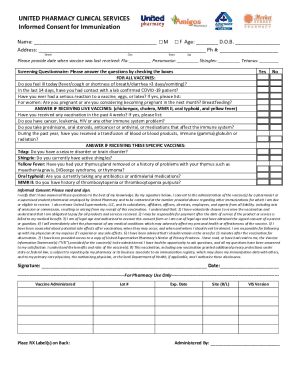
Get Canada United Pharmacy Clinical Services Informed Consent For Immunization 2020-2026
How it works
-

Open form follow the instructions
-

Easily sign the form with your finger
-

Send filled & signed form or save
How to fill out the Canada United Pharmacy Clinical Services Informed Consent For Immunization online
Filling out the Canada United Pharmacy Clinical Services Informed Consent For Immunization is an essential step in receiving your immunization. This guide provides clear instructions to help you navigate the online form with ease and confidence.
Follow the steps to successfully complete your consent form.
- To begin, locate and click the ‘Get Form’ button to access the informed consent form and open it for editing.
- Fill in your personal information. Provide your name, age, date of birth, address, and phone number in the designated fields. Ensure that all information is accurate to avoid any issues with your immunization.
- Indicate the date when you last received any vaccines, such as flu, pneumonia, shingles, or tetanus, in the appropriate sections.
- Complete the screening questionnaire by answering the health-related questions. Check the boxes that apply to you, ensuring you reflect your current health status accurately.
- Review the informed consent statement carefully. By signing, you confirm that all your responses are correct and that you consent to receive the vaccine.
- Sign and date the form at the end of the document, ensuring your name matches the information provided at the beginning.
- After completing the form, you can choose to save your changes, download a copy, print, or share the form as needed.
Complete your informed consent form online to ensure a smooth immunization process.