Loading
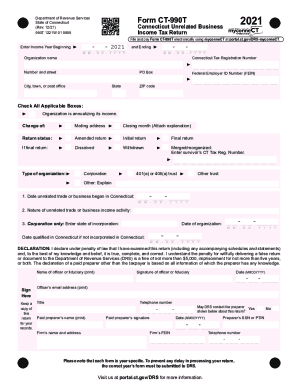
Get Ct Drs Ct-990t 2021
How it works
-

Open form follow the instructions
-

Easily sign the form with your finger
-

Send filled & signed form or save
How to fill out the CT DRS CT-990T online
Filling out the CT DRS CT-990T form electronically ensures a streamlined process for reporting unrelated business income in Connecticut. This guide provides step-by-step instructions to assist users in completing the form accurately and efficiently.
Follow the steps to successfully complete the CT-990T online.
- Click ‘Get Form’ button to obtain the form and open it in the editor.
- Enter the income year by filling in the beginning and ending dates in the specified format (MM-DD-YYYY).
- Fill in the organization name and Connecticut tax registration number in the provided fields.
- Provide the federal employer identification number (FEIN) and the organization's address, including city, state, and ZIP code.
- Check all applicable boxes to indicate if the organization is annualizing its income or if there are any changes to the mailing address, closing month, or return status.
- Complete the sections regarding the type of organization and its unrelated trade or business information, including dates and nature of activities.
- Fill in the computation of income and tax sections accurately, ensuring the figures correspond to the related federal form.
- Complete the apportionment schedules if the business operates in multiple states.
- Review the declaration, signing it by printing the name of the officer or fiduciary, and providing relevant contact information.
- Save any changes made to the form. Users can choose to download, print, or share the completed form as needed.
Complete your CT DRS CT-990T form online today for a smooth filing experience.
Get form
Experience a faster way to fill out and sign forms on the web. Access the most extensive library of templates available.
Get This Form Now!
Use professional pre-built templates to fill in and sign documents online faster. Get access to thousands of forms.