Loading
Get Canada Great West Life Request For Member Withdrawal 2015-2026
How it works
-

Open form follow the instructions
-

Easily sign the form with your finger
-

Send filled & signed form or save
How to fill out the Canada Great West Life Request For Member Withdrawal online
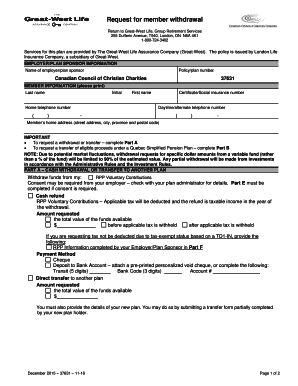
This guide provides step-by-step instructions for completing the Canada Great West Life Request For Member Withdrawal form online. Following these directions will ensure that you accurately submit your withdrawal request.
Follow the steps to complete the withdrawal form online
- Click ‘Get Form’ button to access the withdrawal form and open it in your preferred online editor.
- Fill in your member information in the designated fields. This includes your last name, first name, initial, home telephone number, daytime/alternate telephone number, certificate or social insurance number, and home address (street address, city, province, postal code).
- Indicate the type of request you are making. If you are requesting a cash withdrawal or transfer, complete Part A. If you are transferring eligible proceeds under a Quebec Simplified Pension Plan, complete Part B.
- In Part A, specify whether you wish to withdraw funds from your RPP Voluntary Contributions or request a cash refund. Provide the total amount you wish to withdraw, either before or after applicable taxes are withheld.
- Choose your payment method: either cheque or deposit to a bank account. If selecting a bank deposit, provide your transit number, bank code, and account number. For direct transfers, ensure you submit a transfer form partially filled out by your new plan holder.
- Complete Part C if you have special instructions regarding your withdrawal or transfer.
- Sign and date the form in Part D to request that Great-West Life proceed with the outlined actions.
- If applicable, complete Part E for the consent of an irrevocable beneficiary. Both the member and the beneficiary must sign and date this section.
- If required, have your employer or plan sponsor complete Part F. Their signature and date are necessary for in-service withdrawals where employer consent is needed.
- Review your completed form for accuracy. Once satisfied, save the changes, download, print, and share the form as needed for submission.
Complete your withdrawal forms online with confidence and ensure a smooth processing experience.
You can withdraw or transfer your RRSP+ if you have left Canada permanently. If you emigrate permanently from Canada, you can withdraw your RRSP+ provided that no contribution has been made for at least 730 days (two years).