Loading
Get Irs 13206 2021-2026
This website is not affiliated with IRS
How it works
-

Open form follow the instructions
-

Easily sign the form with your finger
-

Send filled & signed form or save
How to fill out the IRS 13206 online
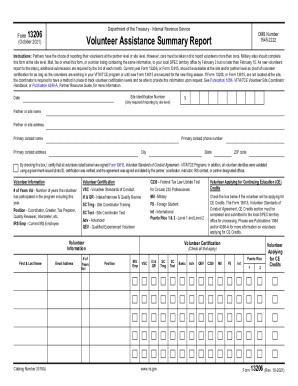
The IRS 13206 form, known as the Volunteer Assistance Summary Report, is an essential document for reporting volunteer participation in IRS programs. This guide provides step-by-step instructions to assist you in accurately completing the form online.
Follow the steps to fill out the IRS 13206 form with ease.
- Press the ‘Get Form’ button to access the form, allowing you to open it in your preferred editor.
- Fill in the site identification number and date if you are reporting at the site level. This information is crucial for accurate tracking.
- Enter the partner or site name, followed by the address. Ensure that all details such as city, state, and ZIP code are complete and accurate.
- Provide the primary contact name, phone number, and address. This ensures the IRS can reach out for any follow-up questions or needed clarifications.
- Check the certification box confirming that all listed volunteers have completed Form 13615 and that their identities were verified.
- For each volunteer, input their information, including first and last name, email address, and number of years they have volunteered.
- Indicate the volunteer’s position by checking the appropriate box and include any relevant certifications they possess.
- If a volunteer is applying for continuing education credits, mark the corresponding box. Ensure that the form is completed in conjunction with the Form 13615 CE Credits section.
- Finalize by verifying the total number of volunteers reported, adding previous and new counts as necessary.
- After ensuring all information is accurate, save any changes, and choose the option to download, print, or share the completed form.
Complete your IRS 13206 documentation online today for a smooth reporting process.
What if I can't find my Letter 6475? Click Sign into your Online Account. Click ID.me Create New Account. Follow the on-screen instructions to provide information to set up the secure ID.me account.