Loading
Get Wa Dshs 14-224 2010-2026
How it works
-

Open form follow the instructions
-

Easily sign the form with your finger
-

Send filled & signed form or save
How to fill out the WA DSHS 14-224 online
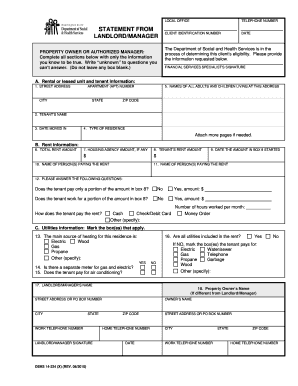
The WA DSHS 14-224 form is critical for assisting with the eligibility determination of clients for various financial services. This guide provides clear, step-by-step instructions for successfully completing the form online, ensuring that all necessary information is thoroughly and accurately submitted.
Follow the steps to complete the WA DSHS 14-224 form online.
- Click the ‘Get Form’ button to obtain the form and open it in the editor.
- Begin by entering the client identification number at the top of the form. This number is essential for tracking the client’s information within the system.
- In section A, rental or leased unit and tenant information, fill out the street address, apartment number, city, state, and zip code where the tenant resides.
- In section B, rent information, enter the total rent amount, any housing agency amount, and the tenant’s rent amount in the corresponding boxes.
- In section C, utilities information, specify the main source of heating, whether all utilities are included in rent, and any utilities that the tenant separately pays for. Mark the relevant boxes accordingly.
- Finally, review all entries for completeness and accuracy. Once satisfied, you can save changes, download, print, or share the completed form.
Complete your WA DSHS 14-224 form online today to ensure a smooth eligibility determination process.
After a background check, it generally takes about a week to receive feedback on your application status. However, in certain cases, it may take longer, especially if there are complications. Being proactive in checking in with DSHS can help you stay informed, particularly when it comes to guidelines established under WA DSHS 14-224.