Loading
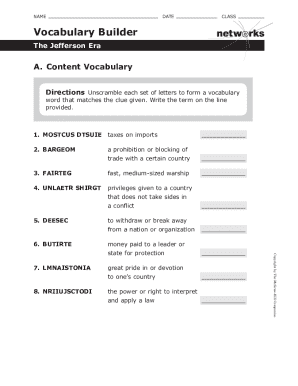
Get Vocabulary Builder The Jefferson Era
How it works
-

Open form follow the instructions
-

Easily sign the form with your finger
-

Send filled & signed form or save
How to fill out the Vocabulary Builder The Jefferson Era online
This guide provides clear and detailed instructions on how to successfully fill out the Vocabulary Builder for The Jefferson Era online. By following the steps outlined below, users can efficiently complete the document with confidence.
Follow the steps to complete the Vocabulary Builder form.
- Click the ‘Get Form’ button to access the Vocabulary Builder The Jefferson Era form. This will open the form in the online editor where you can begin filling it out.
- In the first section, provide your name, class, and date in the designated fields. Ensure you write clearly and legibly to avoid any confusion.
- Move to the questions section. Carefully read each question and formulate your answer in a complete sentence on the provided lines. Remember to stay focused on the context of the Jefferson Era.
- For the chart, identify and describe the changes from Federalist policies and those that were maintained by President Jefferson. Fill in each blank accurately, providing clear insights into the policies.
- Review your responses to ensure clarity and correctness. After confirming that all fields are completed, you can save your changes.
- Finally, choose to download, print, or share the completed Vocabulary Builder form as required.
Start filling out your documents online to enhance your learning experience today.
Frigate. A fast medium, sized warship.