Loading
Form preview
  • US Legal Forms
  • Other Templates
  • More Forms
  • More Uncategorized Forms
  • Section 125 - Reimbursement Claim Form - Ipmg - Insurance ...

Get Section 125 - Reimbursement Claim Form - Ipmg - Insurance ...

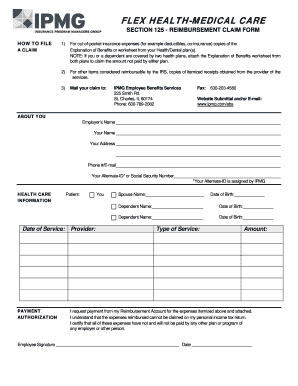
Or worksheet from your Health/Dental plan(s). NOTE: If you or a dependent are covered by two health plans, attach the Explanation of Benefits worksheet from both plans to claim the amount not paid by either plan. 2) For other items considered reimbursable by the IRS, copies of itemized receipts obtained from the provider of the services. 3) Mail your claim to: A CLAIM IPMG Employee Benefits Services 225 Smith Rd. St. Charles, IL 60174 Phone: 630-789-2082 Fax: 630-203-4580 Website Submit.

How it works

  1. Open form

    Open form follow the instructions

  2. Easily sign form

    Easily sign the form with your finger

  3. Share form

    Send filled & signed form or save

How to fill out the SECTION 125 - REIMBURSEMENT CLAIM FORM - IPMG - Insurance online

Filling out the SECTION 125 - REIMBURSEMENT CLAIM FORM - IPMG - Insurance online is a straightforward process that helps you reclaim out-of-pocket medical expenses. This guide provides a step-by-step approach to ensure you complete the form accurately and efficiently.

Follow the steps to fill out your reimbursement claim form with ease.

  1. Click ‘Get Form’ button to obtain the form and open it in your preferred editor.
  2. Begin by filling in your employer’s name in the designated field. Ensure you enter the correct name as it appears in official documents.
  3. Provide your full name and current address in the appropriate fields. Include a valid phone number and email address for communication purposes.
  4. Enter your Alternate-ID or Social Security Number. This ID is assigned by IPMG and is essential for processing your claim.
  5. In the health care information section, fill in the name of the patient, who can be you or your dependent. Provide the date of birth for all individuals listed, ensuring accuracy.
  6. List the types of services received and the corresponding dates. It is crucial to be precise when detailing the medical services to avoid any delays.
  7. Attach necessary documentation such as copies of the Explanation of Benefits or itemized receipts. Ensure that you include receipts from both health plans if applicable.
  8. In the payment authorization section, certify that the expenses have not been paid by any other plan and that they will not be claimed on personal income tax returns.
  9. Sign and date the form to validate your request for reimbursement. Ensure all your information is correct before submission.
  10. Finally, save changes to your form, download a copy for your records, and print or share the form as needed. You may also choose to submit your claim via the provided mailing address, email, or fax options.

Complete your documents online today!

Get form

Experience a faster way to fill out and sign forms on the web. Access the most extensive library of templates available.
Get form

Related content

Illinois Unemployment Insurance Law Handbook...
Sep 1, 2020 — G. Changing From Contribution to Reimbursement . ... B. Forms For...
Learn more
Pharmaceutical Research and Manufactures of...
Jul 21, 2001 — In many countries (such as China, Brazil, and. India) governments obtain...
Learn more

Related links form

Last Year, 81 Percent - Dor Mo 540 2ez 2015 Form GET BEHIND THE WHEEL FOR $250 2016 MWR, Reciprocity Exemption/Affidavit Of Residency - Mn

Questions & Answers

Get answers to your most pressing questions about US Legal Forms API.

Contact support

General rule. A party will be bound by the terms contained in a contractual document, which they have signed even if. they have not read the document (L'Estrange affirmed in Toll)

Please be advised that with an Individual Adobe Sign subscription you can send documents to only maximum of 10 recipients. In order to be able to send document up to 25 recipients you'll have to upgrade the account to Adobe Sign Team level.

However, there may be some limitations to when or where you can use an e-signature, depending on the laws and regulations in your country or jurisdiction. For example, some types of documents may require a physical signature, such as wills, deeds, and powers of attorney.

Please try to logout of the application and reboot the computer once and relogin with the same Adobe ID and try requesting the signatures and see if that works. Also, please try to request signatures via Document Cloud - https://documentcloud.adobe.com/link/home/ and check if that helps.

There is a limit assigned to each service level of the Adobe Sign account. Once you reach the limit, there is no option to increase the transaction limit. If you need to increase the transaction limit, you need to upgrade the service plan.

Only 2 signature / initial images can be stored currently. Every time I want another signature I have to swap out an existing image for one from my files.

If you need a form signed by multiple people, use mega sign through Acrobat Sign. You can send one document to multiple signers to fill and return — and even track it — all in one click.

You can activate and remain signed in to the app(s) on up to two computers.

Get This Form Now!

Use professional pre-built templates to fill in and sign documents online faster. Get access to thousands of forms.
Get form
If you believe that this page should be taken down, please follow our DMCA take down processhere.
Get SECTION 125 - REIMBURSEMENT CLAIM FORM - IPMG - Insurance ...
Get form
  • Adoption
  • Bankruptcy
  • Contractors
  • Divorce
  • Home Sales
  • Employment
  • Identity Theft
  • Incorporation
  • Landlord Tenant
  • Living Trust
  • Name Change
  • Personal Planning
  • Small Business
  • Wills & Estates
  • Packages A-Z
  • Affidavits
  • Bankruptcy
  • Bill of Sale
  • Corporate - LLC
  • Divorce
  • Employment
  • Identity Theft
  • Internet Technology
  • Landlord Tenant
  • Living Wills
  • Name Change
  • Power of Attorney
  • Real Estate
  • Small Estates
  • Wills
  • All Forms
  • Forms A-Z
  • Other Templates
  • Legal Hub
  • About Us
  • Help Portal
  • Legal Resources
  • Blog
  • Affiliates
  • Contact Us
  • Delete My Account
  • Site Map
  • Industries
  • Forms in Spanish
  • Localized Forms
  • State-specific Forms
  • Forms Kit
  • Real Estate Handbook
  • All Guides
  • Notarize
  • Incorporation services
  • For Consumers
  • For Small Business
  • For Attorneys
  • USLegal
  • FormsPass
  • pdfFiller
  • signNow
  • altaFlow
  • DocHub
  • Instapage
Form Packages
  • Adoption
  • Bankruptcy
  • Contractors
  • Divorce
  • Home Sales
  • Employment
  • Identity Theft
  • Incorporation
  • Landlord Tenant
  • Living Trust
  • Name Change
  • Personal Planning
  • Small Business
  • Wills & Estates
  • Packages A-Z
Form Categories
  • Affidavits
  • Bankruptcy
  • Bill of Sale
  • Corporate - LLC
  • Divorce
  • Employment
  • Identity Theft
  • Internet Technology
  • Landlord Tenant
  • Living Wills
  • Name Change
  • Power of Attorney
  • Real Estate
  • Small Estates
  • Wills
  • All Forms
  • Forms A-Z
  • Other Templates
Customer Service
  • Legal Hub
  • About Us
  • Help Portal
  • Legal Resources
  • Blog
  • Affiliates
  • Contact Us
  • Delete My Account
  • Site Map
  • Industries
  • Forms in Spanish
  • Localized Forms
  • State-specific Forms
  • Forms Kit
Legal Guides
  • Real Estate Handbook
  • All Guides
Prepared for you
  • Notarize
  • Incorporation services
Our Customers
  • For Consumers
  • For Small Business
  • For Attorneys
Our Sites
  • USLegal
  • FormsPass
  • pdfFiller
  • signNow
  • altaFlow
  • DocHub
  • Instapage
Social Media
Call us now toll free:
+1 833 426 79 33
As seen in:
© Copyright 1999-2026 airSlate Legal Forms, Inc. 17 Station Street, Ste. 203, Brookline, MA 02445
  • Your Privacy Choices
  • Terms of Service
  • Privacy Notice
  • Content Takedown Policy
  • Bug Bounty Program