Loading
Get Pediatric Medical Records
How it works
-

Open form follow the instructions
-

Easily sign the form with your finger
-

Send filled & signed form or save
How to fill out the Pediatric Medical Records online
Filling out pediatric medical records is an essential process for managing a child's healthcare information. This guide provides clear, step-by-step instructions to assist you in completing the form accurately and efficiently.
Follow the steps to complete the Pediatric Medical Records form
- Click ‘Get Form’ button to obtain the form and open it in the editor.
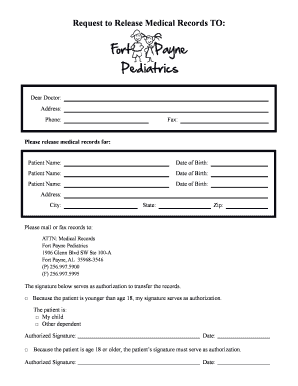
- Begin by entering the request recipient's details at the top of the form. Include the doctor's name, address, phone number, and fax number where specified.
- In the section labeled 'Please release medical records for', enter the name and date of birth for each patient. Make sure to fill in all necessary patient details accurately.
- Provide the address, city, state, and zip code for the patient. Double-check this information to ensure it is complete and accurate.
- Next, specify the destination for the medical records by entering the address of Fort Payne Pediatrics along with their phone and fax number.
- Indicate your relationship to the patient in the authorization section. Choose between 'my child' or 'other dependent' as applicable.
- Sign the form in the designated area to authorize the release of records. If the patient is under 18, sign as their guardian. If they are 18 or older, the patient must sign the form themselves.
- Finally, enter the date of your signature. Review the form for completeness before moving to the next step.
- Once you have filled out all sections, save your changes. You can also download, print, or share the form as needed.
Complete your Pediatric Medical Records online today for efficient management of your healthcare information.
If you are interested in obtaining a copy of your medical records, you will need to contact the doctor's office, clinic or hospital where you were treated.