Loading
Form preview
  • US Legal Forms
  • Form Library
  • More Forms
  • More Uncategorized Forms
  • Special Incident Report

Get Special Incident Report

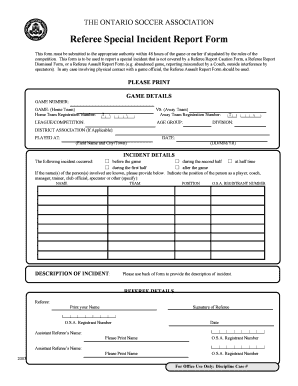
THE ONTARIO SOCCER ASSOCIATION Referee Special Incident Report Form This form must be submitted to the appropriate authority within 48 hours of the game or earlier if stipulated by the rules of the.

How it works

  1. Open form

    Open form follow the instructions

  2. Easily sign form

    Easily sign the form with your finger

  3. Share form

    Send filled & signed form or save

How to fill out the Special Incident Report online

Filling out a Special Incident Report is an important process for documenting incidents that occur during games. This guide will provide you with step-by-step instructions to help you complete the form accurately and efficiently.

Follow the steps to complete the Special Incident Report online.

  1. Click ‘Get Form’ button to obtain the form and open it for completion.
  2. Begin by entering the game details. Fill in the game number, the name of the home team along with their registration number, and specify the league or competition.
  3. Proceed to fill in the details for the away team by providing their registration number, age group, and division information.
  4. If applicable, include the district association where the game was played, as well as the location (field name and city/town) and the date of the incident.
  5. Describe the incident by selecting when it occurred: before the game, during the first half, at half time, during the second half, or after the game.
  6. If the names of the individuals involved are known, provide their names, team, and their roles (e.g., player, coach, manager, etc.). Be sure to include their O.S.A. registrant number if available.
  7. Detail the description of the incident in the space provided, and remember to use the back of the form for any additional information if necessary.
  8. Complete the referee details section by printing your name, signing the form, and including your O.S.A. registrant number.
  9. If there are assistant referees, provide their names and registrant numbers as well.
  10. Once all sections are completed, you can save your changes, download the report, print it for submission, or share it online as required.

Complete your Special Incident Report online today!

Get form

Experience a faster way to fill out and sign forms on the web. Access the most extensive library of templates available.
Get form

Related content

Special Incident Reporting (SIR) Requirements
Special Incident Reporting Requirements. Title 17, Section 54327. When reporting a special...
Learn more
LIC 624 - Unusual Incident/Injury Report
s Rape s Injury-Accident s Medical Emergency s Aggressive Act/Self s Sexual s Pregnancy s...
Learn more
Incident Reports - Staff.Wiki
Because of the potential sensitivity of incident reports, Staff.Wiki has special features...
Learn more

Related links form

UAP BUAP Equipment Evaluation Summary Form 2017 UAP BUAP Equipment Evaluation Summary Form 2015 UFT Defensive Driving Course UIL Marching Band Script

Questions & Answers

Get answers to your most pressing questions about US Legal Forms API.

Contact support

To make an incident report, start by gathering all relevant information about the incident, including the who, what, when, where, and how. Then, organize this information into a clear and concise Special Incident Report format. Ensure that you provide accurate details and any witness accounts to strengthen the report. Using templates from USLegalForms can enhance your efficiency in creating a comprehensive report.

Incident reports should be filed promptly and accurately to ensure that all relevant details are captured. Typically, you should submit the Special Incident Report to the appropriate department or authority within your organization. It's essential to follow any specific guidelines your organization has in place for reporting incidents. For a seamless filing process, consider using templates available at USLegalForms.

The 7 steps to incident investigation include preparing for the investigation, gathering facts, analyzing the facts, identifying root causes, developing recommendations, preparing the report, and following up on the findings. A comprehensive Special Incident Report can facilitate this process by documenting each step clearly. By using a structured approach, you ensure thoroughness and effectiveness in addressing incidents. Consider utilizing USLegalForms to access templates that can streamline your reporting.

A special incident refers to any occurrence that significantly impacts the well-being or safety of an individual receiving care. This might include accidents, abuse, or any unexpected events that require immediate attention. Recognizing what constitutes a special incident is vital for proper reporting and response. The US Legal Forms platform helps you understand and document these incidents effectively, ensuring compliance with guidelines.

The three types of incident reports typically include general incident reports, special incident reports, and behavioral incident reports. Each type serves a specific purpose, addressing various situations that may arise in care settings. Understanding these distinctions helps ensure that incidents are documented accurately and appropriately. With US Legal Forms, you can easily navigate these types and generate the necessary reports based on your needs.

Any circumstance where you believe an accident could have led to serious injury or if you have concerns for the security of nearby customers, merchants, or other people. An event resulting in a severe injury to a worker or client (or a visitor). An incident that causes property or equipment damage results.

The rule of thumb is that any time a patient makes a complaint, a medication error occurs, a medical device malfunctions, or anyone—patient, staff member, or visitor—is injured or involved in a situation with the potential for injury, an incident report is required.

What should you include in an incident report? When & where did it happen? Your report should contain the date, time and location where the accident took place. ... Who were involved? ... What did they do? ... Why did it happen? ... Were there any witnesses? ... What is the extent of damage to a person or property?

A Special Incident Report (SIR) is a formal report that is filed with the regional center whenever a person served by the regional center is involved in an unusual event, such as a crime or injury.

17, § 54327 - Requirements for Special Incident Reporting by Vendors and Long-Term Health Care Facilities. (a) Parent vendors, and consumers vendored to provide services to themselves, are exempt from the special incident reporting requirements set forth in this Article. 5. Physical and/or chemical restraint.

Get This Form Now!

Use professional pre-built templates to fill in and sign documents online faster. Get access to thousands of forms.
Get form
If you believe that this page should be taken down, please follow our DMCA take down processhere.

Industry-leading security and compliance

US Legal Forms protects your data by complying with industry-specific security standards.
  • In businnes since 1997
    25+ years providing professional legal documents.
  • Accredited business
    Guarantees that a business meets BBB accreditation standards in the US and Canada.
  • Secured by Braintree
    Validated Level 1 PCI DSS compliant payment gateway that accepts most major credit and debit card brands from across the globe.
Get Special Incident Report
Get form
  • Adoption
  • Bankruptcy
  • Contractors
  • Divorce
  • Home Sales
  • Employment
  • Identity Theft
  • Incorporation
  • Landlord Tenant
  • Living Trust
  • Name Change
  • Personal Planning
  • Small Business
  • Wills & Estates
  • Packages A-Z
  • Affidavits
  • Bankruptcy
  • Bill of Sale
  • Corporate - LLC
  • Divorce
  • Employment
  • Identity Theft
  • Internet Technology
  • Landlord Tenant
  • Living Wills
  • Name Change
  • Power of Attorney
  • Real Estate
  • Small Estates
  • Wills
  • All Forms
  • Forms A-Z
  • Form Library
  • Legal Hub
  • About Us
  • Help Portal
  • Legal Resources
  • Blog
  • Affiliates
  • Contact Us
  • Delete My Account
  • Site Map
  • Industries
  • Forms in Spanish
  • Localized Forms
  • State-specific Forms
  • Forms Kit
  • Real Estate Handbook
  • All Guides
  • Notarize
  • Incorporation services
  • For Consumers
  • For Small Business
  • For Attorneys
  • USLegal
  • FormsPass
  • pdfFiller
  • signNow
  • altaFlow
  • DocHub
  • Instapage
Form Packages
  • Adoption
  • Bankruptcy
  • Contractors
  • Divorce
  • Home Sales
  • Employment
  • Identity Theft
  • Incorporation
  • Landlord Tenant
  • Living Trust
  • Name Change
  • Personal Planning
  • Small Business
  • Wills & Estates
  • Packages A-Z
Form Categories
  • Affidavits
  • Bankruptcy
  • Bill of Sale
  • Corporate - LLC
  • Divorce
  • Employment
  • Identity Theft
  • Internet Technology
  • Landlord Tenant
  • Living Wills
  • Name Change
  • Power of Attorney
  • Real Estate
  • Small Estates
  • Wills
  • All Forms
  • Forms A-Z
  • Form Library
Customer Service
  • Legal Hub
  • About Us
  • Help Portal
  • Legal Resources
  • Blog
  • Affiliates
  • Contact Us
  • Delete My Account
  • Site Map
  • Industries
  • Forms in Spanish
  • Localized Forms
  • State-specific Forms
  • Forms Kit
Legal Guides
  • Real Estate Handbook
  • All Guides
Prepared for you
  • Notarize
  • Incorporation services
Our Customers
  • For Consumers
  • For Small Business
  • For Attorneys
Our Sites
  • USLegal
  • FormsPass
  • pdfFiller
  • signNow
  • altaFlow
  • DocHub
  • Instapage
Social Media
Call us now toll free:
+1 833 426 79 33
As seen in:
© Copyright 1999-2026 airSlate Legal Forms, Inc. 3720 Flowood Dr, Flowood, Mississippi 39232
  • Your Privacy Choices
  • Terms of Service
  • Privacy Notice
  • Content Takedown Policy
  • Bug Bounty Program