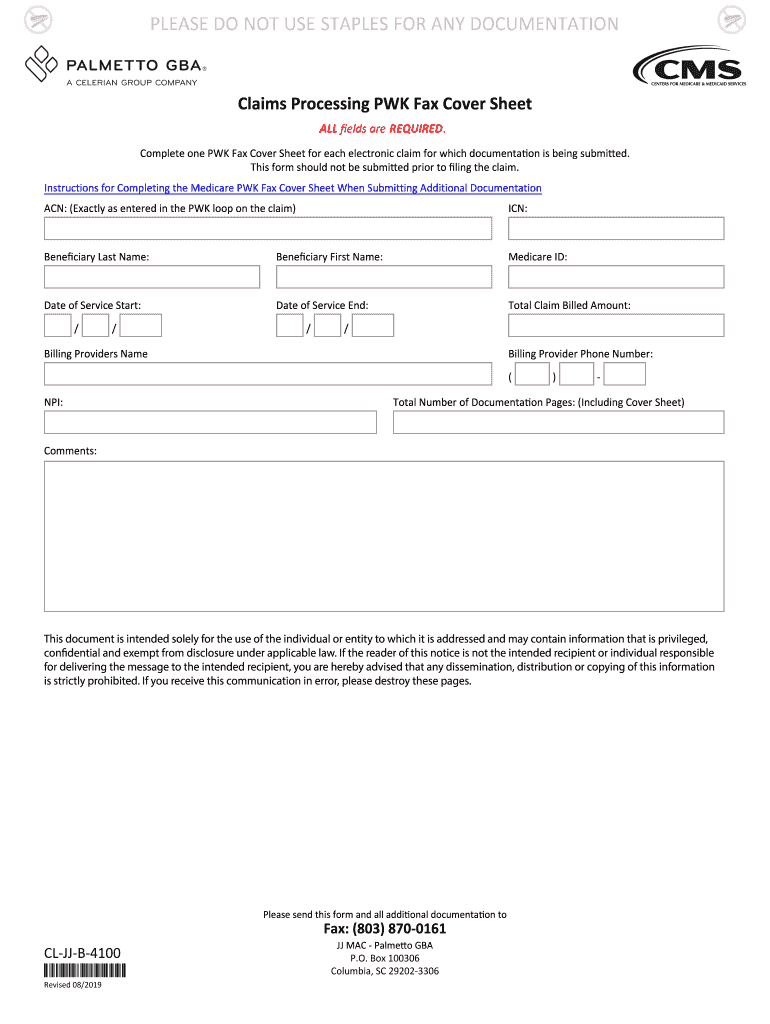
Being submitted. This form should not be submitted prior to ling the claim. Instructions for Completing the Medicare PWK Fax Cover Sheet When Submitting Additional Documentation ACN: (Exactly as entered in the PWK loop on the claim) ICN: Bene ciary Last Name: Bene ciary First Name: Medicare ID: Date of Service Start: Date of Service End: Total Claim Billed Amount: / / / / Billing Providers Name Billing Provider Phone Number: ( NPI: ) - Total Number of Documentation Pages:.
Loading

Open form follow the instructions

Easily sign the form with your finger

Send filled & signed form or save
How to fill out the Palmetto GBA Claims Processing PWK Fax Cover Sheet online
Filling out the Palmetto GBA Claims Processing PWK Fax Cover Sheet correctly is essential for the timely processing of your claims. This guide provides clear, step-by-step instructions to help you complete the form accurately and efficiently.
Follow the steps to complete your PWK Fax Cover Sheet.
- Press the ‘Get Form’ button to access the PWK Fax Cover Sheet and open it for editing.
- Enter the 'ACN' exactly as it appears in the PWK loop on your claim. This identifier is crucial for accurate processing.
- Fill in the 'ICN' field to provide the Internal Control Number associated with your claim.
- Provide the beneficiary’s last name in the designated box to identify the individual relevant to the claim.
- Next, input the beneficiary’s first name to further specify the individual associated with the claim.
- Input the Medicare ID of the beneficiary, which is essential for verification and processing.
- Indicate the 'Date of Service Start' and 'Date of Service End' to define the timeframe for the services rendered.
- Enter the 'Total Claim Billed Amount' to represent the total charges incurred during the service period.
- Provide the billing provider's name in the appropriate section to ensure that the claim is processed through the correct party.
- Include the billing provider’s phone number, formatted correctly for direct contact if needed.
- Fill in the 'NPI' (National Provider Identifier) of the billing provider, as this identification number is critical for processing healthcare claims.
- Note the 'Total Number of Documentation Pages', including the cover sheet, to ensure that all necessary documents are accounted for.
- Use the 'Comments' section for any additional information or notes that may be relevant to the claim.
- Once all fields are complete, review the form for accuracy. After ensuring all information is correct, you can save changes, download, print, or share the completed form.
Complete your Palmetto GBA Claims Processing PWK Fax Cover Sheet online today for efficient claims processing!
Experience a faster way to fill out and sign forms on the web. Access the most extensive library of templates available.
Related content
Jul 27, 2020 — Claims Processing Manual Chapter 30 section 50.3.1. If the claim is...
FL 32771 •Phone (407) 322 26It •Fax (407) 323-9406 PerodicaJ Postage Paid at Sanlord...
Get answers to your most pressing questions about US Legal Forms API.
What is the PWK process?
The PWK process stands for the Proof of Delivery, which is essential in the Palmetto GBA Claims Processing system. It involves submitting documentation that demonstrates the necessary information was provided to the respective party. This documentation typically includes the Palmetto GBA Claims Processing PWK Fax Cover Sheet along with claims data. Ensuring you understand this process streamlines your claims submissions and can significantly enhance your claim outcomes.
How to fill out a cover sheet for a fax?
To fill out a cover sheet for your Palmetto GBA Claims Processing PWK fax, you will need to clearly write your name, phone number, and the date at the top. Beneath that, include the recipient’s name and their fax number. In the message section, provide a short explanation of the attached documents. This organized approach helps the recipient understand the context quickly and aids in efficient processing.
How do you fill out a fax cover sheet?
Filling out a fax cover sheet for Palmetto GBA Claims Processing PWK is simple. Start by entering your information in the sender's section, including your name and contact details. Next, enter the recipient’s name and fax number. Don’t forget to add a brief message or subject line to clarify the content. Concluding with your signature adds a personal touch, ensuring your fax gets the attention it deserves.
What should a fax cover look like?
A fax cover for the Palmetto GBA Claims Processing PWK should include the sender's name, recipient's name, contact information, and a brief description of the documents attached. It should be neat and easy to read, ideally formatted in a professional style. Including the date and any urgency indicators can also be beneficial. This clarity aids recipients in promptly addressing the faxed information.
When you fax, do you need a cover sheet?
Yes, using a cover sheet when you fax is essential, especially for Palmetto GBA Claims Processing PWK documents. A cover sheet provides vital information, such as the sender's and recipient's details, as well as the purpose of the fax. This information streamlines the processing of your fax and helps prevent any confusion. It adds a professional touch to your communication.
Do you fax cover sheet first or last?
When you send a fax, it is best to include the Palmetto GBA Claims Processing PWK Fax Cover Sheet first. This ensures that the recipient understands the contents of your fax immediately. Placing the cover sheet at the front also helps in organizing documents and facilitating faster processing. A well-prepared cover sheet sets the right tone for your communication.
How to send a fax with a cover sheet?
To send a fax with a cover sheet, begin by printing or preparing your Palmetto GBA Claims Processing PWK Fax Cover Sheet. Place the cover sheet on top of the documents you wish to send. Finally, dial the recipient's fax number and send the fax, ensuring to keep a confirmation of the sent documents for your records.
How to fill out fax cover sheet re?
To fill out a fax cover sheet for Palmetto GBA Claims Processing, include your name and your organization at the top. Then, add the recipient’s information, including their name and fax number. It's also helpful to include a brief description of the documents attached and any urgent comments related to the fax.
What is the point of a fax cover sheet?
The main point of a fax cover sheet is to provide essential details about the documents being sent. It ensures that recipients know who the sender is and what the fax contains. For Palmetto GBA Claims Processing, this step is crucial for maintaining clarity and ensuring that all relevant information is received and processed correctly.
What to put on a cover sheet for a fax?
When preparing a fax cover sheet, include the recipient's name, fax number, and your contact information. It's also important to state the number of pages being sent and add a brief note about the purpose of the fax. This information facilitates better communication and helps manage the Palmetto GBA Claims Processing efficiently.
Use professional pre-built templates to fill in and sign documents online faster. Get access to thousands of forms.
If you believe that this page should be taken down, please follow our DMCA take down process here.