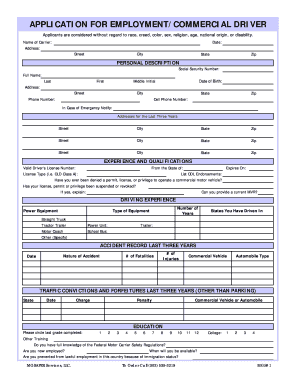
Et City State Zip PERSONAL DESCRIPTION Social Security Number: Full Name: Last First Middle Initial Date of Birth: Address: Street City Phone Number: State Zip Cell Phone Number: In Case of Emergency Notify: Addresses for the Last Three Years: Street City State Zip Street City State Zip Street City State Zip EXPERIENCE AND QUALIFICATIONS From the State of: Valid Driver's License Number: License Type (i.e. CLD Class A): Expires On: List CDL Endorsements: Have you ever.

How it works
  • Open form

    Open form follow the instructions

  • Easily sign form

    Easily sign the form with your finger

  • Share form

    Send filled & signed form or save

How to fill out the MGSafer Services Application For Employment/Commercial Driver online

Filling out the MGSafer Services Application For Employment/Commercial Driver online is an essential step towards securing a position within the company. This guide will walk you through each section of the application to ensure you provide all necessary information accurately and efficiently.

Follow the steps to complete your application effectively.

  1. Click ‘Get Form’ button to obtain the form and open it in the editor.
  2. Begin by entering your personal information in the 'Personal Description' section. This includes your full name, social security number, phone numbers, and your current address, including street, city, state, and zip code.
  3. Proceed to the 'Experience and Qualifications' section. Here, include your valid driver's license number, type of license, and expiration date. Additionally, list any CDL endorsements you hold.
  4. Indicate whether you have ever been denied a permit or if your license has been suspended. If applicable, provide an explanation in the space provided.
  5. Fill in your driving experience by specifying the type of equipment you have operated, the number of years of experience, and the states you have driven in. This may include straight trucks, tractor trailers, and other specified equipment.
  6. Document your accident record for the last three years by listing the nature of each accident, the date, and the number of injuries or fatalities involved.
  7. In the 'Traffic Convictions and Forfeitures' section, provide information about any traffic charges from the last three years, including the state, date, charge, and any penalties.
  8. Complete the 'Education' section by indicating the highest grade completed. Include any college or other training you have received.
  9. Detail your employment history for the past three years, ensuring to provide information for past employers, including phone numbers, addresses, job descriptions, and reason for leaving.
  10. Review the 'Notice to Applicant' section. Answer questions regarding your ability to perform job functions and provide any additional information about previous salary and criminal history.
  11. Finally, sign and date the application, certifying that all information is true and complete to the best of your knowledge. This includes providing your signature for the previous employment alcohol and drug test statement.
  12. After completing the form, you can save your changes, download, print, or share the application as needed.

Complete your MGSafer Services Application For Employment/Commercial Driver online today and take the next step towards your new career.

Get form

Experience a faster way to fill out and sign forms on the web. Access the most extensive library of templates available.

Related content

to m.eet her.e Cotntnission on Thursday

Feb 6, 2004 — Development .council of. Governments. "Since the (commissioners) have not...

Learn more
Questions & Answers

Get answers to your most pressing questions about US Legal Forms API.

Contact support

What is DQF?

DQF stands for Driver Qualification File. It is a compilation of documents that show a driver's eligibility and compliance with transportation regulations. The DQF is crucial for employers, as it serves as a resource for verifying that all driver records are current and meet necessary standards. The MGSafer Services Application For Employment/Commercial Driver facilitates the creation and maintenance of an effective DQF, ensuring compliance and minimizing risks.

A driver file consists of comprehensive information related to the driver's qualifications, history, and compliance documentation. Key components may include the driver's application, driving records, medical certification, and any disciplinary actions. By using the MGSafer Services Application For Employment/Commercial Driver, maintaining these files becomes more efficient and organized. Ensuring your driver file is complete is essential for safety and regulatory purposes.

A driver file should include various documents safeguarding both the driver and the employer. Essential records include the driver's application for employment, driving history, medical certificates, and any relevant training records. With the MGSafer Services Application For Employment/Commercial Driver, you can easily collect and manage these documents in one secure location. An organized driver file promotes safety and compliance.

A DQ form, or Driver Qualification form, is a document used to collect essential information about a driver's qualifications and history. This form typically includes medical information, driving records, and employment history. Utilizing the MGSafer Services Application For Employment/Commercial Driver helps streamline the process of gathering and managing these forms efficiently. A complete DQ form ensures compliance with federal regulations.

The driver file is the comprehensive record that contains crucial information about a driver's qualifications and history. This file typically includes documents such as licenses, certifications, and driving records. For those utilizing the MGSafer Services Application For Employment/Commercial Driver, it helps maintain an organized and compliant driver file. Keeping this information updated is vital for safety and regulatory adherence.

The Scheduling Standards Consortium (SSC) was formed to simplify the integration of systems across the fragmented ecosystem between shippers, carriers and intermediaries and create a more efficient appointment scheduling process.

ON - On Duty. SB - Sleeper Berth. OFF - Off Duty. Typically, when you start your day, you will make an ON log (to show that you are now on-duty). Drive logs (D logs) should be made when a driver is driving.

Duty status refers to the classification of a commercial truck driver's work status during a particular time period. This classification is essential in the trucking industry as it helps to regulate the number of hours a driver can operate a commercial vehicle.

Commercial Driver's License (CDL)

Get This Form Now!

Use professional pre-built templates to fill in and sign documents online faster. Get access to thousands of forms.

If you believe that this page should be taken down, please follow our DMCA take down process here.

Get MGSafer Services Application For Employment/Commercial Driver