Loading

Open form follow the instructions

Easily sign the form with your finger

Send filled & signed form or save
How to fill out the AU SU674 online
Filling out the AU SU674 form online can be a straightforward process when you know what to expect. This guide provides a detailed overview to help you complete each section of the form effectively.
Follow the steps to successfully complete the AU SU674 form online.
- Press the ‘Get Form’ button to access the AU SU674 form and open it in your preferred editor.
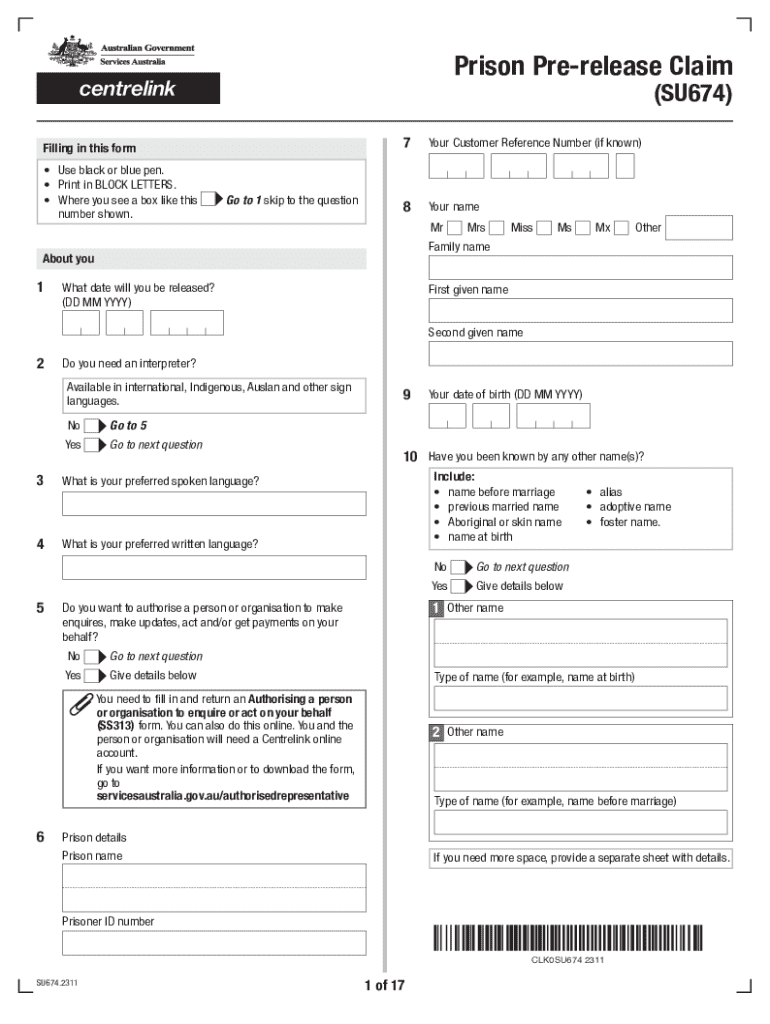
- Review the instructions carefully to understand the purpose of the form, specifically related to claiming JobSeeker Payment, JobSeeker Payment (Provisional), or Youth Allowance for job seekers.
- Start with personal information: Fill in your Customer Reference Number (if known) and your full name in BLOCK LETTERS. Ensure accuracy and completeness for identity verification.
- Indicate your release date and whether you require an interpreter. If you do, specify your preferred spoken and written languages.
- Provide details about any other names you have been known by, including maiden names and aliases, if applicable.
- In the prison details section, fill in the name of the prison and your prisoner ID number.
- Complete the gender and address sections accurately. Indicate your permanent and postal address upon release.
- Answer relationship status questions truthfully to aid in processing your claim. If applicable, fill in your partner's details and current address.
- Proceed through the questions regarding independence, including age and living arrangements, noting any dependent children or care responsibilities.
- Complete sections about your income and assets, providing information about bank accounts, vehicles, and any property you own.
- Finally, review your entries for accuracy, sign and date the form, and ensure you have included any required attachments such as identification documents.
- Return the completed form to your Corrective Officer, who will submit it to Services Australia on your behalf. Ensure all required questions are answered.
Complete your documentation online for a smooth and efficient process.
Experience a faster way to fill out and sign forms on the web. Access the most extensive library of templates available.
Related content
Oct 13, 2021 — Phase 1 building construction cannot begin until all roads &...
... 2023 08:36:49AM via free access - 978-90-04-53097 ... Australia and Japan in ... form...
Apr 11, 2022 — ... 2023 (filed in 2024); • For ... AU–C 230.17. Although document...
Use professional pre-built templates to fill in and sign documents online faster. Get access to thousands of forms.
If you believe that this page should be taken down, please follow our DMCA take down process here.