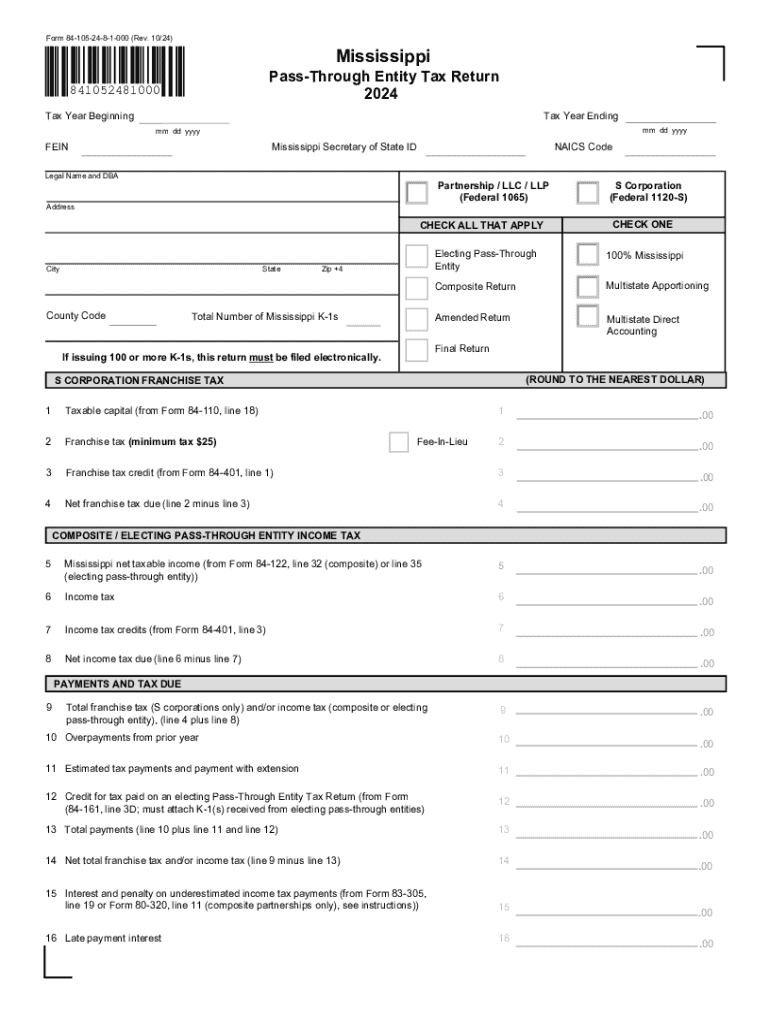
Reset Form Form 84-105-24-8-1-000 (Rev. 10/24) Mississippi Print Form Pass-Through Entity Tax Return 2024 841052481000 Tax Year Ending Tax Year Beginning mm dd yyyy mm dd yyyy FEIN Mississippi Secretary.

Open form follow the instructions

Easily sign the form with your finger

Send filled & signed form or save
How to fill out the MS 84-105 online
The MS 84-105, also known as the Pass-Through Entity Tax Return, is essential for partnerships, LLCs, and S corporations operating in Mississippi. This guide provides clear, step-by-step instructions to assist users in accurately completing the form online.
Follow the steps to fill out the MS 84-105 online effectively.
- Use the 'Get Form' button to access the MS 84-105 and open it in your preferred online editor.
- Enter the tax year beginning and ending dates in the designated fields using the format mm dd yyyy.
- Fill in your Federal Employer Identification Number (FEIN) and Mississippi Secretary of State ID. Ensure the NAICS Code is also provided, along with the legal name and any doing business as (DBA) names.
- Select the appropriate entity type by checking the boxes for Partnership, LLC, LLP, or S Corporation as applicable.
- Complete the address section, including street, city, county code, and ZIP+4.
- Indicate the number of Mississippi K-1s by entering the total number in the provided field. Check the relevant boxes for your filing type, such as 'Amended Return' or 'Final Return.'
- Populate the franchise tax section with figures from other forms as specified, ensuring to calculate and enter net amounts due.
- Fill out the section for composite or electing pass-through entity income tax, carefully noting taxable income and applicable credits.
- Review the payment and tax due sections, filling out late penalties and balances where necessary.
- In Part I, provide the entity information; check if the return is final or amended, and input details of any IRS audits.
- Complete Parts II, III, and IV to list pass-through entities, Q-subs, and officer information as needed.
- After filling out all sections, review your entries for accuracy, then save changes, and prepare to download, print, or share the completed form.
Complete your MS 84-105 online today to ensure timely filing and compliance.
Experience a faster way to fill out and sign forms on the web. Access the most extensive library of templates available.
Related content
Pass Through Entity Tax Return. Form_Number. 84-105. 2024 · 84105248.pdf810.15 KB. Footer...
by AW Act · Cited by 1 — To request a copy of the complaint form, call (866) 632- 9992...
List all pass-through entities in Mississippi that the S corporation / Partnership...
Use professional pre-built templates to fill in and sign documents online faster. Get access to thousands of forms.
If you believe that this page should be taken down, please follow our DMCA take down process here.