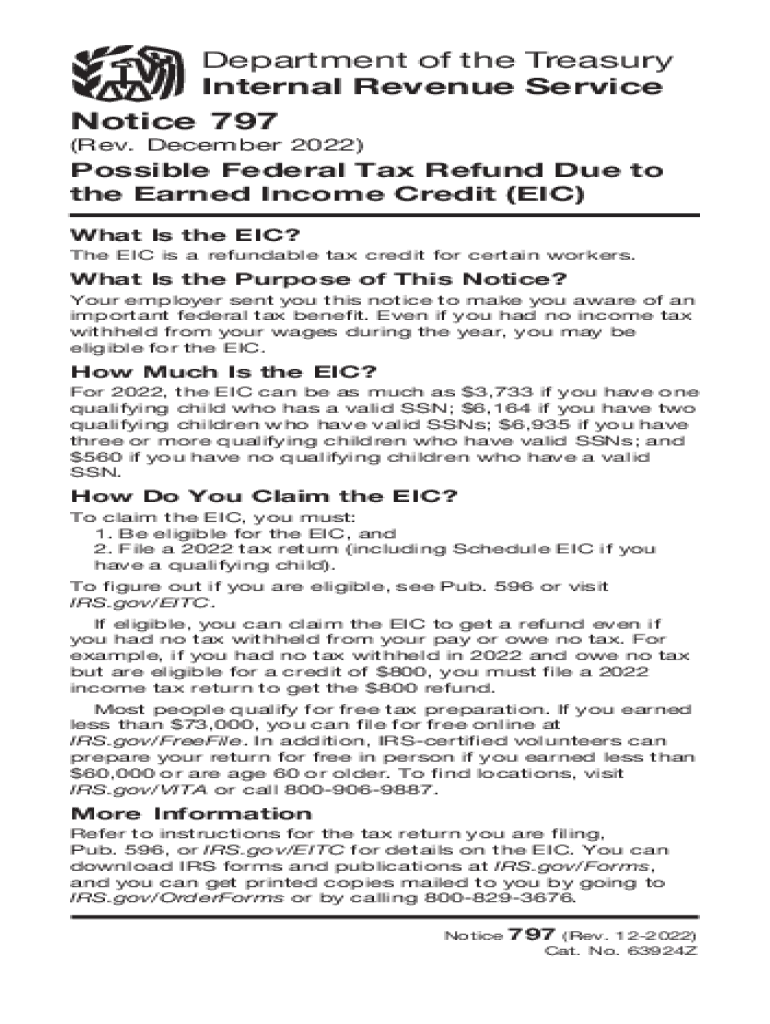
Department of the Treasury Internal Revenue ServiceNotice 797(Rev. December 2022)Possible Federal Tax Refund Due to the Earned Income Credit (EIC) What Is the EIC? The EIC is a refundable tax credit.
Loading

Open form follow the instructions

Easily sign the form with your finger

Send filled & signed form or save
How to fill out the IRS Notice 797 online
The IRS Notice 797 informs users about the potential eligibility for the Earned Income Credit (EIC), a valuable federal tax benefit. This guide provides clear, step-by-step instructions to successfully complete this form online, ensuring that users can easily navigate the process.
Follow the steps to complete the IRS Notice 797 online.
- Click ‘Get Form’ button to access the IRS Notice 797 and open it in your preferred document editor.
- Read the introduction section carefully. This section explains the purpose of the notice and the importance of the EIC. Ensure you understand how the credit works and its benefits.
- Locate the section detailing the EIC amounts. Enter the number of qualifying children you have and check your eligibility against the amounts listed. This will help you identify the potential refund.
- Follow the instructions provided in the notice for claiming the EIC. Review the eligibility criteria and ensure that you meet them before proceeding.
- Ensure you have determined your filing status and whether you need to include Schedule EIC when you file your tax return. This is crucial for claiming the EIC correctly.
- If needed, reach out for assistance or additional information. Consider using IRS resources or contacting IRS-certified volunteers if you qualify for free tax preparation.
- Once all necessary sections are filled out and reviewed, you can save your changes. Download or print the form for your records or to submit it as needed.
Begin filling out your IRS Notice 797 online today to ensure you maximize your potential tax refund.
Experience a faster way to fill out and sign forms on the web. Access the most extensive library of templates available.
Related content
Sep 19, 2020 — Notice 797 informs the public that they may be eligible for a refund on...
Department of the Treasury. VAN Internal Revenue Service. Notice 797. (Rev. December...
... Service (IRS) Form W-2 with the EIC notice on the back of Copy B or a substitute Form...
Use professional pre-built templates to fill in and sign documents online faster. Get access to thousands of forms.
If you believe that this page should be taken down, please follow our DMCA take down process here.