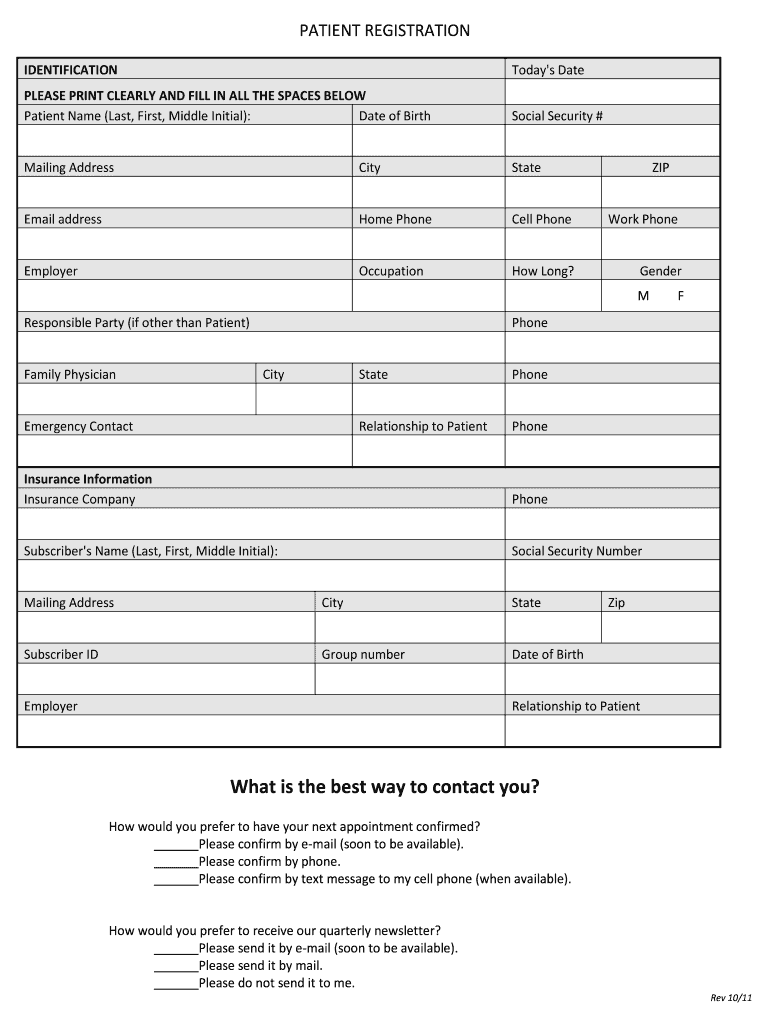
PATIENT REGISTRATION IDENTIFICATION Today's Date PLEASE PRINT CLEARLY AND FILL IN ALL THE SPACES BELOW Patient Name (Last, First, Middle Initial): Date of Birth Social Security # Mailing Address City.
Loading

Open form follow the instructions

Easily sign the form with your finger

Send filled & signed form or save
How to fill out the Dental Office Universal Patient Registration Forms online
Completing the Dental Office Universal Patient Registration Forms online is an essential step in facilitating your dental care journey. This guide offers a clear and supportive process to ensure you provide all necessary information accurately.
Follow the steps to successfully complete the registration form.
- Click 'Get Form' button to obtain the form and open it in your preferred online editor.
- Begin by entering today's date in the designated field. Make sure to use the current date for accurate record-keeping.
- In the patient identification section, provide your full name, date of birth, and social security number. Fill in your mailing address, including city, state, and ZIP code.
- Next, input your contact information. This includes your email address and phone numbers (home, cell, and work). It is important to provide accurate information for effective communication.
- Indicate your employer and occupation along with how long you have been in that position.
- In the responsible party section, provide information if the responsible party is different from the patient. Include their relationship to the patient.
- List your family physician's name and phone number, including their city and state.
- Provide an emergency contact's name, phone number, and their relationship to you.
- In the insurance information section, detail your insurance company, subscriber's name, and necessary identifiers like social security number, subscriber ID, and group number.
- Choose your preferred methods for appointment confirmations and newsletter subscriptions. These options ensure your preferences are acknowledged.
- Complete the 'Getting to know you' section, selecting the ways you learned about the office and your reasons for choosing this dental care provider.
- Fill out the dental history and hearing patients section as applicable, providing recent dental visit details and any health concerns.
- Answer the medical history questions comprehensively, marking 'yes' or 'no' as appropriate. This information is crucial for your safety during treatment.
- Review the financial policy and treatment consent thoroughly, then provide your signature and date to confirm your understanding and agreement.
- Finally, save your changes in the document. You may download, print, or share the completed form as needed.
Get started on filling out your Dental Office Universal Patient Registration Forms online now!
Experience a faster way to fill out and sign forms on the web. Access the most extensive library of templates available.
Related content
Patient Record · by BK Charangowda · 2010 · Cited by 111 — The record includes a...
forms for visits to a doctor's office — ... NYU Langone doctor's office, you can review...
Oct 15, 2015 — Reimbursement for Drugs Administered in a Physician's Office. ... Forms...
Get answers to your most pressing questions about US Legal Forms API.
Why is it important for a new patient to complete a patient registration form?
This is one of the main intentions of a patient registration form. With the patient's medical information, the doctors and medical personnel will be able to determine the specific medical practice and actions to be provided for the patient.
What information is collected on patient registration forms?
The patient's name, address, phone number, date of birth, Social Security number, occupation, place of employment, emergency contact info, health insurance info, etc...
What is the purpose of a registration form?
A registration form is a document with a set of fields that a person fills out and sends to a business or individual to register for an event, program, membership, list, and so on.
What information must be obtained from a new patient?
What's in New Patient Packet? Form 1: Demographic Information, Medical Release and Insurance Information. Form 2: Basic Health Information – Family History, Concerns, Habits, Medications and previous care. Form 3: HIPAA Notice and Privacy Practices.
What is the form of patient?
patient is an adjective and a noun, patiently is an adverb, patience is a noun:Be patient with the baby.
Use professional pre-built templates to fill in and sign documents online faster. Get access to thousands of forms.
If you believe that this page should be taken down, please follow our DMCA take down process here.