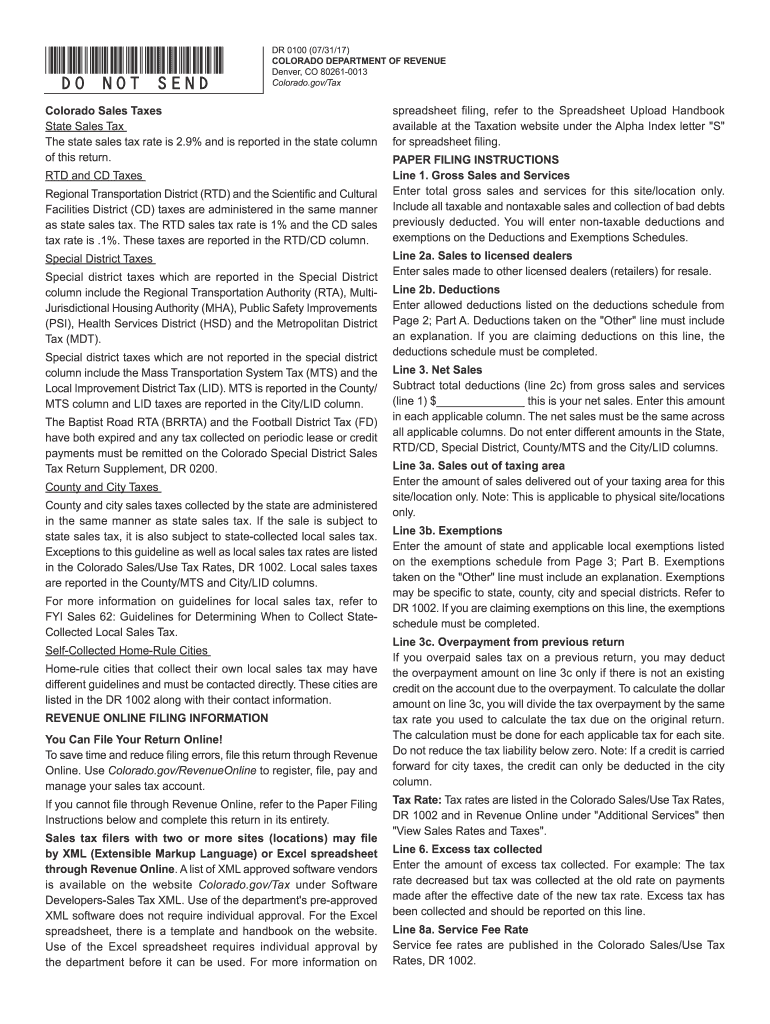
Ses and sales, including sales invoices and purchase orders must be retained for a period of 3 years. Records must be open for inspection by authorized representatives of the department. All taxes paid by the purchaser to the seller shall be and remain public money, as property of the taxing jurisdiction. The seller should maintain records of payment. The law provides severe penalties for any violation of the sales tax laws. Methods of enforcement, as defined in the regulations, include liens wh.
Loading

Open form follow the instructions

Easily sign the form with your finger

Send filled & signed form or save
How to fill out the CO DoR DR 0100 online
Filling out the CO DoR DR 0100 form online can be a straightforward process when you follow the appropriate steps. This guide will provide you with clear instructions on how to complete each section of the form accurately, ensuring compliance with Colorado's tax regulations.
Follow the steps to successfully complete the CO DoR DR 0100 online.
- Click ‘Get Form’ button to access the form and open it in the editor.
- Begin with entering your Colorado Account Number at the designated field. This number is essential for identifying your tax account.
- Input the name of your business or your full name, followed by the address where your business is located. Ensure that all fields are filled with accurate and current data.
- In the section labeled 'Period', specify the month and year for which you are filing this return.
- For Line 1, enter the total gross sales and services for your site/location, including any bad debts previously deducted.
- On Line 2, report any deductions. For Line 2a, include sales to other licensed dealers and for Line 2b, list any other deductions based on your completions of the Deductions and Exemptions Schedule.
- Calculate your net sales by entering the values from Line 1 adjusted for your deductions in Line 3.
- Proceed to calculate the net taxable sales on Line 4 by subtracting the deductions from your net sales total.
- Then, for Lines 5 and 6, compute the sales tax collected and any excess tax that needs to be reported.
- Complete the necessary calculations for service fees on Line 8 and record any applicable penalties or interest on Lines 12 and 13.
- Finally, review all the lines to ensure accuracy, then save your changes, and prepare to submit your filing online or print the form for mailing.
Complete your CO DoR DR 0100 form online today to ensure timely and accurate filing for your retail sales tax return.
Experience a faster way to fill out and sign forms on the web. Access the most extensive library of templates available.
Related content
Retailers must file a sales tax return for every filing period, even if the retailer made...
Apply for an account online via the Colorado Business Express website:...
Jun 29, 2011 — O aparelho não deve ser exposto a goteiras ou respingos e não deve...
Get answers to your most pressing questions about US Legal Forms API.
What do I put down for tax exemption?
When indicating tax exemptions, state the specific type of exemption you are claiming, such as for resale or a nonprofit status. Ensure you provide your exemption identification number if applicable, and be clear about your purchasing intention. The CO DoR DR 0100 is an important document to reference for proper completion.
How to fill out Employee Withholding Certificate form?
To fill out the Employee Withholding Certificate form, start with your personal information, including name and Social Security number. Then, specify your tax situation, allowances, and any additional withholdings you want to apply. For clarity and compliance, having access to resources like the CO DoR DR 0100 is beneficial.
What is an example of a tax exemption?
A common example of a tax exemption is when a non-profit organization purchases items for charitable purposes, allowing them to avoid sales tax. Similarly, items that businesses resell or include in manufacturing processes may also qualify for exemptions. Understanding the CO DoR DR 0100 can help clarify which situations apply.
How to fill out a tax exemption?
To fill out a tax exemption, start by gathering your pertinent information, including your business details and the nature of the exemption. Make sure to provide accurate data on the form and double-check for any missing sections. Utilizing the CO DoR DR 0100 aids in the seamless process of applying for your tax exemption.
How to fill out a sales tax exemption form?
Filling out a sales tax exemption form involves providing accurate information such as the purchaser's name, address, and the type of exemption. You'll also need to state the reason for the exemption and provide any necessary identification numbers. Using the CO DoR DR 0100 effectively will help ensure you meet all requirements.
What is a Dr. 0100 form in Colorado?
The Dr. 0100 form in Colorado serves as a sales tax exemption certificate, enabling certain purchases to be made without incurring sales tax. This form is essential for qualifying entities like non-profits and government agencies. Understanding how to use the CO DoR DR 0100 correctly can simplify your tax-exempt purchases.
How do I write a check to the Colorado Department of Revenue?
When writing a check to the Colorado Department of Revenue, ensure you include the appropriate payee details, which is 'Colorado Department of Revenue.' Clearly state the purpose of the payment, and include your account number in the memo line. Using the CO DoR DR 0100 reference can help in identifying specific items related to your payment.
What qualifies for sales tax exemption in Ohio?
In Ohio, specific purchases such as those made by non-profit organizations, government entities, and certain educational institutions may qualify for sales tax exemption. Additionally, items used for resale or manufacturing purposes can also enjoy this exemption. To make sure you apply correctly, refer to the CO DoR DR 0100 when submitting your exemption forms.
What is the highest sales tax in Colorado?
The highest sales tax in Colorado can reach about 11.2%, primarily influenced by local taxes. It's vital for businesses to keep track of these rates to ensure compliance. For accurate reporting and tax management, the CO DoR DR 0100 form is an invaluable resource that simplifies the process.
What city in Colorado has the highest tax rate?
The city with the highest tax rate in Colorado is often Denver, where the combined tax rate can be quite significant. This is an essential factor for businesses operating in the area. Moreover, understanding forms like the CO DoR DR 0100 can help you manage sales tax effectively.
Use professional pre-built templates to fill in and sign documents online faster. Get access to thousands of forms.
If you believe that this page should be taken down, please follow our DMCA take down process here.
This form is available in several versions. Select the version you need from the drop-down list below.