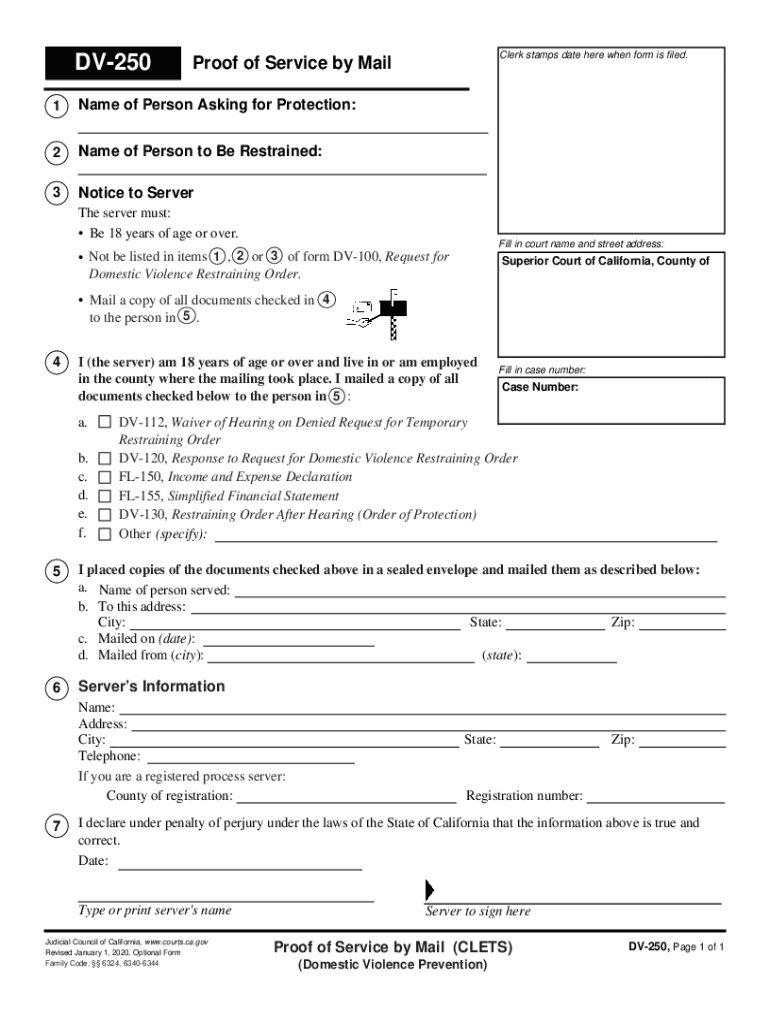
DV250Clerk stamps date here when form is filed. Proof of Service by Mail1Name of Person Asking for Protection:2Name of Person to Be Restrained:3Notice to Server The server must: Be 18 years of age.
Loading

Open form follow the instructions

Easily sign the form with your finger

Send filled & signed form or save
How to fill out the CA DV-250 online
Filling out the CA DV-250 form is a crucial step in the process of seeking protection from domestic violence. This guide will assist you in completing the form online, providing clear and supportive instructions for each section.
Follow the steps to complete the DV-250 form online.
- Click ‘Get Form’ button to obtain the form and open it in the editor.
- In section 1, enter the name of the person asking for protection. This is essential for identifying the requestor in the legal process.
- In section 2, provide the name of the person to be restrained. This clarifies who the order is aimed to protect against.
- Proceed to section 3, labeled 'Notice to Server'. Ensure you fill in the court name and street address where the case is being filed.
- In section 4, the server must verify their age and relationship to the individuals mentioned in sections 1 and 2. They must not be listed in any of those sections.
- In section 5, the server outlines the details of mailing the documents. Include the name of the person served, their address, and the date the documents were mailed.
- Complete section 6 with the server's information, documenting their name, address, city, telephone number, and registration details if applicable.
- In section 7, the server must sign and date the form, affirming that the above information is true under penalty of perjury.
- Once everything is filled out, you can save your changes, download, print, or share the completed form as necessary.
Complete your documents online with ease and ensure your protection is prioritized.
Experience a faster way to fill out and sign forms on the web. Access the most extensive library of templates available.
Related content
Jan 1, 2020 — Not be listed in items , or of form DV-100, Request for. Domestic Violence...
Engages students in the process of transitioning from college student to professional...
The person who serves your form must fill out Form DV-250, Proof of Service by Mail...
Get answers to your most pressing questions about US Legal Forms API.
What is a DV 116?
Order on Request to Continue Hearing (Temporary Restraining Order) (CLETS-TRO) (Domestic Violence Prevention) (DV-116) Tells you that your court date has been rescheduled and if there is a temporary restraining order in effect. Get form DV-116.
How to file a restraining order in Lancaster CA?
The restraining order process for civil harassment cases Ask for a restraining order. You will complete and turn in court papers. ... Serve the other side. The other side (person you want protection from) must be served with (given) the court papers filed with the court. Go to court. ... Finish the case.
What does DV 109 mean?
If you received any of these forms, someone asked for a restraining order against you: Notice of Court Hearing (form DV-109) Request for Domestic Violence Restraining Order (form DV-100) Temporary Restraining Order (form DV-110)
What happens when a temporary restraining order expires in California?
When a protective order expires, the victim and the defendant are released from it. The judge can extend the order for five more years or permanently during the last three months of the order.
Can a restraining order be appealed in California?
Yes, you can appeal a restraining order in California. If you disagree with the contents of your restraining order, you have a right to file a motion with the court to set aside or modify the order. However, the appeal process can vary depending on the intensity of the order.
What happens when a restraining order expires in California?
That means that on that date, your order will end and you will no longer be protected by it. If you are still concerned for your safety or want your restraining order to stay in place, you have to “renew” it, which makes it last longer and gives it a new end date.
How long does a restraining order stay on your record in California?
Q: Are California Restraining Orders Public Records? A: A permanent restraining order is on your public record and will remain there. Sealing a record or expunging charges is only available for criminal charges, and restraining orders are usually part of civil records.
How do I vacate a restraining order in California?
) you have to file a request in court before date that the Restraining Order expires. You can do this if you are the person protected by the order or the person restrained by the order.
Use professional pre-built templates to fill in and sign documents online faster. Get access to thousands of forms.
If you believe that this page should be taken down, please follow our DMCA take down process here.