Loading

Open form follow the instructions

Easily sign the form with your finger

Send filled & signed form or save
How to fill out the Progressive Declarations Page online
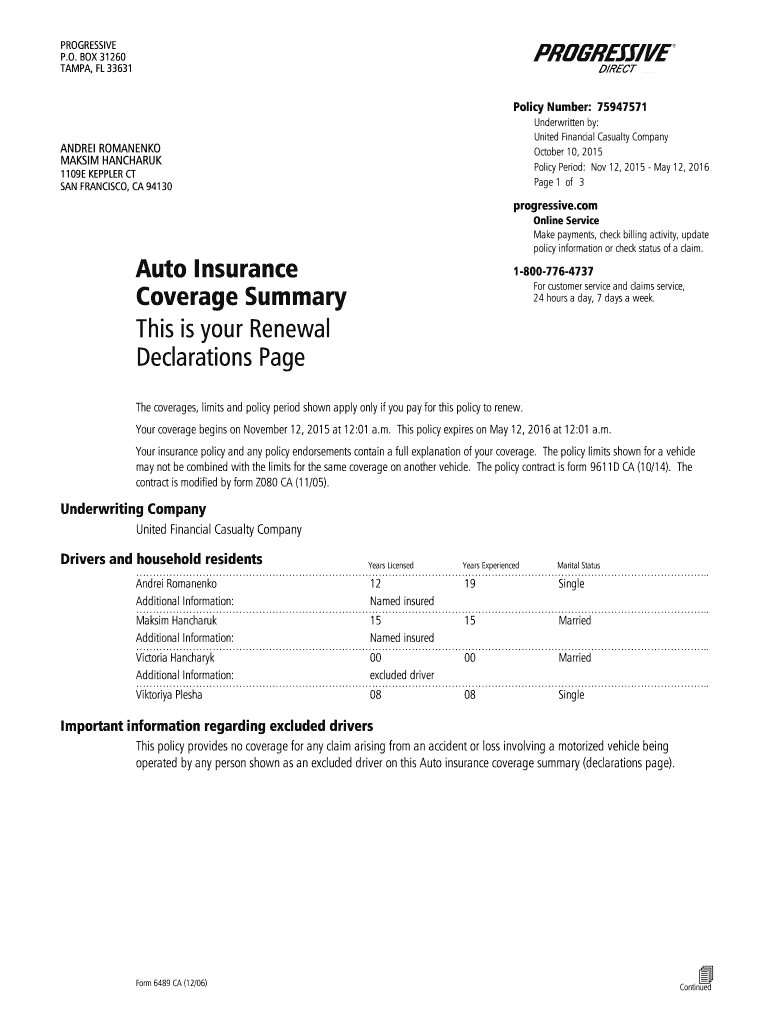
The Progressive Declarations Page is an essential document that summarizes your auto insurance policy. Filling it out correctly ensures you have the optimal coverage for your needs. This guide provides clear and supportive instructions for completing the form online.
Follow the steps to accurately complete the Progressive Declarations Page.
- Click ‘Get Form’ button to obtain the form and open it in the online editor.
- Review the policy number indicated at the top of the form. Ensure that it matches the number provided on your insurance documents.
- Fill in the named insured section with the correct personal information for all relevant individuals, including their years of licensing and experience.
- Enter the details for each vehicle covered under the policy. This includes the make, model, year, VIN, and annual miles driven, along with the vehicle's use (e.g., pleasure).
- Specify the coverage limits and deductibles for each vehicle, ensuring that these details align with your selected insurance package.
- Review the premium amounts listed for each vehicle and the total policy premium, making sure they reflect your coverage choices.
- Examine the payment schedule to understand the installment plan, noting the due dates and amounts for each payment.
- Identify any available premium discounts and verify that the qualifying information is accurately filled out.
- Complete any additional fields required by the form, including lienholder information for vehicles that have loans.
- Once all fields are filled out accurately, save your changes. You can then download, print, or share the completed form as needed.
Get started on completing your Progressive Declarations Page online today to ensure your coverage is in place.
Experience a faster way to fill out and sign forms on the web. Access the most extensive library of templates available.
Related content
This is a declarations page for auto insurance, a copy of your renewal page. It shows...
We declare that no industry deserves protection which is unfair to labor or which is...
Sep 28, 2025 — Based in the New England region of the United States, the Merrimack...
Get answers to your most pressing questions about US Legal Forms API.
How do I get my progressive declaration page?
To acquire your Progressive Declaration Page, simply log into your Progressive account online or through the app. Once there, locate the policy documents section to view and download your declaration page. If you are having trouble, don't hesitate to reach out to customer service for help. Remember that this document provides essential insights into your insurance coverage.
How do I get my declaration page from Progressive?
You can easily get your declaration page from Progressive by accessing your online account. Once logged in, look for the documents section, where you should find your Progressive Declaration Page listed among other policy documents. Alternatively, you can download it directly through the Progressive mobile app. If needed, contacting customer support can provide additional guidance.
How do I get proof of insurance from Progressive?
To obtain proof of insurance from Progressive, log into your online account and download the necessary documentation. Your Progressive Declaration Page serves as a key document showing your coverage and details. If you prefer a physical copy, you can request one directly from their customer service team. This will ensure that you have valid proof for any required purposes.
Where is the declaration page on the State Farm app?
To locate the declaration page on the State Farm app, start by logging into your account. Navigate to the policies section, where you will find options related to your insurance. Your Progressive Declaration Page may also be accessible through document listings within your specific policy. If you encounter any difficulties, their support team is available to help you.
Where can I find my renters insurance declaration page?
You can find your renters insurance declaration page by logging into your insurance provider's online portal. If you have Progressive, simply access your account to view your policy documents. If you prefer a more personalized approach, you can also contact customer service for assistance. Understanding your Progressive Declaration Page is crucial, as it outlines your coverage details.
What is found in the declaration section of a policy?
The declaration section of a policy, including the Progressive Declarations Page, usually reveals critical information about your insurance coverage. It includes the insured party’s information, the policy number, and types of covered risks. This section is beneficial for accessing your policy’s basic details quickly, assisting you when you need to file a claim or make a policy change.
How to read auto insurance declaration page?
Reading the auto insurance declaration page involves looking closely at the information provided. Start by identifying your details, including the vehicle covered and the policy effective dates. Next, review your coverage limits and deductibles. This overview helps you understand the extent of your protection and any responsibilities you may have.
Which information is not included on the declarations page?
While the Progressive Declarations Page contains vital information, it does not include the complete terms and conditions of the policy. Details regarding exclusions, limitations, and specific endorsements are usually found in the policy document rather than the declarations page. It’s important to review the full policy to understand all your coverage aspects thoroughly.
What is listed on the declarations page?
On the declarations page, you will find specific information including the policyholder's details, the effective dates, and the policy types, such as auto, renters, or homeowners insurance. Additionally, it highlights the coverage amounts and any applicable deductibles. This information is vital for quick reference and ensures clarity at the start of any claim process.
What is included in the declaration page?
The Progressive Declarations Page usually contains essential data that outlines your policy specifics. Expect to see the name of the insured, the address, the type of coverage provided, and coverage limits. This page serves as a summary of your insurance policy's critical details, helping you to understand your coverage at a glance.
Use professional pre-built templates to fill in and sign documents online faster. Get access to thousands of forms.
If you believe that this page should be taken down, please follow our DMCA take down process here.