
Open form follow the instructions

Easily sign the form with your finger

Send filled & signed form or save
How to fill out the Europass Cv Online online
Creating a Europass CV online is an essential step in presenting your professional qualifications and skills clearly and effectively. This guide offers a step-by-step walkthrough to help you complete the form accurately and comprehensively, ensuring you stand out in the competitive job market.
Follow the steps to complete your Europass CV online.
- Click the 'Get Form' button to access the Europass CV online form and begin the process of completing your curriculum vitae.
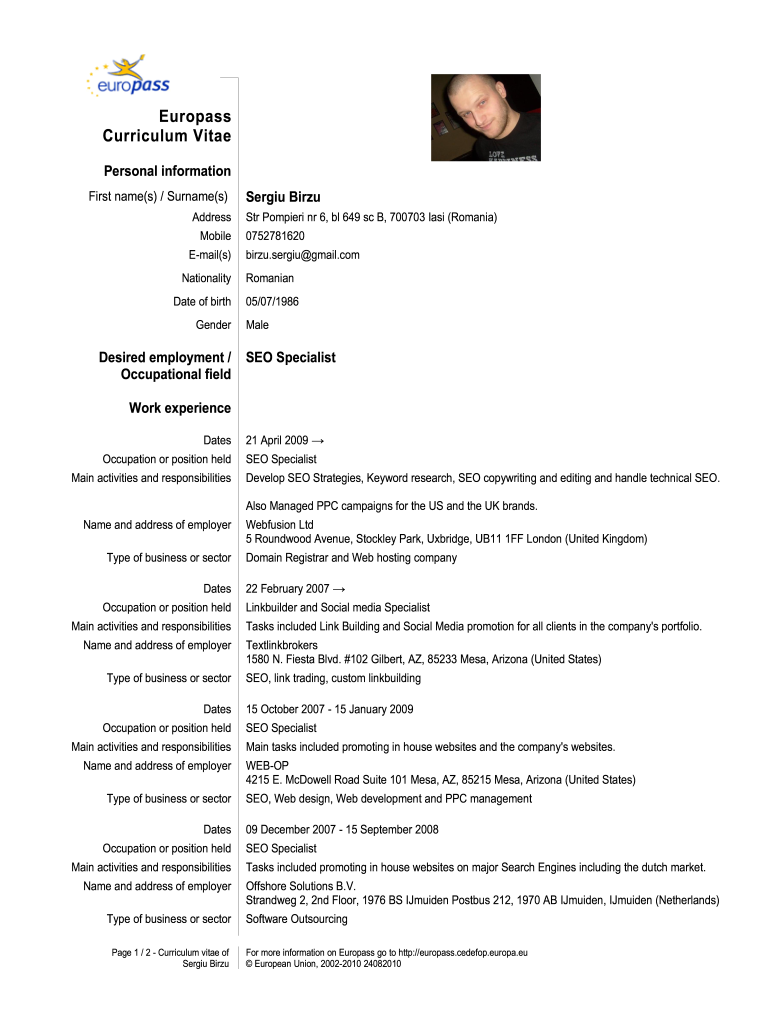
- Fill in your personal information in the designated fields. You will need to provide your first name(s) and surname(s), address, mobile number, email address, nationality, date of birth, and gender.
- Detail your desired employment position in the 'Desired employment' section. This is where you specify the job title or position you are applying for, like 'SEO Specialist.'
- In the work experience section, list your previous positions chronologically. Include the dates of employment, occupation held, main activities and responsibilities, and the name and address of each employer.
- Next, add your education and training details. Provide the dates of attendance, the title of the qualification awarded, principal subjects or occupational skills covered, and the organization providing the education.
- Fill out your personal skills and competences. Include any languages you speak, using the self-assessment grid to indicate your level of understanding, speaking, and writing for each language.
- Finally, review all information for accuracy. You can then save your changes, download the CV, print it, or share it as needed.
Start creating your Europass CV online today to enhance your job applications.
Experience a faster way to fill out and sign forms on the web. Access the most extensive library of templates available.
Related content
Jan 4, 2019 — We request that you use the EuroPass CV format so that applicants are...
by J Smith — Present your skills and competences clearly and logically, so that your...
Se recomienda crear un perfil en cada una las webs, subir el CV actualizado, y tener una...
Get answers to your most pressing questions about US Legal Forms API.
How to make your Europass CV in PDF?
Making your Europass CV in PDF is simple and can be done through an online CV builder. After completing your Europass CV on platforms like UsLegalForms, look for the download option. Select PDF format, and your CV will be converted and ready to download. This convenient feature ensures your CV maintains its format when shared with potential employers.
How do I create my own CV online?
To create your own CV online, start by selecting an online CV builder, such as UsLegalForms. Enter your details, including your education, experiences, and skills. The platform will guide you through the process step-by-step, ensuring your CV stands out professionally. Once complete, you can download your CV in various formats, including Europass.
Which Europass CV format is best?
The best Europass CV format depends on your job preferences and target industries. Generally, the standard Europass format is widely accepted across Europe and is user-friendly. It includes clear sections that highlight your skills and experiences. Using tools like UsLegalForms can help you choose the right format effortlessly.
How to create an Europass CV online?
Creating an Europass CV online is straightforward. Begin by visiting a reputable Europass CV builder, like the one on the UsLegalForms platform. Fill in your personal information, education, work experience, and skills. Finally, review your CV, save it, and you are ready to use it for your job applications.
How do I make my CV in PDF format?
To make your CV in PDF format, start by using Europass CV Online to create your document. After inputting your information, look for the export or download option to choose PDF as your file format. This method guarantees that your CV maintains its design and layout when shared.
How do I upload my CV to Europass?
To upload your CV to Europass, access the Europass CV Online platform and navigate to the upload section. You can either drag and drop your existing CV file or browse your device to select it. This process allows you to create or enhance your CV quickly and effectively.
How do I export a Europass CV to a PDF?
Exporting your Europass CV to a PDF is straightforward. After completing your CV on Europass CV Online, simply select the 'Download as PDF' option. This action generates a polished PDF version, ready to be shared with potential employers.
How do I save my Europass CV online?
To save your Europass CV online, use the Europass CV Online platform to create and edit your CV. Once you finish, look for the 'Save' option, which will store it in your account. This feature ensures that your CV is secure and accessible whenever you need to make updates.
How to make a CV PDF on phone?
You can easily make a CV PDF on your phone by accessing Europass CV Online through your mobile browser. Simply enter your information using the mobile-friendly interface, then choose to export your finished CV as a PDF. This convenience allows you to create and manage your CV anytime, anywhere.
How do I make a CV online PDF?
To create a CV online PDF, start by using a reliable online resource, such as Europass CV Online. Fill in your details in the editor, then select the option to download your CV as a PDF. This ensures your formatting remains consistent and professional, making it ready for job applications.
Use professional pre-built templates to fill in and sign documents online faster. Get access to thousands of forms.
If you believe that this page should be taken down, please follow our DMCA take down process here.