Loading

Open form follow the instructions

Easily sign the form with your finger

Send filled & signed form or save
How to fill out the Spectrum Tv Guide online
This guide provides a comprehensive overview of how to effectively complete the Spectrum Tv Guide online. It serves as a supportive resource for users looking to navigate the document with ease.
Follow the steps to fill out the Spectrum Tv Guide
- Click ‘Get Form’ button to obtain the Spectrum Tv Guide and open it in the editor.
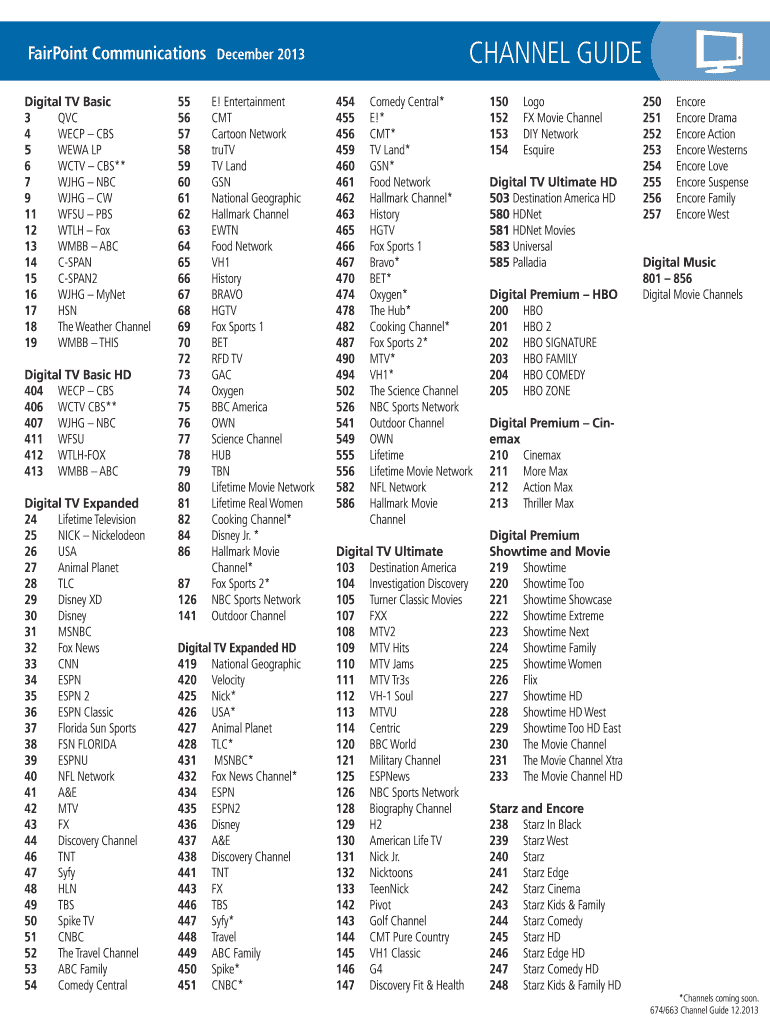
- Begin by reviewing the sections of the document, which include various categories like Digital TV Basic, Digital TV Expanded, and Digital TV Ultimate. Familiarize yourself with the channel listings provided under each category.
- For each category, select the relevant channels you want to include. Make a note of the channel numbers and their corresponding names.
- If applicable, indicate preferences or additional notes next to the channels, especially if you are considering add-ons or special features.
- After you have filled out all necessary information in the Spectrum Tv Guide, look over the document to ensure accuracy.
- Once all information is verified, you can proceed to save the changes, download a copy, print the document, or share it as needed.
Complete your Spectrum Tv Guide online effortlessly today!
Experience a faster way to fill out and sign forms on the web. Access the most extensive library of templates available.
Related content
Find today's TV Guide Listings for your zip code. See what's playing on your local...
Get today's TV listings and channel information for your favorite shows, movies, and...
The new Spectrum Guide is being deployed to some customers with HD digital receivers in...
Get answers to your most pressing questions about US Legal Forms API.
How do I edit my Spectrum channel lineup?
Editing your Spectrum channel lineup can enhance your viewing experience. Log into your Spectrum account and navigate to the channel management section. Here, you can add or remove channels based on your interests. This flexibility allows you to curate your own channel lineup while using the Spectrum TV Guide.
How do I record on Spectrum guide?
Recording shows on the Spectrum guide is simple and convenient. Find the program you want to record in the guide, highlight it, and press the 'Record' button on your remote. You can also access recording options through your Spectrum account. Managing your recordings through the Spectrum TV Guide ensures you never miss a moment.
How do I customize my Spectrum TV guide?
Customizing your Spectrum TV Guide involves selecting your favorite channels and options. Start by entering the menu and choosing personalization settings. You can hide unwanted channels and rearrange the order of your favorites for easy access. This tailored setup makes it easier to enjoy your preferred content.
How do I organize my Spectrum channels?
Organizing your Spectrum channels helps you find what you want to watch quickly. Use your remote to navigate to the channel list and select 'Manage Channels.' From here, you can rearrange channels to suit your viewing habits. This organization enhances your experience while navigating the Spectrum TV Guide.
How do you program a Spectrum guide?
Programming your Spectrum guide typically involves setting up preferences on your device. Access guide settings via your remote, where you can adjust options such as channel selection and viewing preferences. Make sure to save your settings to enjoy a tailored viewing experience on the Spectrum TV Guide.
How to customize Spectrum TV guide?
Customizing your Spectrum TV Guide allows you to see your preferred channels first. You can do this by accessing the settings in your Spectrum account. Here, you can choose to hide channels you don’t watch and prioritize your favorites. This makes navigating the Spectrum TV Guide faster and more personalized.
How to get full guide on Spectrum?
To access the full Spectrum TV Guide, start by pressing the 'Guide' button on your remote control. You can browse through all available channels and shows. Additionally, visit the Spectrum website or app for complete listings and on-demand options. This ensures you maximize your viewing experience.
How to fix Spectrum channel guide?
If you encounter issues with the Spectrum channel guide, first try rebooting your cable box by unplugging it for about 10 seconds before powering it back on. If the problem persists, check your connections to ensure everything is securely plugged in. You can also refresh your Spectrum service through the Spectrum app or website. If needed, the US Legal Forms platform can assist you in finding service-related solutions.
How do you get the guide to work on Spectrum remote?
To get the guide working on your Spectrum remote, simply press the 'Guide' button located near the center of the remote. If the guide does not appear, ensure your remote is functioning correctly with fresh batteries. In some cases, you may need to reset your cable box to establish a proper connection. Once everything is in order, the Spectrum TV guide will be readily accessible.
How do I get the guide to work on my Spectrum TV?
To get the Spectrum TV guide working, first ensure your Spectrum cable box is connected correctly. Next, press the 'Guide' button on your remote, which should display the channels available on your Spectrum TV. If you do not see the guide, try restarting your cable box by unplugging it for 10 seconds and then plugging it back in. Following these steps should help you access the Spectrum TV guide smoothly.
Use professional pre-built templates to fill in and sign documents online faster. Get access to thousands of forms.
If you believe that this page should be taken down, please follow our DMCA take down process here.