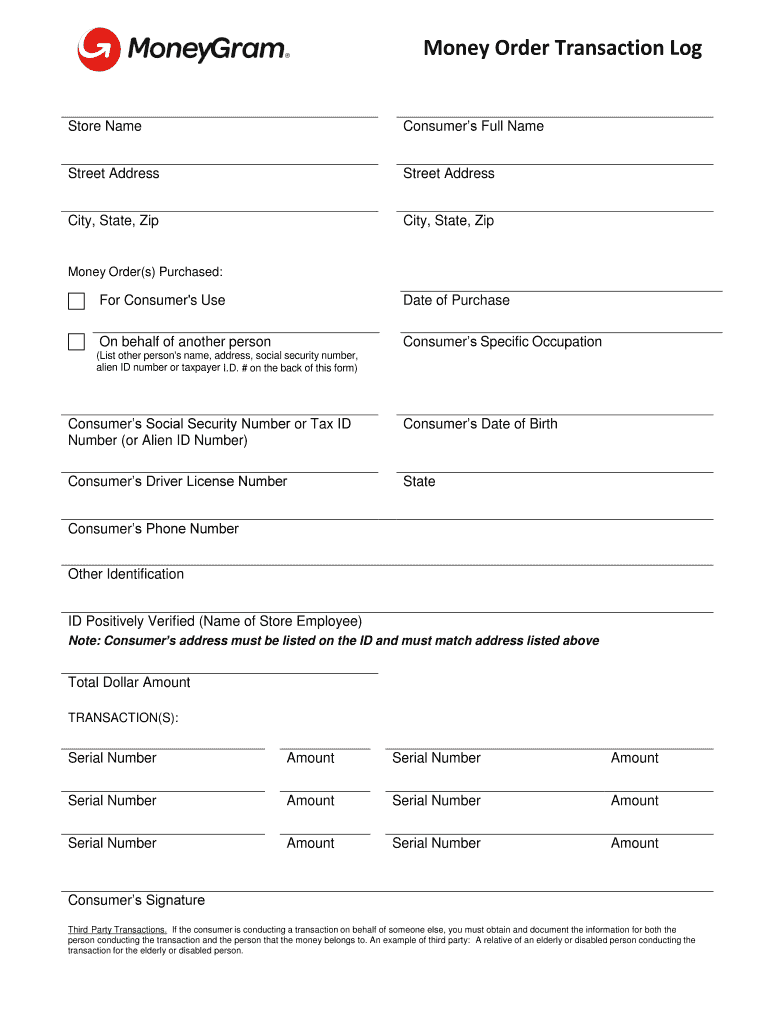
Money Order Transaction Log Store NameConsumers Full Backstreet AddressStreet Addressing, State, SimCity, State, Money Order(s) Purchased:For Consumer 's Sedate of Purchased behalf of another personConsumers.
Loading

Open form follow the instructions

Easily sign the form with your finger

Send filled & signed form or save
How to fill out the MoneyGram Money Order Transaction Log online
Filling out the MoneyGram Money Order Transaction Log is an essential process for documenting money order transactions accurately. This guide provides clear and concise steps to ensure users can complete the log efficiently and correctly.
Follow the steps to complete the transaction log online
- Press the ‘Get Form’ button to access the MoneyGram Money Order Transaction Log and open it in the online editor.
- In the 'Store Name' field, enter the name of the store where the money order was purchased.
- Fill in the 'Consumer’s Full Name' section with the full legal name of the person buying the money order.
- Provide the 'Street Address,' 'City,' 'State,' and 'Zip' code for the consumer's residence accurately.
- In the 'Money Order(s) Purchased' section, specify the details of the money order transactions for personal use.
- Enter the 'Date of Purchase' indicating when the money order was bought.
- If the transaction is conducted on behalf of another individual, enter the person's name, address, Social Security number, Alien ID number, or Taxpayer ID number on the back of the form.
- Input the consumer’s Social Security number or Tax ID number (or Alien ID number) in the designated field.
- Provide the consumer’s Date of Birth for identification purposes.
- Fill in the consumer’s Driver License number and the state where it was issued.
- Include a contact number for the consumer in the 'Consumer’s Phone Number' field.
- Document any other identification provided, ensuring that the name matches the store employee's verification.
- Record the total dollar amount of all transactions completed.
- List the serial numbers and amounts for each money order purchased in the 'TRANSACTION(S)' section.
- The final step requires the consumer's signature to validate the transaction.
- For third-party transactions, ensure to gather and document the necessary details for both individuals involved.
Start completing your MoneyGram Money Order Transaction Log online today!
Experience a faster way to fill out and sign forms on the web. Access the most extensive library of templates available.
Related content
transactions of more than $10,000 with the same customer in a day, it must file a CTR. 1...
Your business may be an MSB (Money Services Business) if… The business ... Monetary...
Nov 27, 2020 — English; Log in. Namespaces. Page · Discussion ...
Get answers to your most pressing questions about US Legal Forms API.
At what dollar amount must you file a currency transaction report on a money order sale?
Money Orders: Whenever a customer purchases money orders, or checks, with cash in the amount of $3,000 to $10,000 certain information must be obtained and retained. (Purchases of more than $10,000 require filing a Currency Transaction Report (CTR) which is explained later in these materials.)
How can you tell if a money order is real?
Look for Physical Clues of Money Order Fraud Sometimes, you can tell that a money order is fake just by looking at it. Most money orders have security features like watermarks and a special ink that will run or change colors if anyone tries to change information on the money order, such as the amount.
At what dollar amount must you make a record of a money order sale?
6. Monetary Instrument Log MSBs must maintain certain information on the sale of monetary instruments such as money orders or traveler's checks from $3,000 to $10,000, inclusive.
What is a money order transaction report?
Money Orders: Whenever a customer purchases money orders, or checks, with cash in the amount of $3,000 to $10,000 certain information must be obtained and retained. (Purchases of more than $10,000 require filing a Currency Transaction Report (CTR) which is explained later in these materials.)
How can you tell if a money order has been cashed?
How can I find out if it has been cashed? You can find out if your money order has been cashed online by clicking Money Order Status or by calling our automated line at 1-800-542-3590. You will need to enter your money order number and the exact dollar amount of your money order.
How does a money order work?
How to use a money order. When you purchase a money order, you pay the full amount upfront plus a small fee. After verifying that the amount is correct, you'll need to fill in your name and contact information on the front of the money order, plus the name of the recipient and their contact information.
What is a money order log?
Use this log to record consumer information for cash money order sales with a face amount of $3,000 or more to one individual in one business day. This form must be retained for five years from date of sale, according to the U.S. Treasury Department regulations.
How do you sign a money order?
Fill in the recipient's name. Write your address in the purchaser section. Include your account number if you're paying a bill. Sign the bottom where it says "purchaser's signature." Keep your receipt.
Are money orders reported to IRS?
Cash also includes cashier's checks, bank drafts, traveler's checks, and money orders. ... You have to file the form within 15 days after receiving the cash. You can file the form electronically or mail it to the IRS. A copy of this form is sent to the Financial Crimes Enforcement Network (FinCEN).
How long does it take to clear a money order?
Money orders generally clear almost immediately, and if you (or the person you send a money order to) are redeeming it for cash, you should receive the funds right away. However, some banks may take as long as 24 hours to deposit a money order into your account, especially if you deposit it later in the day.
Use professional pre-built templates to fill in and sign documents online faster. Get access to thousands of forms.
If you believe that this page should be taken down, please follow our DMCA take down process here.