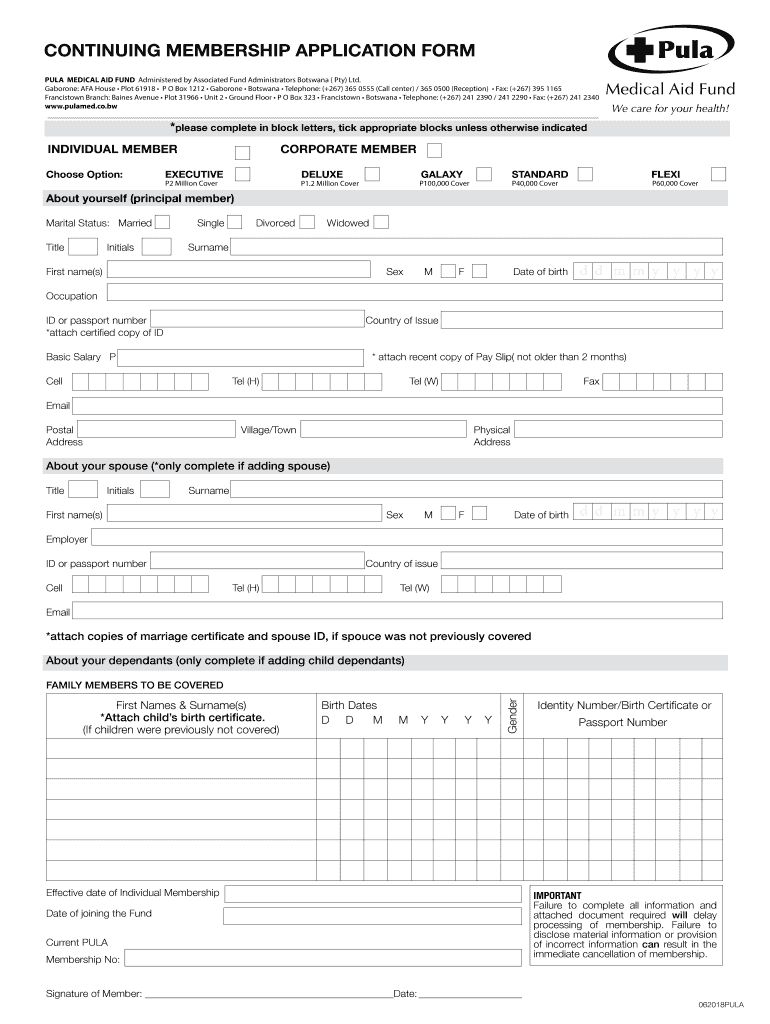
CONTINUING MEMBERSHIP APPLICATION FORM PULL MEDICAL AID FUND Administered by Associated Fund Administrators Botswana (Pty) Ltd. Gaborone: AFA House Plot 61918 P O Box 1212 Gaborone Botswana Telephone:.
Loading

Open form follow the instructions

Easily sign the form with your finger

Send filled & signed form or save
How to fill out the Pula Medical Aid Forms online
Filling out the Pula Medical Aid Forms online is a crucial step in securing your medical assistance. This guide provides clear, step-by-step instructions to help you navigate the form accurately and efficiently.
Follow the steps to complete your application successfully.
- Click ‘Get Form’ button to obtain the form and open it in the editor.
- Begin by selecting the type of membership that applies to you: individual or corporate member. Ensure you tick the appropriate box to indicate your choice.
- Fill in the personal details of the principal member including title, initials, surname, first name(s), sex, date of birth, occupation, and ID or passport number. Remember to attach a certified copy of your ID as required.
- Under the section 'About yourself', provide your basic salary, cell number, and contact details including home phone and work phone. Make sure to attach a recent copy of your pay slip that is not older than two months.
- Complete the spouse section if you are adding a spouse. Fill in their details including title, initials, surname, first name(s), sex, date of birth, and ID or passport number. Attach copies of the marriage certificate and spouse ID if they were not previously covered.
- If you are adding child dependents, provide their first names and surnames, birth dates, and gender. Attach the child’s birth certificate if they were not previously covered.
- Indicate the effective date of individual membership and date of joining the fund. Provide your current Pula membership number.
- Fill in your banking details accurately. Provide the bank name, branch name, branch code, account number, type of account, and account holder. Remember to attach proof of account, such as a cancelled cheque or bank statement.
- Complete the nomination for funeral benefit payout section, including the name, surname, ID number, contacts, address, and relation of the nominated person.
- If applicable, fill out your employment details and the employer warranty section, including your employer’s name, industry, and date of employment. Ensure the employer's stamp and authorized signatory are present.
- Lastly, review all entered information for accuracy. Once confirmed, sign the application under the signature of the principal member before submitting.
- Save changes, download, print, or share the form for your records as necessary.
Complete your Pula Medical Aid Forms online today to ensure your medical coverage and support.
Experience a faster way to fill out and sign forms on the web. Access the most extensive library of templates available.
Related content
This law permits 50 or more shareholders who collectively hold 0.01% of the shares of a...
by B Chilisa · 2001 · Cited by 26 — The majority of the students is not covered by...
DES has mailed 1099-G tax forms to claimants who received Unemployment Insurance (UI) and...
Get answers to your most pressing questions about US Legal Forms API.
What are the benefits of Pula Deluxe?
The De-luxe Benefit Option provides a comprehensive cover of BWP 1,200, 000 per member/family per annum. The Deluxe Benefit Option cover is split into two parts: the Annual Basic Limit of P700, 000 and a dread cover benefit of P500,000. PULA PAYS VAT FOR ALL SERVICES RENDERED TO A MEMBER AND THEIR DEPENDENTS.
What is the medical aid for students in Botswana?
The Bomaid International Student Scheme (ISS) is a comprehensive student medical cover that guarantees access to medical care both locally and regionally.
Does Pula medical aid work in South Africa?
Medical Cover Wherever You Are Most of our members regularly access health care services in South Africa and Namibia. In the event that members pay for themselves when accessing healthcare outside Botswana. PULA will reimburse them fully ing to the agreed tariffs.
Use professional pre-built templates to fill in and sign documents online faster. Get access to thousands of forms.
If you believe that this page should be taken down, please follow our DMCA take down process here.