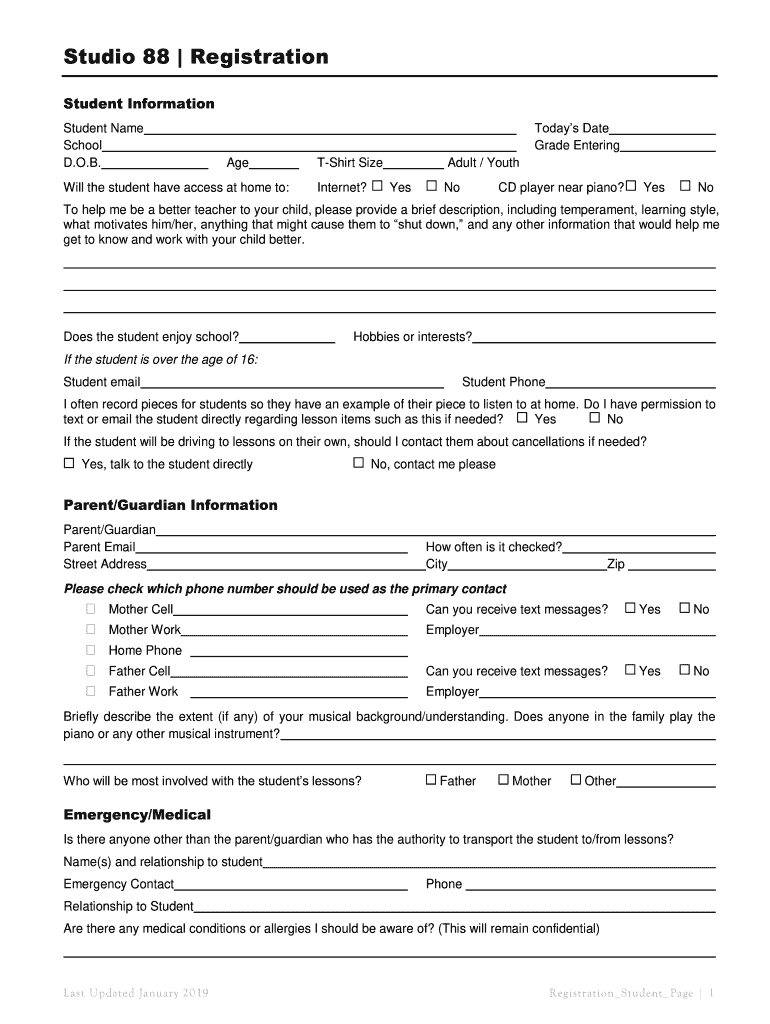
Studio 88 Registration Student Information Student Name School D.O.B.Todays Date Grade Entering AgeWill the student have access at home to:TShirt Size Internet?Adult / Youth YesNoCD player near piano?YesNoTo.
Loading

Open form follow the instructions

Easily sign the form with your finger

Send filled & signed form or save
How to fill out the Studio 88 Registration online
Filling out the Studio 88 Registration online is a straightforward process designed to capture essential information about the student and their learning environment. This guide will walk you through each section of the registration form to ensure that you provide all necessary details accurately.
Follow the steps to complete the registration form online.
- Press the ‘Get Form’ button to obtain the registration form, allowing you to access it in your preferred editor.
- Begin by entering the student information, which includes the student's name, school, date of birth, today's date, grade entering, and age.
- Indicate whether the student has access to the internet at home and their T-shirt size, selecting either adult or youth options.
- Provide details about the student's access to a CD player near the piano by answering 'Yes' or 'No'.
- Fill out a brief description to help the instructor understand the student's temperament, learning style, motivations, and any potential challenges.
- Indicate if the student enjoys school and list any hobbies or interests they have.
- If the student is over the age of 16, provide their email address and phone number.
- Specify if you give permission for the instructor to communicate with the student directly via text or email regarding lesson-related items.
- Indicate preferred communication preferences for cancellation notifications if the student is driving to lessons.
- Enter the parent or guardian's information, including their name, email, street address, and phone number, specifying how often it is checked.
- Describe any relevant musical background or understanding within the family and indicate who will be most involved with the student's lessons.
- Complete the emergency and medical information, including authorized individuals who can transport the student and any medical conditions or allergies.
- For transfer students, provide details about prior lessons, previous teachers, practice habits, and performance experiences.
- Review and accept the responsibilities and expectations outlined in the 3-way contract, checking each box as applicable.
- Review the general studio policies, checking each confirmation box to indicate your understanding.
- Fill out the fees section, noting any dues and payment options available.
- Sign the declaration of understanding for both the student and the parent. Include the date.
- Complete the marketing, media, and social media release section, agreeing or disagreeing to the use of photos and media.
- Once all information has been entered and reviewed, save the changes, then download, print, or share the completed form as needed.
Complete your Studio 88 Registration online today to secure a spot for your music lessons.
Experience a faster way to fill out and sign forms on the web. Access the most extensive library of templates available.
Related content
This new, all-inclusive program features live instruction by artist Laura Villarreal...
Lbhc x Ultraman! Faster checkout; Save multiple shipping addresses; View and track orders...
Late Registration is the second studio album by American rapper and producer Kanye West...
Get answers to your most pressing questions about US Legal Forms API.
Who is the owner of Studio 88?
Laurence Wernars - Founder and CEO @ Studio 88 - Crunchbase Person Profile.
Can I lay by at Studio 88?
Five Benefits Of Using A Lay-bye Facility A lay-bye facility allows you to choose apparel and footwear and pay it off without interest. A lay-bye retains its original price. Studio 88 does not charge an additional fee should the cost of your layby item increase.
Which company bought Studio 88?
The 70% stake in the retail group will offer further exposure to the younger consumer market. Discount fashion retailer Mr Price has received a regulatory clearance to acquire a 70% stake in Studio 88 group in a R3. 6bn deal that gives it further exposure younger consumer market, predominantly in townships.
Can you lay by online?
Not only can you open your Lay-by online in a few easy steps, you can also customise your deposit and payment term to suit your pocket!
How do I contact Studio 88?
Contact us today by easily completing the online contact form or giving us a call on +27 10 006 0888 for any queries you may have. You can also go to our FAQ's page for quick answers.
Does Studio 88 have accounts?
To open an account, you'll need to meet the following criteria: - Have a valid South African ID number. - Have an existing valid bank account, a valid email address and a RICA'd mobile number. - Be at least 18 years of age. - Earn a minimum monthly salary of R5,500.
Which stores are part of the Mr Price Group?
mr price. home. sport. money. miladys. sheet. power. yuppie.
Are Studio 88 sneakers original?
Yes. Studio 88 Store guarantees 100% authenticity. We do not sell, accept, or otherwise deal with s or factory variants. Buy with confidence as all products offered for sale are thoroughly inspected by experienced staff for condition and authenticity.
Is Studio 88 part of Mr Price?
Studio 88 - Mr Price Group. Studio 88 Group is South Africa's largest branded fashion clothing and footwear retailer. We make it our business to bring you the latest sneakers, footwear and clothing in trend.
What is the parent company of Mr Price?
Miladys – acquired in 1987. Sheet Street – acquired in 1996. Mr Price Money – formed in 2007. Power Fashion – acquired in 2020....Mr Price Group. Traded as(JSE: MRP)IndustryRetailFounded1985FounderLaurie J. Chiappini and Stewart B. CohenHeadquartersDurban, KwaZulu-Natal, South Africa5 more rows
Use professional pre-built templates to fill in and sign documents online faster. Get access to thousands of forms.
If you believe that this page should be taken down, please follow our DMCA take down process here.