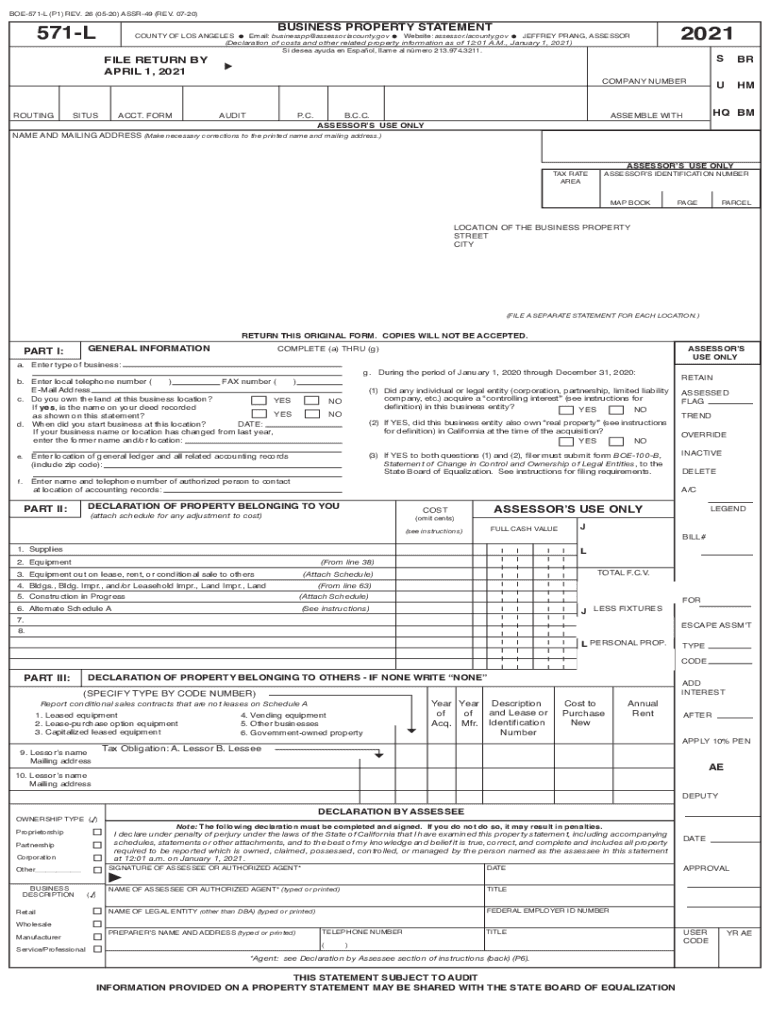
BOE571L (P1) REV. 26 (0520) ASSR49 (REV. 0720)571LBUSINESS PROPERTY STATEMENTCOUNTY OF LOS ANGELES Email: businesspp assessor.lacounty.gov Website: assessor.lacounty.gov JEFFREY PRANG, ASSESSOR (Declaration.

Open form follow the instructions

Easily sign the form with your finger

Send filled & signed form or save
How to fill out the CA BOE-571-L (P1) online
The CA BOE-571-L (P1) is an essential business property statement required by the County of Los Angeles for reporting taxable business property. This guide will provide a clear and supportive walkthrough on how to efficiently complete this form online, ensuring you provide all necessary information accurately.
Follow the steps to successfully fill out the CA BOE-571-L (P1) online
- Click ‘Get Form’ button to access the CA BOE-571-L (P1) online and open it for editing.
- Review the preprinted name and mailing address on the form. Make any necessary corrections to ensure it reflects your current information.
- Fill in the location of the business property by entering the complete street address and city. Remember to file a separate statement for each business location.
- In Part I, complete items (a) through (g). Begin by entering the type of business in item (a) and local telephone number in item (b). For item (c), indicate whether you own the land at this location.
- In item (g), answer the questions regarding changes in ownership or controlling interests and provide details if applicable.
- In Part II, report the actual book costs of your property. Enter the costs for supplies, equipment, building improvements, and any construction in progress as needed.
- Complete Part III for any property belonging to others that is located on your premises. Make sure to report leased equipment and provide relevant details.
- Sign and date the declaration section at the end of the form. Ensure that the declaration reflects your status as the assessee or an authorized agent.
- After completing the form, review all entries for accuracy. Save changes, then download, print, or share the form as required.
Get started today by filling out your CA BOE-571-L (P1) form online to ensure compliance and avoid penalties.
Experience a faster way to fill out and sign forms on the web. Access the most extensive library of templates available.
Related content
BOE-571-L (P1) REV. ... I declare under penalty of perjury under the laws of the State of...
Use professional pre-built templates to fill in and sign documents online faster. Get access to thousands of forms.
If you believe that this page should be taken down, please follow our DMCA take down process here.
This form is available in several versions. Select the version you need from the drop-down list below.