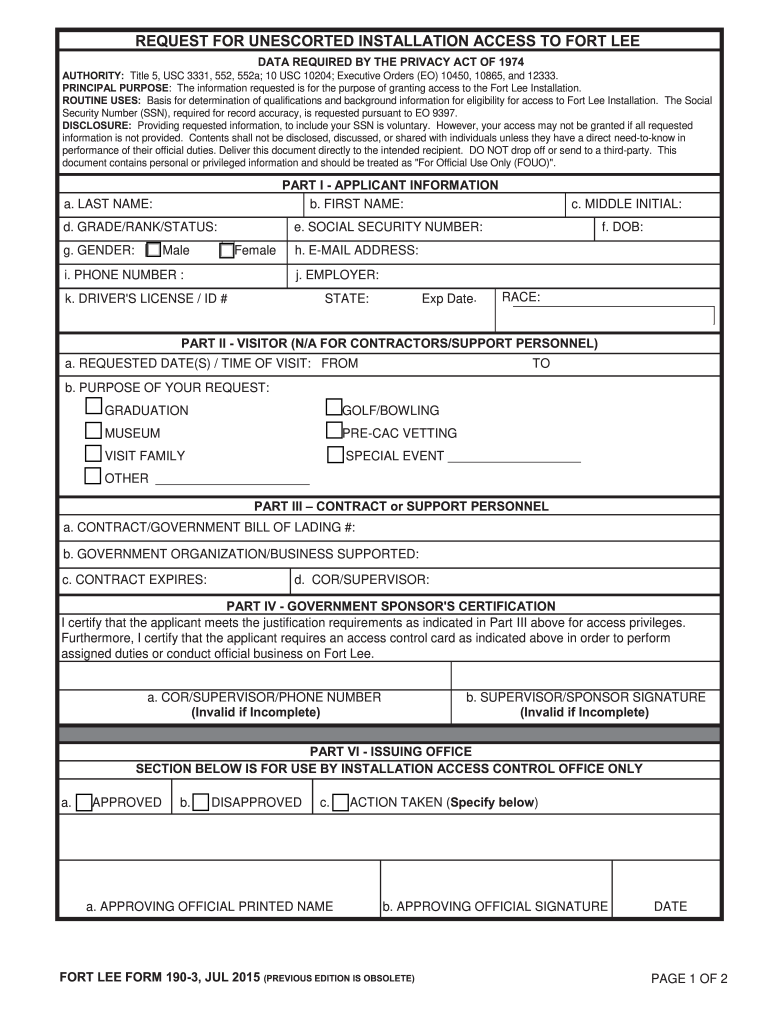
AL PURPOSE: The information requested is for the purpose of granting access to the Fort Lee Installation. ROUTINE USES: Basis for determination of qualifications and background information for eligibility for access to Fort Lee Installation. The Social Security Number (SSN), required for record accuracy, is requested pursuant to EO 9397. DISCLOSURE: Providing requested information, to include your SSN is voluntary. However, your access may not be granted if all requested information is not provi.

Open form follow the instructions

Easily sign the form with your finger

Send filled & signed form or save
How to fill out the Fort Lee 190-3 online
The Fort Lee 190-3 form is essential for individuals seeking unescorted access to the Fort Lee Installation. This guide provides clear, step-by-step instructions for filling out the form efficiently and accurately online.
Follow the steps to complete the Fort Lee 190-3 form online.
- Press the ‘Get Form’ button to access the Fort Lee 190-3 document and open it in the online editor.
- Begin by filling out Part I, which requires applicant information, including your first name, last name, middle initial, Social Security number, date of birth, phone number, e-mail address, and employer.
- Select the appropriate grade, rank, or status, and indicate your gender by choosing either 'Male' or 'Female'.
- If applicable, skip to Part II for visitor details. Provide the requested date(s) and time of your visit, along with the purpose of your request, selecting from options such as graduation, museum, or family visit.
- For contractors or support personnel, complete Part III by entering the contract number, government organization supported, contract expiration date, and your supervisor’s details.
- In Part IV, ensure a government sponsor certifies your application, filling out the supervisor's name and providing their signature.
- Review all sections carefully to ensure completeness, then submit the form online for processing.
- Once submitted, you can save changes, download, print, or share the Fort Lee 190-3 document as needed.
Complete your Fort Lee 190-3 form online today for access!
Experience a faster way to fill out and sign forms on the web. Access the most extensive library of templates available.
Related content
Please complete the attached DES Form 190-3, Fort Lee Access Request. Attachments/Links...
A fosforilação de Med14 por PKA é essencial para a manutenção de intensificadores que...
This report describes the development and use of Graph-Pak I, a 3-dimensional...
Get answers to your most pressing questions about US Legal Forms API.
What is Fort Lee, VA known for?
Fort Lee, VA, is known for its military installation that supports logistics and training for U.S. Army soldiers. It houses the quartermaster school and plays a crucial role in military readiness. The significance of Fort Lee 190-3 is reflected in its contributions to national defense.
Why is Fort Lee being renamed?
Fort Lee is undergoing a renaming process as part of broader discussions about historical representation. This decision stems from the desire to reflect modern values and honor contributions from diverse groups. Understanding these changes in the context of Fort Lee 190-3 can provide insight into ongoing social dialogues.
What happened at Fort Lee?
Fort Lee witnessed several crucial moments during the American Revolution, including troop movements and battles. It played a role in defending positions along the Hudson River. The history encapsulated in Fort Lee 190-3 highlights these vital military operations.
Why was Fort Lee abandoned?
Fort Lee was abandoned primarily due to changing military priorities and the lack of resources. As the war evolved, it became less vital to maintain a presence at this location. Still, the legacy of Fort Lee 190-3 continues to influence historical perspectives.
Why was Fort Lee evacuated and what impact did this have?
Fort Lee was evacuated due to strategic military decisions during the Revolutionary War. The evacuation caused a significant shift in troop movements and morale for the Continental Army. The events surrounding Fort Lee 190-3 shaped military tactics and the ultimate outcome of the war.
Are civilians allowed on Fort Lee?
Civilians can access Fort Lee, but specific rules apply. Generally, individuals must follow security protocols and obtain the necessary passes. Fort Lee 190-3 serves as a guideline for civilians visiting the area, ensuring everyone’s safety and compliance.
What happened at the Battle of Fort Lee?
The Battle of Fort Lee occurred during the American Revolutionary War in November 1776. This battle marked a significant loss for American forces, leading to the evacuation of Fort Lee. Understanding events like these is essential for grasping the historical context of Fort Lee 190-3.
Can civilians get on base without a military ID?
Civilians usually need a military ID or an authorized visitor's pass to enter military bases. However, exceptions may apply for certain public events or open houses. It's essential to check the latest access requirements detailed in Fort Lee 190-3 to avoid any inconvenience during your visit.
Is Fort Gregg-Adams open to the public?
Fort Gregg-Adams is generally open to the public during specific events or programs. Access for non-military personnel may require an invitation or badge for certain areas. To understand the latest accessibility options and regulations, consulting Fort Lee 190-3 is recommended as it provides comprehensive details.
Can civilians get into Fort Mccoy?
Civilians can enter Fort McCoy with the appropriate credentials and reasons for their visit. It's vital to stay informed about the entry requirements as they can vary. The rules and guidelines, including those in Fort Lee 190-3, can help clarify what is necessary for civilians to access military installations.
Use professional pre-built templates to fill in and sign documents online faster. Get access to thousands of forms.
If you believe that this page should be taken down, please follow our DMCA take down process here.
This form is available in several versions. Select the version you need from the drop-down list below.