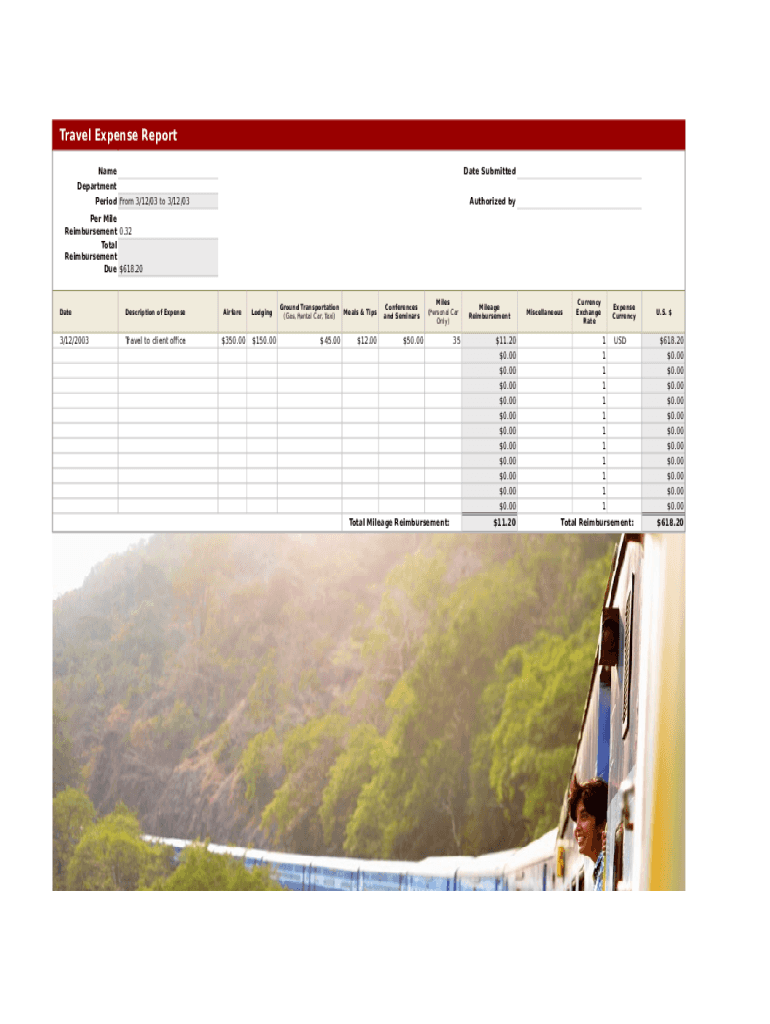
Travel Expense Report Name Department Period From 3/12/03 to 3/12/03Date Submitted Authorized byPer Mile Reimbursement 0.32 Total Reimbursement Due $618.20DateDescription of ExpenseAirfare3/12/2003Travel.
Loading

Open form follow the instructions

Easily sign the form with your finger

Send filled & signed form or save
How to fill out the Travel Expense Mileage Report online
Filling out the Travel Expense Mileage Report online is a straightforward process that helps users document their travel expenses accurately. This guide provides step-by-step instructions to ensure that all necessary information is included for effective reimbursement.
Follow the steps to complete your Travel Expense Mileage Report.
- Press the ‘Get Form’ button to access the form and open it in your preferred digital editor.
- Enter your name in the designated field. Ensure that your name is spelled correctly to avoid any processing delays.
- Fill in your department in the corresponding section. This helps to identify the appropriate budget for reimbursement.
- Indicate the travel period by specifying the start and end dates clearly to reflect the duration of your travel.
- Specify the date you are submitting the report. This is important for tracking the timeline of expenses.
- In the authorized by section, include the name of the person who has approved your travel expenses.
- List expenses under the appropriate categories: airfare, lodging, ground transportation, meals, and miscellaneous. Provide a detailed description for every entry.
- Input the corresponding amounts for each expense category you have incurred during your travel.
- For mileage reimbursement, enter the distance traveled in miles using your personal car. This amount will help calculate the reimbursement you are entitled to.
- Review the total reimbursement amount calculated. Ensure it is accurate based on the expenses and mileage entered.
- Once all fields are filled out correctly, save any changes made to the document, then choose to download, print, or share the form as needed.
Complete your Travel Expense Mileage Report online today for prompt reimbursement.
Experience a faster way to fill out and sign forms on the web. Access the most extensive library of templates available.
Related content
Dec 31, 2019 — ... mileage rates used to calculate the deductible costs of operating an...
Mileage expense incurred for use of personal auto while on university business, i.e...
NON-EMPLOYEE TRAVEL EXPENSE REIMBURSEMENT FORM COVER SHEET ... THE MILEAGE RATE FIELD CAN...
Get answers to your most pressing questions about US Legal Forms API.
How do you record mileage expense?
Make Sure You Qualify for Mileage Deduction. ... Determine Your Method of Calculation. ... Record Your Odometer at Start of Tax Year. ... Maintain Driving Log (If Needed) ... Maintain Record of Receipts (If Needed) ... Record Odometer at End of Tax Year. ... Record Mileage On Tax Return. ... Retain the Documentation.
What is the standard mileage rate for 2020?
See the SHRM Online article IRS Lowers Standard Mileage Rate for 2021. Effective Jan. 1, 2020, the optional standard mileage rate used in deducting the costs of operating an automobile for business is 57.5 cents per mile, down one-half cent from 2019, the IRS announced Dec. 31 in Notice 2020-05.
What is the 2021 mileage rate?
Standard mileage rates for 2021 are down slightly from 2020 in two categories, the IRS said. Beginning Jan. 1, 2021, the standard mileage rate for the business use of cars, vans, pickup or panel trucks will be 56 cents per mile, down 1.5 cents from 2020.
How much do you charge per mile for travel expenses?
Beginning January 1, 2020, the standard mileage rates for the use of a car (van, pickup or panel truck) will be: 57.5 cents per mile for business miles driven, down from 58 cents in 2019. 17 cents per mile driven for medical or moving purposes, down from 20 cents in 2019.
How do you calculate mileage rate for 2020?
IRS announced that Beginning on January 1, 2020, the standard mileage rates for the use of a car (also vans, pickups or panel trucks) would be: 57.5 cents per mile driven for business use, 17 cents per mile driven for medical or moving purposes, 14 cents per mile driven in service of charitable organizations.
What is the current pay for mileage?
56 cents per mile driven for business use, down 1.5 cents from the rate for 2020, 16 cents per mile driven for medical, or moving purposes for qualified active duty members of the Armed Forces, down 1 cent from the rate for 2020, and.
How much is the mileage rate for 2020?
See the SHRM Online article IRS Lowers Standard Mileage Rate for 2021. Effective Jan. 1, 2020, the optional standard mileage rate used in deducting the costs of operating an automobile for business is 57.5 cents per mile, down one-half cent from 2019, the IRS announced Dec. 31 in Notice 2020-05.
What is the mileage rate for 2020 calculator?
2020 Standard Mileage Rate57.5 cents per mile driven for business use, 17 cents per mile driven for medical or moving purposes, 14 cents per mile driven in service of charitable organizations.
What is the mileage expense rate for 2019?
1, 2019, the standard mileage rates for the use of a car (also vans, pickups or panel trucks) will be: 58 cents per mile driven for business use, up 3.5 cents from the rate for 2018, 20 cents per mile driven for medical or moving purposes, up 2 cents from the rate for 2018, and.
Use professional pre-built templates to fill in and sign documents online faster. Get access to thousands of forms.
If you believe that this page should be taken down, please follow our DMCA take down process here.