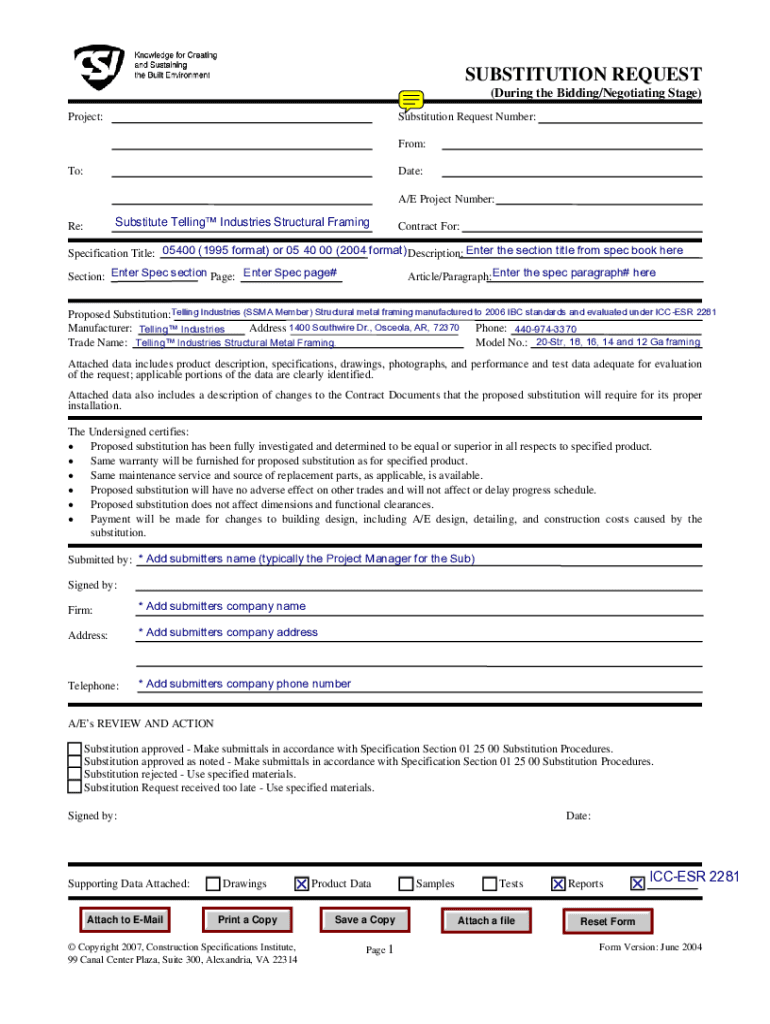
SUBSTITUTION REQUEST (During the Bidding/Negotiating Stage) Substitution Request Number: Project: From: Date: To: A/E Project Number: Substitute Telling Industries Structural Framing Re: Contract.

Open form follow the instructions

Easily sign the form with your finger

Send filled & signed form or save
How to fill out the Pre-Bid Substitution Request CSI Form - Buildstrongcom online
The Pre-Bid Substitution Request CSI Form is an essential document used during the bidding and negotiating stages of construction projects. This guide provides a clear, step-by-step approach to filling out the form online, ensuring that users can easily navigate its components and submit their requests with confidence.
Follow the steps to effectively complete your substitution request.
- Click ‘Get Form’ button to obtain the form and open it in the provided editor.
- Complete the 'Substitution Request Number' field at the top of the form. This is a unique identifier necessary for tracking your request.
- Fill in the 'From' field with your name and the 'Date' field with the current date.
- Enter the 'A/E Project Number' – another vital tracking element.
- Attach supporting data that includes product descriptions, specifications, and any necessary photographs or performance data for evaluation.
- Certify the conditions listed in the following section, ensuring your proposed substitution meets the outlined criteria.
- Utilize the 'A/E’s REVIEW AND ACTION' section for the recipient to provide feedback or approval.
Complete your documents online with ease and precision by following these steps.
Experience a faster way to fill out and sign forms on the web. Access the most extensive library of templates available.
Related content
Prior to bid opening, the engineer may be responsible for issuing amendments to ... Most...
Get answers to your most pressing questions about US Legal Forms API.
How to put watermark in PDF?
Add or replace a watermark, with an open document Choose Tools > Edit PDF > Watermark > Add. (Optional) To apply the watermark selectively to individual pages, click Page Range Options. ... Specify the watermark: ... To change the size of an image watermark, do one of the following:
Which one can be used as a Watermark in a Word document?
While viewing a document in Print Layout, from the Page Layout tab, choose Watermark (found in the "Page Background" section) and then Custom Watermark. This opens a window where you can choose a picture or text and format it as you wish for use as a watermark.
How to add Watermark in PDF?
Add or replace a watermark, with an open document Choose Tools > Edit PDF > Watermark > Add. (Optional) To apply the watermark selectively to individual pages, click Page Range Options. ... Specify the watermark: ... To change the size of an image watermark, do one of the following:
Can I make my own watermark?
You can also create a custom photo watermark from scratch. Start a new project, then use Canva's text tool and extensive font and media library. Save it as a PNG logo or image with no background. If you already have a watermark file, simply upload it to the editor.
How do I add a watermark to my background in Word?
Insert a picture watermark On the Design tab, select Watermark. Select Custom Watermark, and then choose Picture Watermark. Click Select Picture. Find a picture of your own, or search Bing images. Choose the picture you want, and select Insert.
How do I add a watermark to a PDF for free?
How To Watermark PDF Pages Online For Free Step 1: Select your PDF document. Step 2: Add Text Watermark. Click the Add Text button at the top of the PDF page. ... Step 3: Change text size, rotation and location on page. ... Step 4: Change text color, transparency and font family.
How do I Watermark a document?
Add or edit a text watermark On your computer, open a document in Google Docs. Go to Insert. Watermark. In the panel on the right, click Text. Type the text you want to appear as a watermark. Optional: In the panel on the right, you can format your watermark. Click Done.
How do I insert a custom Watermark in Word?
Use a custom watermark On the Design tab, select Watermark > Custom Watermark. Choose Picture Watermark and select a picture, or choose Text watermark and type your watermark text in the Text box. Click OK.
Use professional pre-built templates to fill in and sign documents online faster. Get access to thousands of forms.
If you believe that this page should be taken down, please follow our DMCA take down process here.