Loading
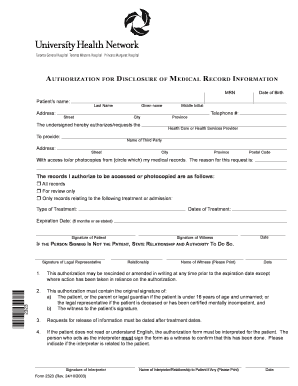
Get Medical Release Form - The Princess Margaret
How it works
-

Open form follow the instructions
-

Easily sign the form with your finger
-

Send filled & signed form or save
How to fill out the Medical Release Form - The Princess Margaret online
Filling out the Medical Release Form - The Princess Margaret is a crucial step in managing your health information. This guide provides clear and detailed instructions to help you complete the form accurately and efficiently.
Follow the steps to successfully fill out the Medical Release Form online.
- Click ‘Get Form’ button to obtain the document and open it in the editor.
- Begin by entering your personal information. You will need to provide your last name, given name, and middle initial. Also, include your address, which consists of your street, city, province, and postal code.
- Next, add your date of birth and telephone number in the specified fields.
- Indicate the third party you are authorizing to access your medical records by filling out their name and address in the appropriate sections.
- Select the type of access you are authorizing: either access to all records, review-only access, or access only to records related to specific treatments or admissions.
- If you are only authorizing access to specific treatments, specify the type of treatment and the relevant dates of treatment.
- Fill in the expiration date for the authorization, which can be up to six months from the date of signing, or as stated.
- Sign the form where indicated, ensuring you are the patient or the legal representative if applicable. Add the date of your signature.
- If a witness is required, have them sign as well and provide their printed name and date.
- If you are filling this out on behalf of someone else, provide your signature as the legal representative and detail your relationship to the patient.
- Finally, review all the information for accuracy before saving your changes. Options may include saving, downloading, printing, or sharing the completed form.
Complete your Medical Release Form online today for efficient management of your health information.
It's a supporting document for an invoice and can include: Supplier invoice. The vendor or supplier's details, e.g., name, address, email, etc. Terms of payment, e.g., amount owed, due date, discounts, etc.