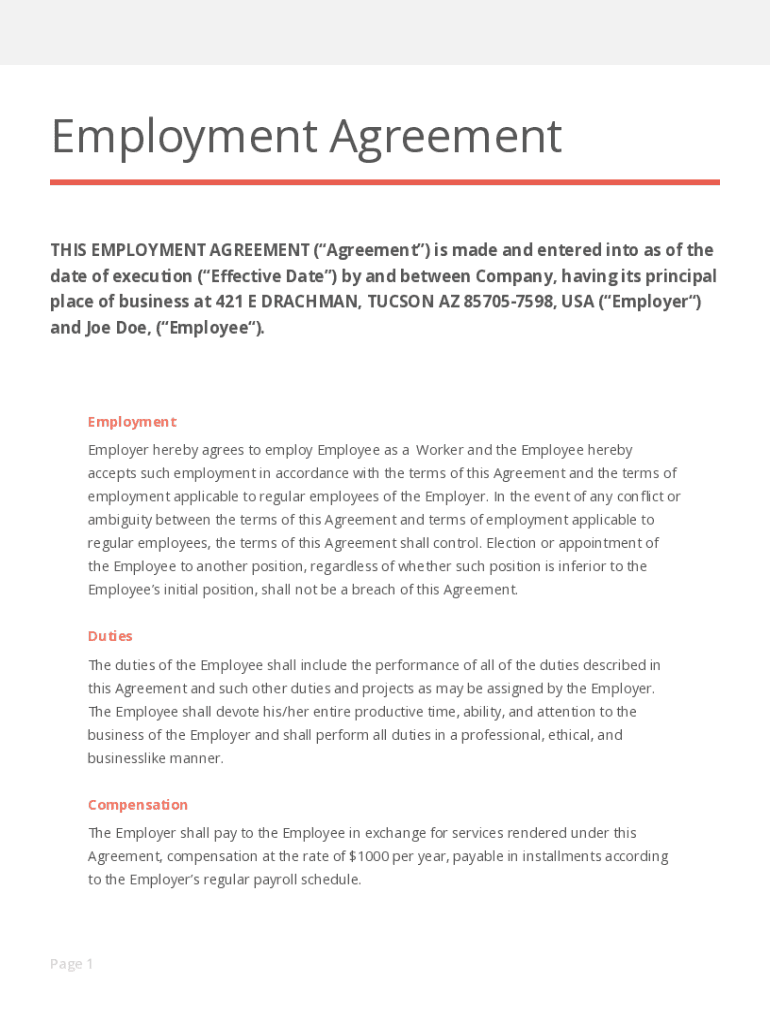
Employment Agreement THIS EMPLOYMENT AGREEMENT ( Agreement ) is made and entered into as of the date of execution ( E?ective Date ) by and between Company, having its principal place of business at.
Loading

Open form follow the instructions

Easily sign the form with your finger

Send filled & signed form or save
How to fill out the Employment Agreement Template online
Filling out an employment agreement template online is a straightforward process that ensures clear communication between an employer and an employee. This guide will take you through each section of the agreement to help you complete it accurately.
Follow the steps to complete the Employment Agreement Template online.
- Click ‘Get Form’ button to obtain the Employment Agreement Template and open it in your online editor.
- Begin by entering the effective date of the agreement at the top of the form. This date indicates when the terms of the employment will begin.
- Fill in the company's name and address in the designated fields. Make sure to accurately represent the organization that is offering the employment.
- Enter the employee's name in the appropriate section. This should reflect the legal name of the person who will be employed.
- In the 'Employment' section, confirm the position the employee will hold. Specify the job title and note that the employee agrees to the terms stated in the document.
- In the 'Duties' section, clearly describe the responsibilities expected from the employee. This section should outline the primary tasks to ensure clarity in the role.
- Under 'Compensation,' enter the agreed salary or wage details. State how and when the employee will be compensated, aligning with your company's payroll schedule.
- To complete the 'Benefits' section, outline the benefits the employee will receive, such as paid holidays and personal days. Include any specific policies your company follows regarding these benefits.
- In the 'Term and Termination' section, explain the at-will employment nature. Specify the terms under which either party can terminate the agreement.
- Ensure both parties read through the agreement, then have them sign and date the document in the specified signature areas. This finalizes the agreement legally.
- After filling out all sections, review the document for accuracy and completeness. Finally, save changes, download, print, or share the form as needed.
Start completing your Employment Agreement Template online today for clarity and professionalism in your hiring process.
Experience a faster way to fill out and sign forms on the web. Access the most extensive library of templates available.
Related content
Duties and Scope of Employment. (a). Position. For the term of this Agreement, the Company...
Employment Agreement (Sample). THIS AGREEMENT made as of the ______day...
Jan 1, 2019 — Provides direct labor or service on a Metro contract. Employee must expend...
Get answers to your most pressing questions about US Legal Forms API.
What are common mistakes in employment contracts?
Common mistakes in employment contracts include vague job descriptions, unclear compensation details, and failing to specify the duration of employment. These oversights can lead to disputes down the road. Using an Employment Agreement Template can help prevent these issues by providing a structured framework that covers all necessary elements.
How to fill out an employment form?
Filling out an employment form requires you to provide accurate personal information, including your contact details and work history. Make sure to read each section carefully and provide any necessary documentation. Having an Employment Agreement Template on hand can guide you through the details that may need to be included.
How to write an employment agreement?
To write an employment agreement, start by defining key terms such as job responsibilities, compensation, and duration of employment. Clearly outline expectations for both the employer and the employee. Utilizing an Employment Agreement Template can streamline the process and ensure that you cover all essential aspects.
What is a standard employment agreement?
A standard employment agreement is a formal document that outlines the terms of employment between an employer and employee. It typically includes details such as job role, salary, work hours, and benefits, alongside clauses regarding confidentiality and termination. Understanding what goes into an Employment Agreement Template can help ensure clarity and protection for both parties involved.
Where can I download an employment contract?
You can download a ready-made employment contract from various trusted online sources. Platforms like US Legal Forms offer customizable Employment Agreement Templates that you can access instantly. These templates come with clear guidelines prompting you to insert relevant information, making the process quick and straightforward.
How do you write a simple employment contract?
To write a simple employment contract, start by defining the parties involved, including their names and addresses. Next, outline the job title, responsibilities, and expectations clearly. Include details about compensation, benefits, and working hours. Finally, ensure both parties sign the document to confirm their agreement, utilizing an Employment Agreement Template for guidance can simplify this process.
What should employment agreement include?
Here's a look at the basic steps you'll need to take to create a simple and effective client contract: Include Contact Information of Both Parties. ... Specify Project Terms and Scope. ... Establish Payment Terms. ... Set the Schedule. ... Decide What Happens If a Contract Is Terminated. ... Determine Who Owns Final Copyrights.
How do you write a contract agreement?
Write the contract in six steps Start with a contract template. ... Open with the basic information. ... Describe in detail what you have agreed to. ... Include a description of how the contract will be ended. ... Write into the contract which laws apply and how disputes will be resolved. ... Include space for signatures.
What should in content of an employment contract be?
A typical employment contract contains details such as the start and end dates of employment, compensation, job duties, and other expectations of both the employer and the employee.
How are employment contracts made?
An employment contract form is written to legally define the relationship between the employee and the employer. Both parties have to agree and sign a written contract before the new hire can start working. This document ensures employees follow the company as per rules and regulations.
Use professional pre-built templates to fill in and sign documents online faster. Get access to thousands of forms.
If you believe that this page should be taken down, please follow our DMCA take down process here.